
| Technote PR 10 | October 1990 |
Changes since October 1990: Added code in both versions to handle printing
documents larger than 128 pages.
At one time, Apple recommended that developers call _PrOpen at the beginning of their application and _PrClose at the end, before returning to the Finder. This recommendation was in the ancient past when an application only had to deal with a single printer driver.
As more printer drivers became available, it became important for an
application to consider the presence of other applications and how opening and
closing the printer driver affected them. The user could open the Chooser at
any time and change the current printer driver without the current
application's knowledge. If an application followed the old philosophy and a
user changed the current printer driver while running the application, the next
time the user attempted to print, the wrong driver would be open, the Printing
Manager would not be able to find the necessary resources, and the user would
get an error.
DTS currently recommends that applications open and close the printer driver each time the application uses the Printing Manager.
MPW Pascal
*------ PrintStuff ----------------------------------------------------------------*}
{**
 **	PrintStuff will call all of the necessary Print Manager calls to print
 **	a document.  It checks PrError() after each Print Manager call.  If an
 **	error is found, all of the Print Manager open calls (i.e., PrOpen,
 **	PrOpenDoc...) will have a corresponding close call before the error
 **	is posted to the user.  You want to use this approach to make sure the
 **	Print Manager closes properly and all temporary memory is released.
 **}

PROCEDURE PrintStuff;

VAR
  copies,
  firstPage,
  lastPage,
  loop,
  numberOfCopies,
  pageNumber,
  printmgrsResFile,
  realNumberOfPagesInDoc  : Integer;
  PrintError              : LongInt;
  oldPort                 : GrafPtr;
  thePrRecHdl             : THPrint;
  thePrPort               : TPPrPort;
  theStatus               : TPrStatus;

BEGIN
  GetPort(oldPort);

  {**
      UnLoadTheWorld will swap out ALL unneeded code segments and data that are NOT
      required
      during print time. Your print code must be a separate code segment.
  **}
  UnLoadTheWorld;

  thePrRecHdl := THPrint(NewHandle(SIZEOF(TPrint)));

  IF (MemError = noErr) AND (thePrRecHdl <> NIL) THEN
    BEGIN
      PrOpen;
        IF (PrError = noErr) THEN
          BEGIN
            {**
                Save the current resource file (i.e. the printer driver's)
                so the driver will not lose its resources upon return from
                the pIdleProc.
             **}
            printmgrsResFile := CurResFile;
            PrintDefault(thePrRecHdl);

            IF (PrError = noErr) THEN
              BEGIN
                IF (PrStlDialog(thePrRecHdl)) THEN
                  BEGIN
                    {**
                        DetermineNumberOfPagesinDoc determines the number of
                        pages contained in the document by comparing the size of
                        the document with rPage from the TPrInfo record (IM II-150).
                        It returns the number of pages required to print the
                        document for the currently selected printer.
                     **}

                    realNumberOfPagesinDoc := DetermineNumberOfPagesinDoc
                                                  (thePrRecHdl^^.prInfo.rPage);

                    IF (PrJobDialog(thePrRecHdl)) THEN
                      BEGIN
                        {**
                            Get the number of copies of the document that the
                            user wants printed from iCopies of the TPrJob record
                            (IM II-151).
                         **}

                        numberOfCopies := thePrRecHdl^^.prJob.iCopies;

                        {**
                            Get the first and last pages of the document that
                            were requested to be printed by the user from iFstPage
                            and iLastPage from the TPrJob record (IM II-151).
                         **}

                        firstPage := thePrRecHdl^^.prJob.iFstPage;
                        lastPage := thePrRecHdl^^.prJob.iLstPage;

                        {**
                            Print "all" pages in the print loop
                         **}

                        thePrRecHdl^^.prJob.iFstPage := 1;
                        thePrRecHdl^^.prJob.iLstPage := 9999;

                        {**
                            Determine the "real" number of pages contained in
                            the document.  Without this test, you would print
                            9999 pages.
                         **}

                        IF (realNumberOfPagesinDoc < lastPage) THEN
                          lastPage := realNumberOfPagesinDoc;

                        PrintingStatusDialog := GetNewDialog(257, NIL, POINTER(-1));

                        {**
                            Print the number of copies of document requested by the
			      user
                            from the Print Job Dialog.
                         **}

                        For copies := 1 To numberOfCopies Do
                          BEGIN

                            {**
                                Install a pointer to your pIdle proc in my print record.
                             **}
                             thePrRecHdl^^.prJob.pIdleProc := @checkMyPrintDialogButton;

                            {**
                                Restore the resource file to the printer driver's.
                             **}
                            UseResFile(printmgrsResFile);

                            thePrPort := PrOpenDoc(thePrRecHdl, NIL, NIL);

                            IF (PrError = noErr) THEN
                              BEGIN
                                {**
                                    Print the range of pages of the document requested
                                    by the user from the Print Job Dialog.
                                 **}
                                pageNumber := firstPage;
                                WHILE ((pageNumber <= lastPage) AND (PrError = noErr)) DO
                                  BEGIN

				    { **
					If we've crossed a 128-page boundary,
					close the current print file, send it
					to the printer if necessary, and open a
					new document.
				    ** }

				    IF (pageNumber - firstPage) MOD iPFMaxPgs = 0 THEN
                                      BEGIN
                                        IF pageNumber <> firstPage THEN
                                          BEGIN
                                            PrCloseDoc(thePrPort);
                                            IF (thePrRecHdl^^.prJob.bJDocLoop = bSpoolLoop)
                                              AND (PrError = noErr) THEN
                                              PrPicFile(thePrRecHdl, NIL,NIL, NIL, theStatus);
                                            thePrPort := PrOpenDoc(thePrRecHdl, NIL, NIL);
                                          END;
                                        END;

				      PrOpenPage(thePrPort, NIL);

                                      IF (PrError = noErr) THEN
                                        BEGIN
                                          {**
                                              rPage (IM II-150) is the printable
                                              area for the currently selected printer.
                                              By passing the current enables your app to use
					      the same routine to draw to the screen and the
					      printer's GrafPort.
                                           **}

                                          DrawStuff (thePrRecHdl^^.prInfo.rPage,
                                                     GrafPtr (thePrPort),
                                                     pageNumber);
                                        END;
                                      PrClosePage(thePrPort);
                                      pageNumber := pageNumber + 1;
                                  END;  {**  End pagenumber loop  **}
                              END;
                            PrCloseDoc(thePrPort);
                          END;  {**  End copies loop  **}

                          {**
                              The printing job is being canceled by the request of
                              the user from the Print Style Dialog or the Print Job
                              Dialog.  PrError will be set to iPrAbort to tell the
                              Print Manager to abort the current printing job.
                           **}
                      END
                        ELSE
                      PrSetError(iPrAbort);   {**  Cancel from the job dialog  **}
                  END
                    ELSE
                  PrSetError(iPrAbort);   {**  Cancel from the style dialog  **}
              END;
          END;
    IF (thePrRecHdl^^.prJob.bJDocLoop = bSpoolLoop) and (PrError = noErr) THEN
      PrPicFile(thePrRecHdl, NIL, NIL, NIL, theStatus);

    {**
        Grab the printing error -- once you close the Printing Manager, PrError doesn't return
        a valid result anymore.
     **}

    PrintError := PrError;

    PrClose;


    {**
        You do not want to report any printing errors until you have fallen
        through the printing loop. This will make sure that ALL of the Print
        Manager's open calls have their corresponding close calls, thereby
        enabling the Print Manager to close properly and that all temporary
        memory allocations are released.
     **}

    IF (PrintError <> noErr) THEN
      PostPrintingErrors (PrintError);

    END;

  IF (thePrRecHdl <> NIL) THEN
    DisposHandle(Handle (thePrRecHdl));

  IF (PrintingStatusDialog <> NIL) THEN
    DisposDialog(PrintingStatusDialog);

  SetPort(oldPort);
END;  {**  PrintStuff  **}
MPW C
/*------ PrintStuff ----------------------------------------------------------------*/
 **
 **    PrintStuff will call all of the necessary Print Manager calls to print
 **    a document. It checks PrError() after each Print Manager call. If an error
 **    is found, all of the Print Manager open calls (i.e., PrOpen, PrOpenDoc...)
 **    will have a corresponding close call before the error is posted to the user.
 **    You want to use this approach to make sure the Print Manager closes properly
 **    and all temporary memory is released.
 **/

void PrintStuff ()
{
  GrafPtr      oldPort;
  short        copies,
               firstPage,
               lastPage,
               numberOfCopies,
               printmgrsResFile,
               realNumberOfPagesinDoc,
               pageNumber,
               PrintError;
  THPrint      thePrRecHdl;
  TPPrPort     thePrPort;
  TPrStatus    theStatus;

  GetPort(&oldPort);

 /**
     UnLoadTheWorld will swap out ALL unneeded code segments and data that
     are NOT required during print time. Your print code must be a separate
     code segment.
  **/

  UnLoadTheWorld ();
  thePrRecHdl = (THPrint)  NewHandle (sizeof (TPrint));

 /**
     Check to make sure that the memory manager did not produce an error
     when it allocated the print record handle and make sure it did not pass
     back a nil handle.
  **/

  if (MemError() == noErr && thePrRecHdl != nil)
    {
      PrOpen();

      if (PrError() == noErr)
        {
         /**
              Save the current resource file (i.e. the printer driver's) so
              the driver will not lose its resources upon return from the pIdleProc.
          **/
          printmgrsResFile = CurResFile();
          PrintDefault(thePrRecHdl);

          if (PrError() == noErr)
            {
              if (PrStlDialog(thePrRecHdl))
                {
                 /**
                     DetermineNumberOfPagesinDoc determines the number of pages
                     contained in the document by comparing the size of the document
                     with rPage from the TPrInfo record (IM II-150). It returns the
                     number of pages required to print the document for the 			             currently selected printer.
                  **/

                  realNumberOfPagesinDoc = DetermineNumberOfPagesinDoc
                                             ((**thePrRecHdl).prInfo.rPage);

                  if (PrJobDialog(thePrRecHdl))
                    {
                     /**
                          Get the number of copies of the document that the user
                          wants printed from iCopies of the TPrJob record (IM II-151).
                      **/

                      numberOfCopies = (**thePrRecHdl).prJob.iCopies;

                       /**
                           Get the first and last pages of the document that
                           were requested to be printed by the user from iFstPage
                           and iLastPage from the TPrJob record (IM II-151).
                        **/

                      firstPage = (**thePrRecHdl).prJob.iFstPage;
                      lastPage = (**thePrRecHdl).prJob.iLstPage;

                       /**
                           Print "all" pages in the print loop
                        **/

                      (**thePrRecHdl).prJob.iFstPage = 1;
                      (**thePrRecHdl).prJob.iLstPage = 9999;

                       /**
                           Determine the "real" number of pages contained in the 			           document. Without this test, you would print 9999 pages.
                        **/

                      if (realNumberOfPagesinDoc < lastPage)
                        lastPage = realNumberOfPagesinDoc;

                      PrintingStatusDialog = GetNewDialog(257, nil, (WindowPtr) -1);

                       /**
                           Print the number of copies of the document
                           requested by the user from the Print Job Dialog.
                        **/
                      for (copies = 1; copies <= numberOfCopies; copies++)
                        {
                         /**
                             Install a pointer to your pIdle proc in my print record.
                          **/
                          (**thePrRecHdl).prJob.pIdleProc = checkMyPrintDialogButton;

                         /**
                             Restore the resource file to the printer driver's.
                          **/

                          UseResFile(printmgrsResFile);
                          thePrPort = PrOpenDoc(thePrRecHdl, nil, nil);

                          if (PrError() == noErr)
                            {

                             /**
                                 Print the range of pages of the document
                                 requested by the user from the Print Job Dialog.
                              **/
                              pageNumber = firstPage;
                              while (pageNumber <= lastPage && PrError() == noErr)
                                {

				     /**
					   If we've crossed a 128-page boundary,
					   close the current print file, send it
					   to the printer if necessary, and open a
					   new document.
				     **/

				     if ((pageNumber - firstPage) % iPFMaxPgs == 0)
				       {
				         if (pageNumber != firstPage)
				           {
				             PrCloseDoc(thePrPort);
				             if (((**thePrRecHdl).prJob.bJDocLoop ==
                                             bSpoolLoop) && (PrError() == noErr))
                                             PrPicFile(thePrRecHdl, nil, nil, nil,
                                                       &theStatus);
				             thePrPort = PrOpenDoc(thePrRecHdl, nil,
                                                                nil);
                                         }
                                     }

				     PrOpenPage(thePrPort, nil);

                                  if (PrError() == noErr)
                                    {
                                     /**
                                         rPage (IM II-150) is the printable area
                                         for the currently selected printer. By 					     passing the current port to the draw 						     routine, enables your app to use the same 					     routine to draw to the screen and the 					     printer's GrafPort.
                                      **/
                                      DrawStuff ((**thePrRecHdl).prInfo.rPage,
                                                 (GrafPtr) thePrPort, pageNumber);
                                    }

                                  PrClosePage(thePrPort);
                                  pageNumber++;
                                }  /**  End pageNumber loop  **/
                            }
                          PrCloseDoc(thePrPort);
                        } /**  End copies loop  **/
                    }
                   /**
                       The printing job is being canceled by the request of the
                       user from the Print Style Dialog or the Print Job Dialog.
                       PrError will be set to PrAbort to tell the Print Manager to
                       abort the current printing job.
                    **/
                  else
                    PrSetError (iPrAbort);   /**  cancel from the job dialog  **/
                }
              else
                PrSetError (iPrAbort);   /**  cancel from the style dialog  **/
            }
        }

      if (((**thePrRecHdl).prJob.bJDocLoop == bSpoolLoop) && (PrError() == noErr))
        PrPicFile(thePrRecHdl, nil, nil, nil, &theStatus);

       /**
           Grab the printing error -- once you close the Printing Manager, PrError doesn't
	   returna valid result anymore.
       **/

      PrintError = PrError();

      PrClose();

       /**
           You do not want to report any printing errors until you have fallen
           through the printing loop. This will make sure that ALL of the Print
           Manager's open calls have their corresponding close calls, thereby
           enabling the Print Manager to close properly and that all temporary
           memory allocations are released.
        **/
      if (PrintError != noErr)
        PostPrintingErrors (PrintError);
    }

  if (thePrRecHdl != nil)
    DisposHandle((Handle) thePrRecHdl);

  if (PrintingStatusDialog != nil)
    DisposDialog(PrintingStatusDialog);

  SetPort(oldPort);
} /** PrintStuff **/An application should always check for error conditions while printing by calling PrError. PrError returns errors from the Printing Manager (and some AppleTalk and OS errors) that occur during printing.
As the example code demonstrates, an application should call PrError after each call to a Printing Manager function or procedure. By consistently checking PrError after each call, the application is able to catch any errors created at print time and report them to a user via a dialog box in a clean and graceful manner.
The following section outlines some general error-handling guidelines.
* You should avoid calling PrError within your pIdle procedure; errors that occur while it is executing are usually temporary and serve only as internal flags for communication within the printer driver--they are not intended for the application. If you absolutely must call PrError within your idle procedure, and an error occurs, never abort printing within the idle procedure itself. Wait until the last called printing procedure returns, then check to see if the error still remains. Attempting to abort printing within an idle procedure is a guarantee of certain death.
* Upon detecting an error after the completion of a printing routine, stop drawing at that point, and proceed to the next procedure to close any previously made open calls. For example, if you detect an error after calling PrOpenDoc, skip to the next PrCloseDoc. Or, if you get an error after calling PrOpenPage, skip to the next PrClosePage and PrCloseDoc. Remember that if you have called PrOpen, then you must call the corresponding PrClose to ensure that printing closes properly and all temporary memory allocations are released and returned to the heap.
* Do not display any alert or dialog boxes to report an error until the end of the printing loop. Once at the end, check for the error again; if there is no error assume that printing completed normally. If the error is still present, then you can alert the user.
This technique is important for two reasons. First, if you display a dialog box in the middle of the printing loop, it could cause errors that can terminate an otherwise normal job. For example, if the printer is an AppleTalk printer, the connection can be terminated abnormally since the driver would be unable to respond to AppleTalk requests received from the printer while the dialog box was waiting for input from the user. If the printer does not hear from the Macintosh with a short period of time (e.g., 30 seconds), it times out, assuming that the Macintosh is no longer there, which results in a prematurely broken connection causing another error to which the application must respond.
In addition, the driver may have already displayed its own dialog box in response to an error. In this instance, the driver posts an error to let the application know that something went wrong and it should abort printing. For example, when the LaserWriter driver detects that the Laser Prep version which has been downloaded to the LaserWriter is different than that with which the user is trying to print, it displays the appropriate dialog box informing the user of the situation and giving him the option of reinitializing the printer. If the user chooses to cancel printing, the driver posts an error to let the application know that it needs to abort, but since the driver has already taken care of the error by displaying a dialog box, the error is reset to zero before the printing loop is complete. The application should check for the error again at the end of the printing loop, and if it still indicates an error, the application can then display the appropriate dialog box.
* If using PrGeneral, be prepared to receive the following errors: NoSuchRsl, OpNotImpl, and resNotFound. In all three cases, the application should be prepared to continue to print without using the features of that particular opcode.
However, in the case of the resNotFound error, it means the current printer driver does not support PrGeneral. This lack of support should not be a problem for an application, but it needs to be prepared to deal with this error. If you receive a resNotFound error from PrError, clear the error with a call to PrSetError(0); otherwise, PrError might still contain this error the next time you check it, which would prevent your application from printing.
If you install a procedure for handling requests to cancel printing, with an option to pause the printing process, beware of timeout problems when printing to the LaserWriter. Communication between the Macintosh and the LaserWriter must be maintained to prevent a job or a wait timeout. If there is no communication for a period of time (over two minutes), the printer times out and the print job terminates due to a wait timeout. Or, if the print job requires more than three minutes to print, the print job terminates due to a job timeout. Since, there is no good method to determine to what type of printer an application is printing, it is probably a good idea to document the possibility of a LaserWriter timing out for a user who chooses to select "pause" for over two minutes.
The Printing Manager reports the error messages covered in this section. If an error that does not belong to the Printing Manager occurs, the Printing Manager puts it into low memory, where it can be retrieved with a call to PrError, and terminates the printing loop, if necessary. As already documented, if you encounter an error in the middle of a printing loop, do not jump out; fall through the loop and let the Printing Manager terminate properly.
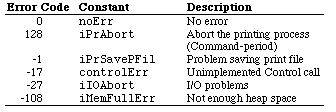
The following errors are specific to the LaserWriter family:
-4101 Printer not found or closed
-4100 Connection just closed
-4099 Write request too big
-4098 Request already active
-4097 Bad connection refnum
-4096 No free Connect Control Blocks (CCBs) available
-8133 PostScript error occurred during transmission of data to printer. Most often caused by a bug in the PostScript code being downloaded.
-8132 Timeout occurred. This error is returned when no data has been sent to the printer for two minutes. Usually caused by extremely long imaging time.
-8131 Printer not responding: it may have been turned "off." This error occurs if a user turns off the LaserWriter in the middle of a print job.
The following errors are specific to PrGeneral:
1 NoSuchRsl Requested resolution is not supported
2 OpNotImpl Requested PrGeneral opcode not implemented in the current printer driver.
-192 resNotfound The current printer driver does not support PrGeneral.
The most common error encountered is -4101, which is generated if no
LaserWriter is selected. Since this error is so common, it is a good idea to
display a dialog box requesting the user to select a printer from the Chooser
when this error is encountered.
Further Reference:

Main | Top of Section | What's New | Apple Computer, Inc. | Find It | Feedback | Help