You may want to use low-level Apple Events instead of writing AppleScripts if you are producing tools or programs that need to control the CodeWarrior IDE while they are running. Third-party editors or browsers, and other tools, might require this capability.
For documentation on using low-level Apple Events in your program code, refer to Inside Macintosh: Interapplication Communication (Addison-Wesley) for a discussion of how to use the Apple Events portion of the Mac OS Toolbox.
There is some example code available that shows how to send Apple
Events to the CodeWarrior IDE. You can find it on the CodeWarrior
Reference CD in the CodeWarrior Examples folder, under the MacOS Examples folder. This code is a starter project for your work, and you
will need to verify the code for proper operation. It is not intended
to be a commercially-shipping product.
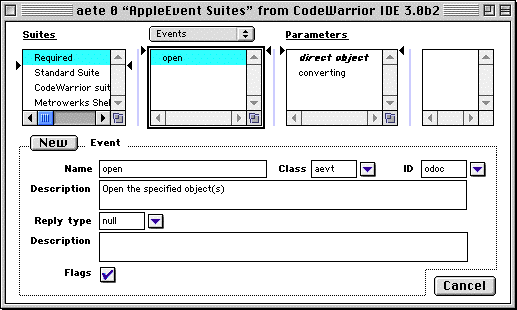
Largely, you will need to inspect the CodeWarrior IDE's `aete' and `aedt' resources using a resource editor to see what the low-level
codes are to control the IDE. Figure A.1 shows an example view of what this might look like using the
Resorcerer 2.0 resource editor. Rather than document all the low-level
codes required to control the IDE, using a resource editor is
the best solution to learn the low-level codes for now. With new
innovations for the IDE on the horizon, the low-level codes may
be documented at a later date.
Figure 0.1 Resorcerer 2.0 View of the CodeWarrior IDE `aete' resource