[ First ] [ Previous ] [ Next ] [ Last ] [ Manuals ]
Chapter 6.
x86-Specific Information
The x86 assembler supports all instructions for the following processors, including the MMX extensions to the x86 architecture, and generates code only for a 32-bit flat memory space:
- 80486
- Pentium
- Pentium Pro processors
This chapter provides information specific to the x86 processor family.
This chapter includes the following topics:
Related Documentation COFF Support x86-Specific Assembler Settings
Related Documentation 
Programming the 80386 (by Crawford & Gelsinger, Sybex), is helpful for writing x86 assembly language code. The book includes extra instructions introduced for later processors.
COFF Support
In addition to supporting the ELF (Executable and Linkable Format) object file format, the x86 assembler supports COFF (Common Object File Format).
 NOTE
NOTE
For information on using the .section directive with ELF, see "section".
If you are generating COFF format, the .section directive has the following syntax:
.section name [,flags]
Defines a section in an object file.
Table 6.1 describes the syntax elements for the COFF .section directive.
Syntax descriptions for COFF .section directive:
Syntax Element
|
Description
|
name
|
The name of the section.
|
flags
|
Numeric value that indicates the COFF section flags. You must specify the flags as the bitwise OR of the applicable values in Table 6.2.
|
Table 6.2 shows the COFF section flags that you can specify.
NOTE
To use symbolic names for the flags, you must define each name as an equate.
COFF section flags:
Flag
|
Name
|
Description
|
0x00000000
|
IMAGE_SCN_TYPE_REG
|
Reserved for future use.
|
0x00000001
|
IMAGE_SCN_TYPE_DSECT
|
Reserved for future use.
|
0x00000002
|
IMAGE_SCN_TYPE_NOLOAD
|
Reserved for future use.
|
0x00000004
|
IMAGE_SCN_TYPE_GROUP
|
Reserved for future use.
|
0x00000008
|
IMAGE_SCN_TYPE_NO_PAD
|
Indicates that the section should not be padded to the next boundary.
|
0x00000010
|
IMAGE_SCN_TYPE_COPY
|
Reserved for future use.
|
0x00000020
|
IMAGE_SCN_CNT_CODE
|
Indicates that the section contains executable code.
|
0x00000040
|
IMAGE_SCN_CNT_INITIALIZED
_DATA
|
Indicates that the section contains initialized data.
|
0x00000080
|
IMAGE_SCN_CNT_UNINITIALIZED
_DATA
|
Indicates that the section contains uninitialized data.
|
0x00000100
|
IMAGE_SCN_LNK_OTHER
|
Reserved for future use.
|
0x00000200
|
IMAGE_SCN_LNK_INFO
|
Indicates that the section contains comments or other information.
|
0x00000400
|
IMAGE_SCN_TYPE_OVER
|
Reserved for future use.
|
0x00000800
|
IMAGE_SCN_LNK_REMOVE
|
Indicates that the section will not be part of the executable image.
|
0x00001000
|
IMAGE_SCN_LNK_COMDAT
|
Indicates that the section contains COMDAT data.
|
0x00008000
|
IMAGE_SCN_MEM_FARDATA
|
Reserved for future use.
|
0x00020000
|
IMAGE_SCN_MEM_PURGEABLE
|
Reserved for future use.
|
0x00020000
|
IMAGE_SCN_MEM_16BIT
|
Reserved for future use.
|
0x00040000
|
IMAGE_SCN_MEM_LOCKED
|
Reserved for future use.
|
0x00080000
|
IMAGE_SCN_MEM_PRELOAD
|
Reserved for future use.
|
0x00100000
|
IMAGE_SCN_ALIGN_1BYTES
|
Indicates that the section must be aligned on a 1-byte boundary.
|
0x00200000
|
IMAGE_SCN_ALIGN_2BYTES
|
Indicates that the section must be aligned on a 2-byte boundary.
|
0x00300000
|
IMAGE_SCN_ALIGN_4BYTES
|
Indicates that the section must be aligned on a 4-byte boundary.
|
0x00400000
|
IMAGE_SCN_ALIGN_8BYTES
|
Indicates that the section must be aligned on an 8-byte boundary.
|
0x00500000
|
IMAGE_SCN_ALIGN_16BYTES
|
Indicates that the section must be aligned on a 16-byte boundary.
|
0x00600000
|
IMAGE_SCN_ALIGN_32BYTES
|
Indicates that the section must be aligned on a 32-byte boundary.
|
0x00700000
|
IMAGE_SCN_ALIGN_64BYTES
|
Indicates that the section must be aligned on a 64-byte boundary.
|
0x00800000
|
IMAGE_SCN_ALIGN_128BYTES
|
Indicates that the section must be aligned on a 128-byte boundary.
|
0x00900000
|
IMAGE_SCN_ALIGN_256BYTES
|
Indicates that the section must be aligned on a 256-byte boundary.
|
0x00A00000
|
IMAGE_SCN_ALIGN_512BYTES
|
Indicates that the section must be aligned on a 512-byte boundary.
|
0x00B00000
|
IMAGE_SCN_ALIGN_1024BYTES
|
Indicates that the section must be aligned on a 1024-byte boundary.
|
0x00C00000
|
IMAGE_SCN_ALIGN_2048BYTES
|
Indicates that the section must be aligned on a 2048-byte boundary.
|
0x00D00000
|
IMAGE_SCN_ALIGN_4096BYTES
|
Indicates that the section must be aligned on a 4096-byte boundary.
|
0x00E00000
|
IMAGE_SCN_ALIGN_8192BYTES
|
Indicates that the section must be aligned on an 8192-byte boundary.
|
0x01000000
|
IMAGE_SCN_LNK_NRELOC_OVFL
|
Indicates that the section contains extended relocations.
|
0x02000000
|
IMAGE_SCN_MEM_DISCARDABLE
|
Indicates that the section can be discarded.
|
0x04000000
|
IMAGE_SCN_MEM_NOT_CACHED
|
Indicates that the section cannot be cached.
|
0x08000000
|
IMAGE_SCN_MEM_NOT_PAGED
|
Indicates that the section cannot be paged.
|
0x10000000
|
IMAGE_SCN_MEM_SHARED
|
Indicates that the section can be shared in memory.
|
0x20000000
|
IMAGE_SCN_MEM_EXECUTE
|
Indicates that the section can be executed as code.
|
0x40000000
|
IMAGE_SCN_MEM_READ
|
Indicates that the section is readable.
|
0x80000000
|
IMAGE_SCN_MEM_WRITE
|
Indicates that the section is writable.
|
Listing 6.1 shows definitions of text, data, and zero-initialized data sections.
COFF example section definitions:
; .text -- a section containing executable code
section .text, 0x6000102
; IMAGE_SCN_MEM_READ | IMAGE_SCN_MEM_EXECUTE |
; IMAGE_SCN_LNK_COMDAT | IMAGE_SCN_CNT_CODE
; .data -- a section containing initialized data
section .data, 0xC0301040
;  IMAGE_SCN_MEM_READ | IMAGE_SCN_MEM_WRITE |
;  IMAGE_SCN_ALIGN_4BYTES | IMAGE_SCN_LNK_COMDAT |
;  IMAGE_SCN_CNT_INITIALIZED_DATA
; .bss -- a section containing zero-intialized data
section .bss, 0xC0301080
;  IMAGE_SCN_MEM_READ | IMAGE_SCN_MEM_WRITE |
;  IMAGE_SCN_ALIGN_4BYTES | IMAGE_SCN_LNK_COMDAT |
;  IMAGE_SCN_CNT_UNINITIALIZED_DATA
x86-Specific Assembler Settings
This section documents the settings on the Assembler target settings panel that are specific to the x86 assembler. Figure 6.1 shows the Assembler target settings panel for the x86 assembler.
Assembler target settings panel for x86 assembler: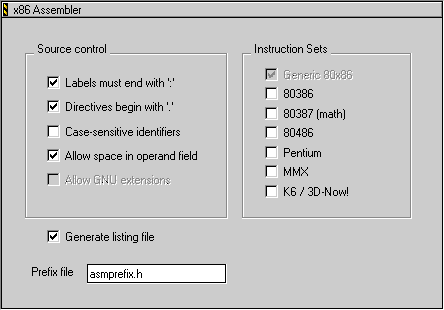
You can use the x86 assembler to generate code for several different instruction sets that are available for x86 processors. The Instructions Sets group of the Assembler target settings panel includes the following checkboxes, which you can select to indicate the instruction sets you want to use:
- 80386
- 80387
- 80486
- Pentium
- MMX
- K6 / 3D-Now!
NOTE
For information on the other settings shown in Figure 6.1, see "Common Assembler Settings".
[ First ] [ Previous ] [ Next ] [ Last ] [ Manuals ]
Visit the Metrowerks website at: http://www.metrowerks.com
For assistance contact Metrowerks Technical Support at: cw_support@metrowerks.com
Copyright © 2000, Metrowerks Corp. All rights reserved.
Last updated: July 20, 2000