[ First ] [ Previous ] [ Next ] [ Last ] [ Manuals ]
Header Files

(K&R, §A12.4) The C compiler can nest #include files up to 32 times. An include file is nested if another #include file uses it in an #include statement. For example, if Main.c includes the file MyFunctions.h, which includes the file MyUtilities.h, the file MyUtilities.h is nested once.
You can use full path names in #include directives, as in this example for Mac OS:
#include "HD:Tools:my headers:macros.h"
The CodeWarrior IDE lets you specify where the compiler looks for #include files with the Access Paths settings panel, shown in Figure 3.1. It contains two lists of folders: the User list and the System list. By default, each list contains one folder. The User list contains {Project }, which is the folder that the project file is in and all the folders it contains. The System list contains {Compiler }, which is the folder that CodeWarrior is in, and all the folders it contains.
The Access Paths settings panel (Mac OS):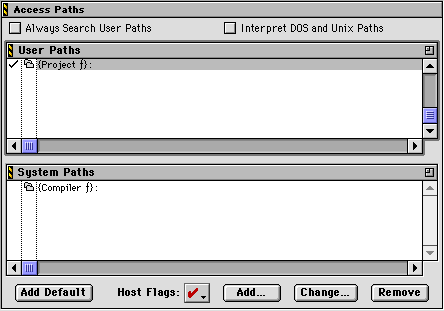
The compiler searches for a #include file in either the System list or both the User and System lists, depending on which characters enclose the file. If you enclose the file in brackets (#include <stdio.h>), the compiler looks for the file in the System list. If you enclose the file in quotes (#include "myfuncs.h"), the compiler looks for the file in the User list first, and then in the System list. In general, use brackets for include files that are for a large variety of projects and use quotes for include files that are for a specific project.
If the Always Search User Paths option is selected, the compiler also uses the User access paths for include files enclosed in brackets (#include <file>).
For information on how to modify the Access Paths settings panel, see the Code-Warrior IDE User Guide.
See also: "Prefix Files."
 TIP
TIP
If you're using the compiler under Apple Computer's MPW programming environment, you can specify where to find #include files with the -i compiler option and the {CIncludes} variable, described in Command-Line Tools Manual and MPW Command Reference.
[ First ] [ Previous ] [ Next ] [ Last ] [ Manuals ]
Visit the Metrowerks website at: http://www.metrowerks.com
For assistance contact Metrowerks Technical Support at: cw_support@metrowerks.com
Copyright © 2000, Metrowerks Corp. All rights reserved.
Last updated: August 17, 2000