[ First ] [ Previous ] [ Next ] [ Last ] [ Manuals ]
Expanding and Collapsing Groups

In the Project window, groups organize files into collapsible lists. Click a group's name to expand it and view its contents. Click the group's name again to collapse it and view only its name.
You can expand or collapse all subgroups that belong to a particular group, as shown in Figure 3.10. Use one of the following techniques:
Windows, Solaris, and Linux
Alt-click the group's name.
Mac OS
Option-click the group's name.
Expanding Groups and Subgroups: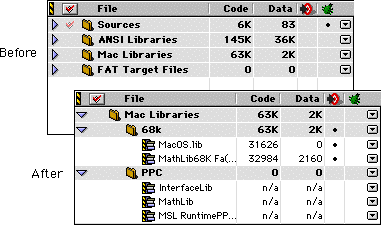
You can also expand or collapse sibling groups (all groups at the same level), as shown in Figure 3.11. Use one of the following techniques:
Windows, Solaris, and Linux
Ctrl-click a group's name.
Mac OS
Command-click a group's name.
[ First ] [ Previous ] [ Next ] [ Last ] [ Manuals ]
Visit the Metrowerks website at: http://www.metrowerks.com
For assistance contact Metrowerks Technical Support at: cw_support@metrowerks.com
Copyright © 2000, Metrowerks Corp. All rights reserved.
Last updated: August 17, 2000