[ First ] [ Previous ] [ Next ] [ Last ] [ Manuals ]
Targets View

The Targets view shows a list of the build targets in the project. This view also shows the items required by the build targets to create a final output file. Figure 3.5 shows a sample Targets view.
The Targets view also contains the Link column. Use this column to establish dependencies among build targets. For example, one build target might depend on the output of another build target. To establish this dependency in the Targets view, click in the Link column next to the build target that creates the output.
If your project includes RAD designs, the Targets view also shows the hierarchy of build targets within each design. For more information on working with build targets, see "Working with Complex Projects". To learn more about designs, see "RAD Designs and Layouts".
Targets View in the Project Window: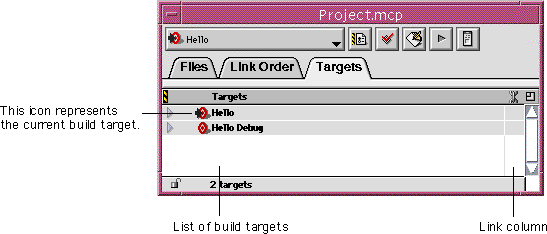
[ First ] [ Previous ] [ Next ] [ Last ] [ Manuals ]
Visit the Metrowerks website at: http://www.metrowerks.com
For assistance contact Metrowerks Technical Support at: cw_support@metrowerks.com
Copyright © 2000, Metrowerks Corp. All rights reserved.
Last updated: August 17, 2000