[ First ] [ Previous ] [ Next ] [ Last ] [ Manuals ]
Reverting to a Previously-Saved File

If you've opened a text file and started editing it, then realize that you don't want to use the changes you've made, use the Revert command on the File Menu. When you select this command the dialog box shown in Figure 4.13 appears.
Revert to a Previous File: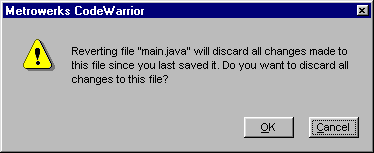
If you click the OK button, the last copy of the file you're working with will be opened, and all changes you have made since the last time you saved the file are lost. If you click Cancel, the file you're working with is not changed or saved to disk, and you can continue editing it.
[ First ] [ Previous ] [ Next ] [ Last ] [ Manuals ]
Visit the Metrowerks website at: http://www.metrowerks.com
For assistance contact Metrowerks Technical Support at: cw_support@metrowerks.com
Copyright © 2000, Metrowerks Corp. All rights reserved.
Last updated: August 17, 2000