[ First ] [ Previous ] [ Next ] [ Last ] [ Manuals ]
Going to a Particular Line

You can go to a specific line in an editor window if you know its line number. The IDE numbers lines consecutively, with the first line designated as line 1.
 Click the Line and Column Indicator in the editor window to open the Line Number dialog box shown in Figure 5.12. Enter the desired line number and click OK.
Line Number Dialog Box: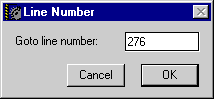
[ First ] [ Previous ] [ Next ] [ Last ] [ Manuals ]
Visit the Metrowerks website at: http://www.metrowerks.com
For assistance contact Metrowerks Technical Support at: cw_support@metrowerks.com
Copyright © 2000, Metrowerks Corp. All rights reserved.
Last updated: August 17, 2000