[ First ]  [ Previous ]  [ Next ]  [ Last ]  [ Manuals ]


New Data Member Wizard

The New Data Member wizard is divided into the following steps:

1. Describe the declaration of the new data member.

2. Specify file locations for the new data member.

To use the New Data Member wizard, follow these steps:

1. Describe the declaration of the new data member.

This section of the wizard, shown in Figure 7.18, lets you specify the name, type, and initializer for the new data member. Other options are available to further describe the data member.

This section includes the following parts:


Name

Type a name for the data member in this field.


Type

Enter an appropriate data-member type in this field.


Namespaces required for type (optional)

If desired, enter a list of namespaces required for the type in the Type field. Sample parameters are listed above the field.

New Data Member wizard - Data Member Declaration:
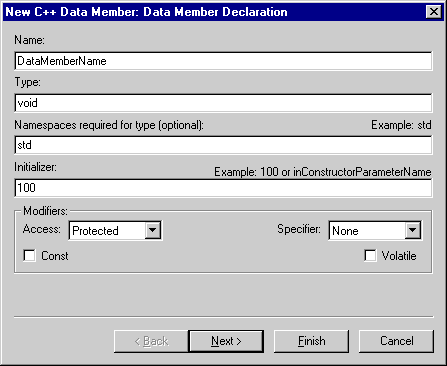
Initializer

If you wish, type an initial value for the data member in this field. Sample initializers are listed above this field.


Modifiers

Use the Access and Specifier pop-up menus to choose the access level and member specifier for the new data member. Possible access levels include Public, Protected, and Private. Possible specifiers include None, Static, and Mutable. You can enable the Const or Volatile checkboxes as desired to further describe the data member's modifiers.

New Data Member wizard - File Locations:

2. Specify file locations for the new data member.

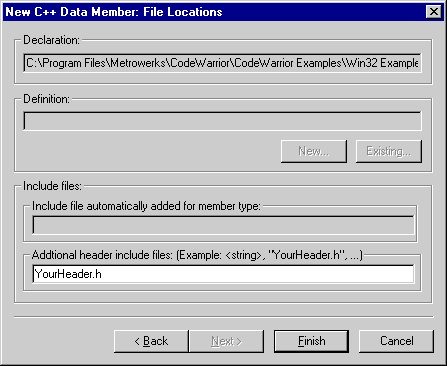
This section of the wizard, shown in Figure 7.19, lets you specify file locations associated with the new member function.

This section includes the following parts:


Declaration

This field shows you the location of the file to which the data member's declaration will be added.


Definition

This field is not available in this wizard.


Include file automatically added for member type

This field shows you the #include file that is automatically added for the data-member type.


Additional header include files

Enter in this field a list of other #include files for the new data member, in addition to the file listed in the previous field. Some examples are provided above the field.


[ First ]  [ Previous ]  [ Next ]  [ Last ]  [ Manuals ]

Visit the Metrowerks website at: http://www.metrowerks.com
For assistance contact Metrowerks Technical Support at: cw_support@metrowerks.com
Copyright © 2000, Metrowerks Corp. All rights reserved.

Last updated: August 17, 2000