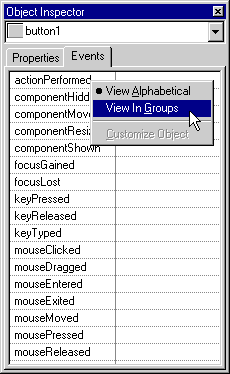
The Object Inspector contextual menu provides several convenient commands for manipulating objects. The available commands in this menu depend on the object you select. A sample Object Inspector contextual menu is shown in Figure 13.18.
To display the Object Inspector contextual menu:
The following list describes some of the commands in the Object Inspector contextual menu:
Select All-selects the contents of the current text field.
Delete-removes the contents of the current text field.
Customize Object-lets you change object characteristics.
View Alphabetical-changes the Events view so that all object events are listed in alphabetical order, regardless of the groups to which those events belong.
View In Groups-changes the Events view so that object events are displayed in group hierarchies.