[ First ] [ Previous ] [ Next ] [ Last ] [ Manuals ]
Copy Files Accessory

When you choose the Copy Files menu command, CodeWarrior launches a desk accessory. This desk accessory lets you copy files and folders between the Solaris or Linux environment from within the CodeWarrior IDE. The environment includes such file systems and devices as Macintosh diskettes; AppleDouble; K-AShare; EtherShare and Partner file systems; and NFS-mounted UNIX file systems. For example, you can use the Copy Files command to copy a file from a Macintosh diskette to a UNIX directory.
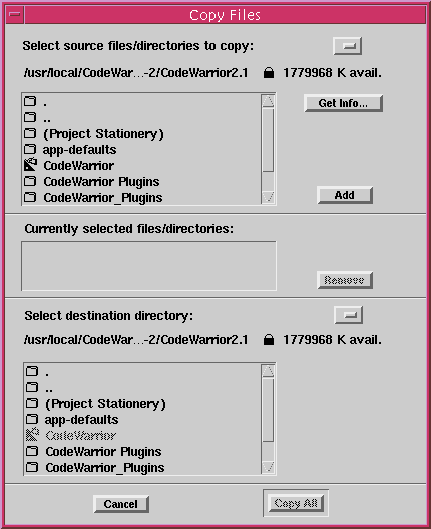
To display the Copy Files dialog box (Figure B.1), choose Info > Copy Files.
This dialog box contains three sections: Source File/Directory Selection, Currently Selected Files/Directories, Destination Directory Selection
Figure B.1 The Copy Files Dialog Box
[ First ] [ Previous ] [ Next ] [ Last ] [ Manuals ]
Visit the Metrowerks website at: http://www.metrowerks.com
For assistance contact Metrowerks Technical Support at: cw_support@metrowerks.com
Copyright © 2000, Metrowerks Corp. All rights reserved.
Last updated: August 17, 2000