
Lets you enter command-line arguments for a SIOUX program.
Compatibility:This function is compatible with the following targets:
|
ANSI
|
BeOS
|
EMB/RTOS
|
Palm OS
|
Win32
|
|
#include <console.h>
int ccommand(char ***argv);
Parameters for this function are:
 WARNING!
This function displays a dialog that lets you enter arguments and redirect standard input and output, as shown in "The ccommand dialog". Please refer to "Overview of SIOUX," for information on customizing SIOUX, or setting console options.
 NOTE
NOTE
stdin, stdout, cin and cout are redirected. Standard error reporting methods stderr, cerr and clog are not redirected.
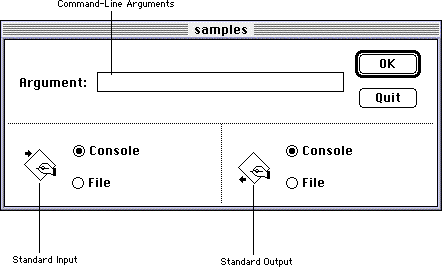
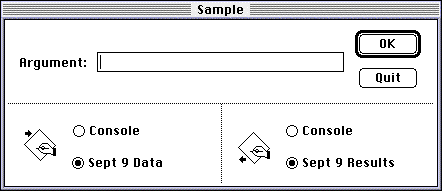
Enter the command-line arguments in the Argument field. Choose where your program directs standard input and output with the buttons below the field: the buttons on the left are for standard input and the buttons on the right are for standard output. If you choose Console, the program reads from or write to a SIOUX window. If you choose File, ccommand() displays a standard file dialog which lets you choose a file to read from or write to. After you choose a file, its name replaces the word File, as shown in "Redirecting input and output to files".
The function ccommand() returns an integer and takes one parameter which is a pointer to an array of strings. It fills the array with the arguments you entered in the dialog and returns the number of arguments you entered. As in UNIX or DOS, the first argument, the argument in element 0, is the name of the program. "Example of ccommand()" has an example of command line usage
This function returns the number of arguments you entered.
See Also: Example of ccommand() :#include <stdio.h>
#include <console.h>
int main(int argc, char *argv[])
{
int i;
argc = ccommand(&argv);
for (i = 0; i < argc; i++)
printf("%d. %s\n", i, argv[i]);
return 0;
}