This background chapter discusses in general terms what a framework is, the kind of power it has, and the kinds of design patterns you typically encounter in a framework. This will give you an understanding of the universe within which PowerPlant lives.
This overview gives you an invaluable perspective when you work with PowerPlant code. In the next chapter you'll see how PowerPlant implements the high-level relationships that designers have found to be vital in a good, object-oriented application framework.
This chapter discusses the following topics:
Programmers want and benefit from reusable code. Reinventing the wheel is not a reasonable or productive use of your time and effort. In this section we're going to talk about three different ways in which programmers have organized useful collections of reusable code. They are:
Each collection of reusable code is more sophisticated and more powerful than its predecessor. Because procedural libraries are familiar to most programmers, we'll start with them.
You should realize, however, that some programmers use these terms interchangeably. You will regularly hear frameworks called class libraries, and libraries referred to as frameworks. Nonetheless, there is a distinction between each of these collections, as you'll soon see.
Code libraries have been around for a long time. It is quite likely that you are familiar with one or more procedural libraries. The ANSI standard C library is an excellent example of a function-based code library.
A procedural code library is a collection of routines (functions, procedures, subroutines) you can use in your own code. Such a library is usually designed to serve the lowest common denominator, so the routines in the library tend to be simple and generic to a fault. The routines are usually of a "housekeeping" or utility nature. They help you take care of programming chores, such as converting lower case characters to upper case, formatting strings, performing basic math, and so forth.
There are libraries designed for specific areas of programming, and these can be very helpful in solving programming problems in that area. You might find libraries for astronomy-related code, database manipulation, and so on.
Unfortunately, in many cases the library's routines are not perfectly suited to your particular programming problem. You may find you need to modify some of the code, or replace it. Modifying library code is always a chancy proposition, because there may be hidden dependencies between the function you're modifying and the rest of the library. This is a pitfall best avoided. Moreover, replacing code defeats the purpose of the library.
Despite their limitations, procedural libraries are very useful. They have saved many programmers thousands of hours of work. The limitations are real however, and the desire for greater flexibility and more reusable code has led to significant advancements.
A class library, in its most general sense, is simply a procedural library rewritten in an object-based language. A class library is a collection of classes designed to be of some use to you in accomplishing your programming chores.
The various classes may not even be related to each other, depending upon the nature and purpose of the library. Like a procedural code library, the class library is usually a collection of utility classes.
The main advantage that a class library has over a procedural library is extensibility. Because of object-oriented features such as inheritance and derivation, you can easily extend the utility of the library to meet your particular programming challenge.
When the library does not solve your problem completely, you can declare your own class, inherit from the library class, and override a few functions to make it fit precisely with your particular needs. You are no longer modifying the library code directly, you are extending it.
While you are replacing part of the underlying class by overriding behavior, the mechanism is simpler and more reliable than replacing functions in a procedural library. You aren't modifying the library's internal dependencies, and you still inherit all the behavior you do not override. No generic solution is ever going to perfectly solve all programmers' problems all the time. But the class library gives you a more flexible and robust mechanism for modifying the generic solution.
So, where do frameworks fit into this picture?
A framework is a structured form of class library designed to assist in solving a specific programming problem, a concept called the problem domain. A framework is a collection of classes designed to form a cohesive whole aimed at the problem domain.
Because they are all aimed at the same domain, the classes in a framework tend to be more integrated and more interdependent than in a simple class library. This can make a framework both more powerful and more difficult to use.
It is more powerful because the entire collection of reusable code is aimed at a single problem. This makes everything more focused. Because the problem domain is limited, the "generic" solution can be that much more specific.
A framework may be more difficult to use because, being more interdependent, you must get your head around the entire design to see how all the pieces work together. Only then can you figure out how to use the framework to solve your own particular version of the problem domain.
No matter how well designed or focused, a framework is still a generic solution to the problem. You must take advantage of the flexibility of an object-oriented language to derive your own solution from within the bounds of the framework.
A framework may be aimed at any sort of problem domain. You might design a framework to help solve database problems, physics problems, inventory control problems, and so forth. One potential problem domain-the one we're most interested in here-is application programming.
An application framework is an object-based framework whose problem domain is application programming. The framework is aimed at solving the problems that application programmers encounter when writing software for a particular platform. The platform of interest to us here is the Mac OS.
In general, an application framework concerns itself with the application interface, not the application content. This is an important distinction, and one you should remember, because it drives much of the design of a good framework.
The reason is simple. The interface elements of most applications are fairly standard, and therefore lend themselves to a generic solution. The content of applications is highly variable from application to application, thus making any generic solution almost worthless.
 NOTE
NOTE There are some common types of data that many applications contain, such as text or tables. You will find support for this kind of data in some application frameworks (PowerPlant among them). All the same, the principal focus of an application framework is in the visible interface.
Beyond interface solutions, the second area in which an application framework provides solutions is in the flow of control in an application. A good framework identifies and dispatches events to the appropriate elements in the application.
The application framework can usually create a completely functional-but empty-application with very little effort. The framework provides a series of default or empty behaviors that serve as hooks. You override those behaviors in your own classes when necessary to mold the framework to your specific needs.
For example, an application framework is likely to have a "Draw" behavior somewhere to draw the contents of a window (or part of a window). You override the Draw behavior to draw your unique content, but you never have to worry about when or whether the Draw behavior should be called. The flow of control and basic functionality is provided for you in the application framework.
The advantages of a powerful application framework are immediately obvious. With little or no work, you already have a complete application shell ready to be filled with your own content. In addition, because many programmers have worked on or with the framework, its code is likely to be extremely reliable.
In a well-designed framework, you may find yourself using 90% or more of the framework without change. Common problems like event parsing, menu management, and idle time processing have already been solved by expert programmers.
Their solutions are embedded within the application framework. A good application framework like PowerPlant lets you take advantage of their work and reuse their code. You can really concentrate on the particular areas where your application needs special behavior. This, after all, is a lot more fun than reinventing the wheel, and is a much better use of your time and skills.
Application frameworks are often very complex, with dozens of highly interdependent classes. Learning the ins and outs of an application framework can be a daunting task. On the other hand, the architecture of a modern, well-designed application framework like PowerPlant can make the learning process a lot easier. You'll see how in the next chapter, when we discuss how PowerPlant implements the design patterns you typically find in an application framework.
If you have never used an application framework, you are about to acquire a new and very powerful tool.
However, one of the principal hurdles you will encounter is the obscure and seemingly strange code you find hiding in the source files. It's rather like being dropped into a maze where the walls not only block your view, they reorganize themselves every time you turn around.
Although it doesn't look like it from the inside of the maze, there really is a plan to the apparent madness. The path out of the maze is not obvious when you're lost at the code level. However, it is easy to see the solution from high above the maze. When you look down on the maze, patterns can emerge.
A design pattern is an intentional, coherent system based on the interrelationship of component parts.
For example, take a look at a stone building. You are quite likely to see one or two patterns used to span a gap in a wall (such as for a doorway or a window). One pattern you'll see is the post and lintel, where two uprights support a crossbeam that carries the load. Another is the arch, where a series of shaped stones carry the load across the gap. These are design patterns in masonry.
In object-oriented programming, the components in a design pattern are the classes or groups of classes that have, over time, been found to work well together to accomplish some specific task.
All applications encounter similar problems. Although the details of solutions vary from framework to framework, most frameworks have followed established patterns that work well. These patterns are part of the architecture of the framework. They are the steel skeleton that makes it strong.
Once you understand the patterns, complex and obscure code will become clear. You will know its place in the scheme of things, and it will no longer seem strange.
You'll be visiting these patterns again in the next chapter when you see how PowerPlant solves these high-level problems.
The patterns discussed in this section include:
NOTE The terminology used in this discussion matches that used in PowerPlant. You may hear these patterns called by other names in other frameworks, but the underlying pattern and functionality are essentially the same.
An application framework usually has an application object. This object is responsible for providing application-level services. It launches, initializes the environment, runs an event loop, and quits.
The application object is usually the final dispositor of events not handled elsewhere in the application. As a result, it is responsible for basic menu control, document creation, and events that are not related to any particular window or part of the application, such as displaying the About box that is a familiar part of any Mac application.
A Macintosh application is event driven, and a framework must handle events. You will usually find event handling and/or dispatching classes that take care of this service for you. This class or group of classes is responsible for parsing the event and dispatching control after determining the nature of the event.
Event dispatch can be a tricky business. For example, assume you receive an event that contains a keystroke, and you have several editable text fields available in a window. Which one should receive the event?
To simplify the event dispatch problem, the application framework establishes an object hierarchy so that every object that can respond to an event is owned by some other object. Ultimately the application owns them all.
An object that can handle events and respond to commands is called a commander. In the chain of command, those higher up are called supercommanders and those lower down are called subcommanders. Any given commander may be both a supercommander to its own subcommanders, and a subcommander to some other supercommander.
NOTE The application object is typically the ultimate supercommander and is not a subcommander to any other object.
Typically the command hierarchy is a tree. No object may have more than one supercommander, but it may have several subcommanders. A commander may have no subcommander at all if that particular commander is a leaf on the command tree.
Even with a command hierarchy, there are still two possible solutions to the event dispatch problem. You can dispatch events from the top down, or from the bottom up.
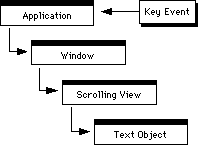
The top-down approach starts at the application level and moves down the command hierarchy looking for an object that can handle the event (a leaf object). This approach is less common, but certainly reasonable. It has some advantages and disadvantages. Because control starts at a high level, you can process many events right there (meaning that your leaf objects can be simpler because they don't have to understand those events). On the other hand, if the event is destined for a leaf object-and most events are-dispatch must proceed down through the entire tree before the event is ultimately handled, as shown in Figure 4.1.
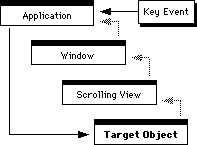
The other approach (the one you'll find in PowerPlant) is to dispatch events from the bottom up. In this design pattern, the application keeps track of a target object. The target object is the currently active command object destined to be the recipient of all (or most) events. When an event is dispatched, it goes directly to the target object, which is always a commander, as shown in Figure 4.2.
If the target object is incapable of handling the event, it passes the event back up the command hierarchy to its owner/supercommander. The supercommander may handle the event, or pass it on to the next commander up the chain. Ultimately, if no object handles the event the application object receives the event back, and must handle the event itself.
NOTE The framework usually takes care of tracking the target object automatically. There will be times when you want to switch targets manually.
The principal advantage of the bottom-up approach is that the target object can adjust the context of the application to match the object's own capabilities. Because it gets events first the target object can set up menus properly to reflect its behavior. If the target object is a text object for example, it might enable a font menu.
This gives you tremendous flexibility. You can put a great deal of power down deep into the leaves of your command hierarchy, and let them take care of things for you. This makes the central control system a lot simpler. If you add a new kind of object, you don't have to redesign the control system, you simply give that new object the knowledge necessary to adapt the entire application to its needs.
As an additional advantage, tracing the command chain is a lot simpler from the bottom up. Each supercommander may have several subcommanders. Figuring out which way to go from the top down is a non-trivial task. Figuring out which way to go from the bottom up is simple-there is only one path because each commander has one supercommander.
Because an application framework deals primarily with the visual interface, how the framework draws is an important design pattern. To make drawing as flexible as possible, an application framework establishes a visual hierarchy similar in concept to the command hierarchy.
A view is an area within which drawing occurs. A view is not a window (although a window may be a view).
NOTE You may encounter the term "pane" used synonymously with "view." In PowerPlant, panes and views are specific classes with specific features. We'll discuss their differences in the next chapter, and we'll discuss their features in great detail later in this manual. For now, we'll use the term view very generally to mean a drawing area, and nothing more.
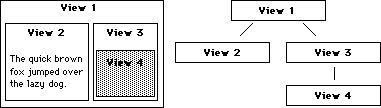
The important feature of most application frameworks with respect to drawing is that views can form a hierarchy. A view may contain other views (subviews), which may contain other subviews, and so on.
In other words, views may have a superview-subview relationship. Like commanders, a view may be a superview to its own subviews, and a subview to its own superview. No view may have more than one superview, but it may have several or no subviews.
The view hierarchy is responsible for maintaining the coordinate systems and the relative relationship, position, and appearance of the view objects in the chain. With a little imagination you can see that this kind of system is excellent for accomplishing tasks like scrolling, creating different views on the same data, and so forth.
In a good application framework, the view system is also responsible for maintaining knowledge of the drawing environment. On a Macintosh, this means tracking and maintaining the clipping area, graphics port, and so forth.
Setting up these features for a particular view is called setting the focus for that view. The view focus is an important concept. In order for view objects to draw properly, they must be the focus of attention within the operating system's graphics environment.
NOTE Like the target object in the command hierarchy, the framework usually handles focus automatically. There will be times when you manually force a view to become the focus before drawing it.
Views are usually responsible for drawing themselves in response to messages from the control system. Drawing occurs from the top down, so that superviews are drawn before subviews. As a result, the subviews are drawn last-on top of all the superviews in the view hierarchy.
A view may also be a commander. For example, you may have a certain kind of view that displays a picture. You may want certain features enabled or disabled when the user is manipulating the picture. In order for that to happen, the view containing the picture must also be a commander so that it can respond to events.
NOTE Do not confuse the visual hierarchy with the command hierarchy. The visual hierarchy is concerned with drawing things. The command hierarchy is concerned with handling events and commands. An object may occupy a position in either or both chains. As a result, the chains are interconnected but the chains remain distinct.
In a typical application framework you encounter a wide variety of classes derived from a base view class. These subclasses describe standard visual features of the Macintosh environment such as scroll bars, text boxes, check boxes, radio buttons, standard buttons, lists, pictures, popup menus, and more. You will encounter a bevy of these classes in PowerPlant, and you'll find them extremely useful.
You have already encountered an important messaging system, the command hierarchy. A message is received by the application, parsed, dispatched to a target object, and processed. This messaging system is vital to the functioning of an application. However, it is limited because communication only occurs vertically through the command hierarchy, and it only involves events.
In many cases you will need objects that communicate with each other when they are not part of the same chain of command, or the same view hierarchy, or when the message involved is not an event.
Framework designers have created a wonderfully flexible messaging system to solve this problem-the broadcaster-listener system (also known as the notifier-responder).
A broadcaster is an object that sends a message on certain occasions. For example, a check box may send a message that it has been clicked. The nature of the message may vary depending upon circumstances. In a typical message, a control will broadcast its current setting to all its listeners so that they may respond accordingly.
A listener is an object that listens for messages. Depending upon the messages it receives, it may or may not respond with some action. For example, if a listener receives a message that a particular check box has been clicked and is now on, the listener may activate some new feature in a window or within the application.
Broadcaster and listener relationships: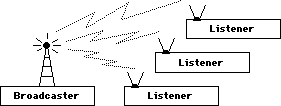
The flexibility in this system comes from the fact that the broadcaster has a dynamic list of listeners to whom it sends messages when appropriate. You may add or remove listeners at any time. The broadcaster doesn't need to know the nature of the listener, or what the listener will do in response to the message. Likewise the listener doesn't need to know anything about the nature of the broadcaster. The listener must understand the nature of the message in order to respond appropriately, but not the nature of the broadcaster.
This loose coupling between broadcaster and listener keeps the entire messaging system extremely flexible. You'll use it extensively when you work with PowerPlant.
Persistence refers to the concept that some data (or more precisely, objects that contain data) should continue to exist even when the application is not running. To do that-to be persistent-this data must be stored on a medium other than volatile RAM.
A common solution is to use file and document classes to support reading and writing data from disk, and stream classes to help move that data around.
A file is stored data. An application framework provides classes that help you manipulate files in the standard fashion, with behaviors to open, close, revert, save, and print.
On the Macintosh, a file's contents are typically displayed in a window. In the PowerPlant architecture, the document class is the link between a file and a window. It connects a specific file to a specific window, and keeps track of whether the contents of the data have been changed. The document also provides support for printing the data.
A stream is an ordered series of bytes of data. Streams are extremely useful in a variety of programming tasks, particularly the transfer of data from one place to another (such as saving data to a disk or sending data over a network).
Files and streams, linked to windows by a document, work hand in hand to make the process of saving data to disk and reading the data from disk as painless as possible. The document keeps track of which window is attached to which file, and the physical location of the file. You use the stream classes to write data to or read data from the associated file.
Taken together, the document/file/stream combination can insulate you from the details of managing file I/O at the operating system level.
Any good application framework provides a variety of services to you to make your programming chores easier. In addition to the command, view, and messaging systems, the framework also provides utility-level services.
The precise services will vary from framework to framework, but you are likely to encounter classes designed to help you with:
Learning about all the features available to you in a major application framework is a non-trivial task. There are close to 2,000 functions in PowerPlant. The good news, as you may recall from earlier in this chapter, is that you get to inherit the vast majority of them without ever seeing or being concerned with the functions in any way.
You'll discover that there are a few important places in PowerPlant where you must derive classes, a few common functions you must override, and a few places where you must provide new functionality. These places are well known and easily identifiable. Once you know what they are, you can create a simple and unique application fairly easily.
In an ever-improving attempt to create reusable code, code designers created procedural libraries, class libraries, and ultimately frameworks aimed at specific problem domains.
Application frameworks provide a generic solution to the significant coding problems faced when writing an application.
The design patterns used in application frameworks include features that support event handling and dispatch, command flow control, the visual display of standard interface elements, inter-object messaging, file I/O, and utility functions.
The PowerPlant universe is expanding before your eyes. You know what an application framework is, and what it does. In the next chapter we'll talk about the specific PowerPlant classes that implement the design patterns we have talked about here.
After that we'll start writing real PowerPlant code. In the process we'll introduce you to all the places where you will usually interact with PowerPlant. Soon you'll be able to use PowerPlant's immense power easily and effectively.