This section discusses how to begin using the public interfaces of the CodeWarrior IDE to write scripts and extend the operation of the IDE.
One of the first lines of your script should be something like:
set codewarrior = CreateObject("CodeWarrior.CodeWarriorApp")
This creates a COM instance of the CodeWarrior IDE that you can interact with in subsequent scripting operations. For more information about this, refer to "ICodeWarriorApp."
Now we'll analyze how you would use OLE/COM Object Viewer to learn how to script the IDE for one simple operation. In order to do much in the IDE, you will need to open a project. This can be accomplished with this script command:
set project = codewarrior.OpenProject(projectname, true, 2, 0 )
How would you know how to write this command? Simple, use the OLE/COM Object Viewer to inspect the CoClasses for the operation you want to perform, as in the steps here:
1. To do this for the OpenProject method, you would first launch OLE/COM Object Viewer.
2. Then use the View menu to put it into Expert Mode, click on the plus sign "+" next to Type Libraries in the left window pane, then double-click on the Metrowerks CodeWarrior IDE entry.
A window similar to Figure 3.2 appears.
3. Then use the View menu of the ITypeLib Viewer window to choose Group by type kind.
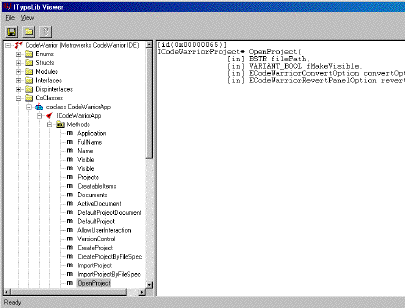
4. Then click on the plus sign "+" next to CoClasses, then the + next to coclass CodeWarriorApp, then the + next to Methods.
Your window should now look something like that shown in Figure 3.3.
This shows that the OpenProject method requires 4 arguments, all are parameters that are passed
in only (the [in] designation signifies this):
filePath - the path to the project to be opened.
fMakeVisible - whether to make the project visible or not.
convertOption - whether to allow the project to be converted or not (taking
a value from the ECodeWarriorConvertOption enumeration).
revertOption - the value from the enumeration named ECodeWarriorRevertPanelOption .
You can view the values for the enumerations in the same window under the Enums hierarchy.
You can also refer to "CodeWarrior IDE COM Reference" for more information on the specific interfaces instead of looking each one up with the OLE tool.