This chapter discusses support for 68K assembler development.
This section describes how to use the CodeWarrior compiler's built-in support for assembly language programming, including assembler syntax.
The topics in this section are:
To specify that a block of code in your file should be interpreted
as assembly language, use the asm keyword.
To ensure that the C/C++ compiler recognizes the asm keyword, you must turn off the ANSI Keywords Only option in the C/C++ Language panel. This panel and its options
are fully described in the C Compilers Reference.
The assembly instructions are the standard 68K instruction mnemonics. For information on 68K assembly language instructions, see M68000PM/AD: M68000 Family Programmer's Reference Manual
You use the 68K inline assembler to specify that an entire function is in assembly language. Assembly statement blocks within a function are not supported. In other words, the 68K inline assembler is a function-level assembler.
Inline assembly code for 68K uses the following syntax:
asm long f(void) { . . . } // OK: An assembly function
asm void g(void)
{
    add.l      d4, d5
    rts
}
However, the following code would not be legal:
long MyFunc (void)
{
  asm {. . .}  // Error, assembly statement blocks not supported
}
 NOTE
NOTE Assembly language functions are never optimized, regardless of compiler settings.
Keep these tips in mind as you write assembly functions:
[LocalLabel:] (instruction | directive) [operands]
;).
     move.l   0xABCDEF, d5    // OK
     move.l   $ABCDEF, d5     // ERROR
     move.l   b, DO           // OK
     MOVE.L   b, d0           // ALSO OK
Listing 11.1 shows an example of an assembly function.
Creating an assembly function:
long int b;
struct mystruct {
  long int a;
} ;
static asm long f(void)     // Legal asm qualifier
{
  move.l   struct(mystruct.a)(A0),D0 // Accessing a struct.
  add.l    b,D0   // Using a global variable, put return value
                  // in D0.
  rts             // Return from the function:
                  // result = mystruct.a + b
}
The rest of this section describes how to create local variables, access function parameters, refer to fields within a structure, and use the preprocessor with the assembler. A section at the end of the chapter describes some special assembler directives that the built-in assembler allows.
A label must end in a colon and may contain the @ character. For example:
asm void foo(void)
{
x1:  dc.b     "Hello world!\n"  // OK
@x2: dc.w     5                 // OK
x3   dc.w     1,2,3,4           // ERROR: Needs a colon
}
You cannot begin comments with a semicolon (;), but you can use C and C++ comments. For example:
    add.l      d5,d5                ; ERROR
    add.l      d5,d5                // OK
    add.l      d5,d5                /* OK */
NOTE The ANSI Strict option must be off in order to use // C++ comments.
You can use all preprocessor features, such as comments and macros, in the assembler. Just keep these points in mind when writing a macro definition:
;), because the preprocessor ignores newlines. For example:
#define MODULO(x,y,result)\
          move.w   x,D0; \
          ext.l    D0; \
          divs.w   y,D0; \
          swap     D0; \
          move.w   D0,result
% instead of #, since the preprocessor uses # as an operator to concatenate token. For example:
#define ClearD0 moveq %0,D0
You can refer to a field in a structure with the struct construct, as shown below:
struct(structTypeName.fieldName) structAddress
This instruction moves into D0 the refCon field in the WindowRecord that A0 points to:
move.l struct(WindowRecord.refCon) (A0), D0
To refer to a global variable, just use its name, as shown below:
int x;
asm void f(void)
{
  move.w      x,d0    // Moving x into d0
  // . . .
}
The built-in assembler gives you two ways to refer to local variables
and function arguments: you can do the work on your own or let
the built-in assembler do the work for you. To do it on your own,
you must explicitly save and restore processor registers and local
variables when entering and leaving your assembly function. You
cannot refer to the variables by name. You can refer to function
arguments off the stack pointer. For example, this function moves
its argument into d0:
asm void foo(short n)
{
  move.w      4(sp),d0 //  n
  // . . .
}
To let the built-in assembler do it for you, use the directives
fralloc and frfree. Just declare your variables as you would in a normal C function.
Then use the fralloc directive. It makes space on the stack for the local stack variables
and reserves registers for the local register variables (with
the statement link #x,a6). In your assembly, you can refer to the local variables and
variable arguments by name. Finally, use the frfree directive to free the stack storage and restore the reserved
registers.
Listing 11.2 is an example of using local variables and function arguments.
static asm short f(short n)
{
  register short a; // Declaring a as a register variable
  short b;          // and b as a stack variable
  // Note that you need semicolons after these statements.
  fralloc +     // Allocate space on stack and reserve registers.
  move.w  n,a   // Using an argument and local var.
  add.w   a,a
  move.w  a,D0

  frfree        // Free the space that fralloc allocated
  rts
}
Every assembly function should end in an rts or a preturn statement. If you forget to add one, the compiler does not add
one for you, and does not raise an error. Use the rts statement for ordinary C functions. Use the preturn statement for Pascal functions, since it performs the clean up
that Pascal functions need. For example:
asm void f(void)
{
    add.l      d4, d5
}                      // Error, no RTS statement
asm void g(void)
{
    add.l      d4, d5
    rts                // OK
}

asm void pascal h(void)
{
    add.l      d4, d5
    preturn            // OK
}
This section describes some special assembler directives that the 68K built-in assembler accepts. They are:
dc[.(b|w|l)] constexpr (,constexpr)*
68K assembler directive that defines a block of constant expressions,
constexpr, as initialized bytes, words, or long words. If there
is no qualifier, .w is assumed. For dc.b you can specify any string constant (C or
Pascal). For dc.w you can specify any 16-bit relative offset to
a local label. For example:
asm void foo(void)
{
x1: dc.b  "Hello world!\n" // Creating a string
x2: dc.w  1,2,3,4          // Creating an arrray
x3: dc.l  3000000000       // Creating a number
}
ds[.(b|w|l)] size
68K assembler directive that defines a block of size bytes, words,
or longs. The block is initialized with null characters. If there
is no qualifier, .w is assumed. For example, this statement defines a block big enough
for the structure DRVRHeader.
ds.b sizeof(DRVRHeader)
entry [extern|static] name
68K assembler directive that defines an entry point into the current
function. Use the extern qualifier to declare a global entry point and use the static qualifier to declare a local entry point. If you leave out the
qualifier, extern is assumed.
static long MyEntry(void);
static asm long MyFunc(void)
{
    move.l  a,d0
    bra.s   L1
    entry   static MyEntry
    move.l  b,d0
L1: rts
}
fralloc [+]
68K assembler directive that lets you declare local variables
in an assembly function. The fralloc directive makes space on the stack for your local stack variables
and reserves registers for your local register variables (with
the statement link #x,a6). For more information, see "Using Local Variables and Arguments in 68K Assembly."
There are two versions of fralloc. The fralloc directive (without a +), pushes modified registers onto the stack. The fralloc + directive also pushes all register arguments into their 68K registers.
frfree
68K assembler directive that frees the stack storage area and
restores the registers (with the statement unlk a6) that fralloc reserved. For more information, see "Using Local Variables and Arguments in 68K Assembly."
machine number
68K assembler directive that specifies which CPU the assembly code is for. The number must be one of the following:
To use the following MC68020 assembler instructions, specify 68020, 68030, or 68040:
You cannot use MC68020, MC68030, or MC68040 addressing modes.
To disable the MC68020 assembler instructions, specify 68000 or 68010. The arguments 68349, 68881, 68882, and 68851 have no effect.
opword const-expr (,const-expr)*
68K assembler directive that lets you include the opcode for an
instruction. It works the same as dc.w, but emphasizes that the expression is an instruction. For example,
this directive calls WaitNextEvent():
opword 0xA860 // WaitNextEvent
The built-in assembler uses all the standard MC 68000 assembler
instructions. It accepts some additional directives described
in "Assembler Directives for 68K." It also accepts the following 68020 assembler instructions, after
you use one of these directives: machine 68020, machine 68030, or machine 68040:
You cannot use MC68020, MC68030, or MC68040 addressing modes.
 TIP
TIP If you know the opcode for an assembly statement that's not supported,
you can include it in your function with the opword directive, described at "opword."
This section describes the 68K-specific extensions to the C and C++ standards found in the CodeWarrior C/C++ compiler.
You can disable some of these extensions with options in the C/C++ Language panel. This panel is described fully in the C Compilers Reference manual.
The topics in this section are:
When targeting 68K, the C/C++ compiler let you include simple inline data with the asm declaration. Use this syntax:
asm { constant, constant, . . . }
asm ( constant, constant, . . . )
A constant can be a numeric constant or a string literal.
void foo()
{
  asm ( (short)0x4e71,(short)0x4e71 );
    // two 68K NOP instructions
  asm { 0x4e714e71,0x4e714e71 };
    // four 68K NOP instructions

  asm ((char)'C',(char)'o',(short)'de',"Warrior");
}
Produces assembly code that looks like this:
Assembly code from inline data:
  LINK   A6, #$0000
  NOP
  NOP                      ; First two NOPs
  NOP
  NOP
  NOP
  NOP                      ; Next four NOPs
  DC.B    "CodeWarrior\0"
  UNLK    A6
  RTS
(K&R, §A8.6.3, §A10.1) When targeting 68K, the C/C++ compiler
lets you specify which registers a function uses for its parameters
and return value. Registers D0-D2, A0-A1, and FP0-FP3 are available.
When you declare the function, specify the registers by using
the #pragma parameter statement before the declaration. When you define the function,
specify the registers right in the argument list.
This is the syntax for the #pragma parameter:
#pragma parameter return-reg func-name(param-regs)
The compiler passes the parameters for the function func-name in the registers specified in param-regs instead of the stack, and returns any return value in the register return-reg. Both return-reg and param-regs are optional.
For example, Listing 11.6 shows the declaration and definition of a function, in which
a is passed in D0, p is passed in A1, x is passed in FP0, f is passed on the stack, and the return value is in D2.
Using registers with functions:
// prototype
#pragma parameter __D2 function(__D0,__A1,__FP0)
short function(long a, Ptr p, long double x, short f);
// function definition
short function(long a:__D0, Ptr p:__A1,
               long double x:__FP0, short f) :__D2
{
  // ...
}
If the PC-Relative Strings option in the 68K Processor settings panel is on, the compiler
stores the string constants used in a local scope in the code
segment and addresses these strings with PC-relative instructions.
If this option is off, the compiler stores all string constants
in the global data segment. This option helps keep your global
data segment smaller.
Regardless of how this option is set, the compiler stores string constants that have global scope in the global data segment. Listing 11.7 shows an example.
#pragma pcrelstrings on
int f(char *);

int x = f("Hello"); // "Hello" allocated in global data segment

int bar()
{
  return f("World"); // "World" allocated in code segment
                     // (pc-relative)
}
#pragma pcrelstrings reset
NOTE If you turn the Pool Strings option on, the compiler ignores the setting of the PC-Relative Strings option.
The PC-Relative Strings option corresponds to the pragma pcrelstrings. To check whether this option is on, use __option (pcrelstrings). By default, this option is off.
This section describes how the CodeWarrior C/C++ compilers implement
integer and floating-point types for 68K processors. You can also
read limits.h for more information on integer types, and float.h for more information on floating-point types.
The topics in this section are:
The 68K back-end compiler lets you choose the number of bytes
allocated for an int. Use the 4-Byte Ints option in the 68K Processor settings panel.
Table 11.1 shows the size and range of the integer types available when targeting 68K.
For this type
Option setting
size is
and its range is
The 68K back-end compiler lets you choose the number of bytes
allocated for a double. Use the 8-Byte Doubles option in the 68K Processor settings panel.
In general, turn this option off because 8-byte (64-bit) doubles are less efficient. However, if you are porting code that relies on 8-byte doubles, turn this option on.
| For this type |
Option setting |
Size is |
and its range is |
|---|---|---|---|
There is a variable type called short double that serves a very specialized purpose. It was added to be compatible
with old Think C code. It is the only way to get access to 8-byte
IEEE floats in the 68K compiler when you are not using the 8-byte
doubles floating point mode.
NOTE You really should not use this feature if you don't have to.
This section describes the C/C++ calling conventions for 68K development.
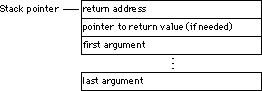
The compiler passes all parameters on the stack in reverse order.
The compiler passes the return value in different locations, depending on the nature of the value and compiler settings.
D0.
A0.
There are two options that change how the compiler returns a value.
If you turn on either the pragma pointers_in_D0 or pragma mpwc, the compiler returns pointer values in register D0. Use one of these pragmas if you're calling a function declared
in an MPW library. If the 68881 Codegen option is on, the compiler returns 96-bit floating-point values
in register FP0.
Figure 11.1 shows what the stack looks like when you call a C function with the 68K compiler.
(K&R, §A4.3, §A8.3, §A8.6.2) This section describes how the C/C++ compiler allocates space for variables.When targeting 68K, the C/C++ compiler lets you declare structs and arrays to be any size. However, it does place some limits on how you allocate space for them. Also, the operating system your software will run on may also limit the size of variable allocations.
Bitfields can be only 32 bits or less.
A function cannot contain more than 32K of local variables. To avoid this problem, do one of the following:
static. Note that you may run into the 32K limit on global variables,
described below.
(K&R, §A4.1, §A8.1) This section describes how the C/C++ compilers allocate variables to registers. The 68K back-end compiler automatically allocates local variables and parameters to registers according to how frequently they're used and how many registers are available. If you're optimizing for speed, the compiler give preference to variables used in loops.
The 68K back-end compiler gives preference to variables declared
to be register, but does not automatically assign them to registers. For example,
if the compiler has to choose between a variable from an inner
loop and a variable declared register, the variable from the inner loop will be placed in the register.
The 68K compiler can use these registers for local variables:
If you turn on the 68881 Codegen option, the 68K compilers also use these registers:
FP4 through FP7 for 96-bit floating-point numbers
This section discusses optimizations that are specific to 68K development with CodeWarrior. This topic is:
More optimizations are available through the Global Optimizations panel.
The C/C++ compiler can perform an optimization called register coloring. In this optimization, the compiler assigns two or more variables
to the same register. It does this if the source code does not
use the variables at the same time. In this example, the compiler
could place i and j in the same register:
short i;
int j;
for (i=0; i<100; i++) { MyFunc(i); }
for (j=0; j<100; j++) { MyFunc(j); }
However, if a line of code like the one below appears anywhere
in the function, the compiler would realize that you are using
i and j at the same time, and place them in different registers.
MyFunc (i + j);
Register coloring reduces code size and has no effect on execution time.
If register coloring is on while you debug your code, it may appear
as though there's something wrong with the variables that share
a single register. In the example above, i and j would always have the same value. When i changes, j changes in the same way, and vice versa.
You can prevent this by turning off register coloring, or by declaring
the variables as volatile.
You control whether the 68K back-end compiler performs the register coloring optimization from the Global Optimizations settings panel. Refer to the IDE User Guide for information on this panel.
The Global Register Allocation option corresponds to the pragma no_register_coloring. To check whether this option is on, use __option (no_register_coloring). By default, this option is off.s
This section describes how to use the CodeWarrior compiler to generate code for a specific processor. You can specify a processor in the 68K Processor panel. For a full discussion of this panel and its options, see "68K Processor."
When targeting 68K processors, the compiler can generate code for specific 68K processors: the MC68020 processor, and the MC68881 floating-point unit.
You control whether the 68K back-end compiler generates code for
specific 68K processors with options in the 68K Processor settings panel. The options are the 68020 Codegen checkbox and the 68881 Codegen option in the Floating Point pop-up menu.
You should use these options only if your application will run solely on machines that have that specific processor and your application needs the extra features that the processor provides. Code compiled for a specific 68K processor may not work on another 68K processor.
This sections contains the following topics:
The C/C++ compiler generates object code for the Motorola MC68000
processor if the 68020 Codegen checkbox is disabled and 6881 Codegen is not selected from the Floating Point pop-up menu in the 68K Processor settings panel.
When generating 68000 object code, keep in mind that functions
are limited to 32K in size. CodeWarrior C/C++ uses relative branching,
and the MC68000's relative branching instructions are limited
to 16 bits. Only MC68020 and higher processors have 32-bit relative
branching instructions, which the C/C++ compiler will generate
if 68020 Codegen is on.
The C/C++ compiler lets you take full advantage of the MC68020
processor. This feature is controlled by the 68020 Codegen checkbox in the 68K Processor settings panel. For information on this panel, see "68K Processor."
To generate code optimized for the 68020 processor, select the 68020 Codegen checkbox on the 68k Processor settings panel. When you enable this option, the C/C++ compiler use the extensions available in the MC68020 instruction set, including integer multiplication, integer division, and bit-field operations.
Generating code for 68020 and higher processors makes it possible to have functions that are greater than 32K, thanks to the 32-bit relative addressing instructions of these processors.
However, think carefully before you use the 68020 Codegen option. Your code will not run on any machine that does not have an MC68020 or equivalent, including a Mac OS computer using a PowerPC chip. See "Hazards of 68020 and 68881 Codegen."
The 68020 Codegen option corresponds to the pragma code68020. To check whether this option is on, use __option (code68020). By default, this option is off.
The C/C++ compiler lets you take full advantage of the MC68881
floating-point unit (FPU). This feature is controlled by the 68881 Codegen option on the Floating Point pop-menu on the 68K Processor settings panel.
To generate code optimized for the 68881 FPU, choose the 68881 Codegen option. When you choose it, the C/C++ compiler generates code optimized for the MC68881.
It stores variables declared long double or extended in 96 bits. It uses MC68881 instructions for basic arithmetic
operations, such as addition, subtraction, multiplication, division,
and comparisons. The header files fp.h and math.h use MC68881 instructions for many transcendental and floating-point
conversions. The compiled code is faster and computes the same
results as code compiled with the option off.
The 68881 Codegen option corresponds to the pragma code68881. To check whether this option is on, use __option (code68881). By default, this option is off.
The rest of this section describes what happens when you choose MC68881 Codegen.
If you choose the 68881 Codegen option, the compiler stores any variable declared extended or long double in the Motorola 96-bit format, instead of the SANE 80-bit format.
Both formats meet the IEEE standards for accuracy. The main difference
between them is that the 96-bit format contains 16 bits of padding
so that an extended number fits evenly into three 32-bit memory
accesses.
MacTypes.h defines the extended type. SANE.h contains two other type definitions: extended80 and extended96. It also contains functions that convert between 80-bit and 96-bit
formats: x96tox80() and x80tox96().
The MC68881 has eight registers, FP0 through FP7, that store 96-bit
floating-point values (that is, extended or long double). If you choose the 68881 Codegen option, your assembly language routines can use registers FP0
through FP3 for temporary storage without restoring their values.
If you use registers FP4 through FP7, you must preserve their
contents.
The compiler allocates variables of type long double or extended to registers to optimize performance.
You can compile code specifically aimed at either the MC68020 or the MC68881 FPU. For details, see "Generating Code for the MC68020" and "Generating Code for the MC68881."
However, you should use these options only if your application will run solely on machines that have that specific processor, and your application needs the extra features that the processor provides. If you know your code will only be run on a particular machine with the required chip, there is no problem.
You can create alternative builds within your code to compile
for different targets. Use the __option() pre-processor function. Use __option(code68881) to check whether the 68881 Codegen option is on. Use __option(code68020) to check whether the 68020 Codegen option is on.
Listing 11.8 shows an example that uses different code depending on whether you are generating code for the MC68881.
Checking for the MC68881 at compile time:
int calc(double i)
{
#if __option (code68881)  // generate code optimized for the floating point unit
#else
  // generate code for any 68K processor
#endif
}
Table 11.3 lists the pragmas supported for 68K development.
These pragmas, pragma syntax, and how to determine and modify the state of the compiler using pragmas are all detailed in the C Compilers Reference.
This section discusses the background information on the 68K linker and how it works. The topics in this section are:
The 68K linker deadstrips unused code and data only from files compiled by the CodeWarrior C/C++ compiler. Assembler relocatable files and C/C++ object files built by other compilers are never deadstripped. Deadstripping is particularly useful for C++ programs. Libraries (archives) built with the CodeWarrior C/C++ compiler only contribute the used objects to the linked program. If a library has assembly or other C/C++ compiler built files, only those files that have at least one referenced object contribute to the linked program. Completely unreferenced object files are always ignored.
It is useful to know that 'ckid' resources are stripped, in addition to stripping 'mcvs' resources with ID=128. These are the version control resources used by Metrowerks Visual SourceSafe and MacCVSPro.
Link order is generally specified in the Segments view of the Project window. For general information on setting link order, see the IDE User Guide.
Regardless of the link order specified in the Segments view of the Project window, the 68K linker always processes C/C++ or assembler source files before it processes relocatable files (.o) or archive files (.a), which are treated as libraries. Therefore if a symbol is defined in a source file, the linker will use that definition in preference to a definition in a library.
There is one exception. If the source file definition is a weak
symbol, then the linker will use a global symbol in a library.
You can create a weak symbol with #pragma overload.
The 68K linker ignores executable files that are in the project. You may find it convenient to keep the executable there so that you can disassemble it. If a build is successful, the file will show up in the project as out of date (there will be a check mark in the touch column on the left side of the project window) because it is a new file. If a build is unsuccessful, the IDE won' t be able to find the executable file and will stop the build with an appropriate message.