[ First ]  [ Previous ]  [ Next ]  [ Last ]  [ Manuals ]


C/C++ Language Panel

You may configure how the C/C++ compiler works by setting a variety of options. You set these options in the C/C++ Language settings panel, shown in Figure 2.1. For information on how to display a particular settings panel for a build target, see the CodeWarrior IDE User Guide.


TIP

Another way to set these options is to use pragma directives in your source code. See "Pragmas" for more information.

Each compiler option has a corresponding pragma that you can use in source code to turn that particular option on or off, regardless of the settings in the C/C++ Compiler panel. In addition, there are some pragmas that do not have a corresponding setting in the C/C++ Compiler panel. See "Pragmas Overview" for details on each available pragma.

You may also use a special preprocessor directive in your code to determine the current setting of each option. See "Checking Options" for information on how to use this directive.

Some of the options shown in Figure 2.1 may not appear for some targets. For example, the Direct to SOM item appears for Mac OS.

The C/C++ Language Settings Panel:
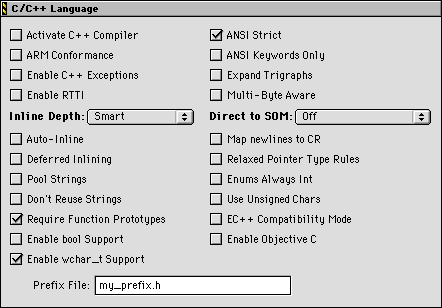
Most of the items in this panel are discussed elsewhere in this manual, because they are closely related to how the compiler implements standard C and C++.


Other items

Table 2.1 lists where to find information about the other items in this panel.

C/C++ Language Panel options:

This option
Is described here
Activate C++ Compiler  
"Using the C++ Compiler Always."  
ARM Conformance  
"Controlling ARM Conformance"  
Enable C++ Exceptions  
"Controlling C++ Extensions"  
Enable RTTI  
"Controlling RTTI"  
Inline Depth   Auto-inline   Deferred Inlining  
"Inlining"  
Pool Strings  
"Pool Strings"  
Don't Reuse Strings  
"Reusing Strings"  
Require Function Prototypes  
"Require Function Prototypes"  
Enable bool Support  
"Using the bool Type"  
Enable wchar_t Support  
"Using the wchar_t Type"  
ANSI Strict  
"ANSI Strict"  
ANSI Keywords Only  
"ANSI Keywords Only"  
Expand Trigraphs  
"Expand Trigraphs"  
Multi-Byte Aware  
"Multibyte Strings and Comments"  
Direct to SOM  
Targeting Mac OS manual  
Map Newlines to CR  
"Map Newlines to CR"  
Relaxed Pointer Type Rules  
"Relaxed Pointer Type Rules"  
Enums Always Int  
"Enumerated Types"  
Use Unsigned Chars  
"Use Unsigned Chars"  
Prefix File  
"Prefix Files"  
EC++ Compatibility Mode  
"Activating EC++"  
Enable Objective C  
Targeting Mac OS X manual  


[ First ]  [ Previous ]  [ Next ]  [ Last ]  [ Manuals ]

Visit the Metrowerks website at: http://www.metrowerks.com
For assistance contact Metrowerks Technical Support at: cw_support@metrowerks.com
Copyright © 2000, Metrowerks Corp. All rights reserved.

Last updated: August 17, 2000