[ First ]  [ Previous ]  [ Next ]  [ Last ]  [ Manuals ]


C/C++ Warnings Panel

This section describes the items in the C/C++ Warnings panel. You determine which warnings you receive by setting options in the panel. Figure 2.2 shows this panel.

Each warning also has a corresponding pragma that you can use in source code to turn that particular warning on or off for a limited piece of code. See "Pragmas Overview" for details on each available pragma.

There are other warnings not listed in the C/C++ Warnings panel. All warnings are covered in "CodeWarrior C/C++ Errors and Warnings."

You may also use a special preprocessor directive in your code to determine the current setting of each option. See "Checking Options" for information on how to use this directive.

For information on how to display a particular settings panel, see the IDE User Guide.

The C/C++ Warnings Settings Panel:
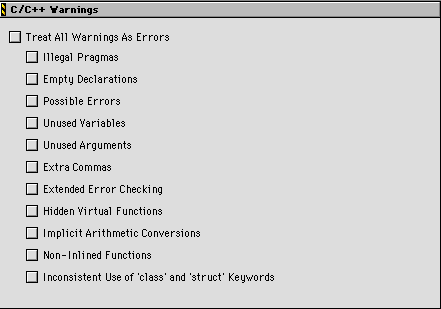
The items in this panel are listed in "C/C++ Warning Panel options.":

C/C++ Warning Panel options:

This option
Is described here
Activate C++ Compiler  
"Using the C++ Compiler Always."  
ARM Conformance  
"Controlling ARM Conformance"  
Enable C++ Exceptions  
"Controlling C++ Extensions"  
Enable RTTI  
"Controlling RTTI"  
Inline Depth   Auto-inline   Deferred Inlining  
"Inlining"  
Treat All Warnings As Errors  
"Treating All Warnings as Errors"  
Illegal Pragmas  
"Catching Illegal Pragmas"  
Empty Declarations  
"Catching Empty Declarations"  
Possible Errors  
"Avoid Unintentional Errors"  
Unused Variables  
"Finding Unused Variables"  
Unused Arguments  
"Finding Unused Arguments"  
Extra Commas  
"Ignoring Extra Commas"  
Extended Error Checking  
"Suspicious Assignments to Enumerations and Incorrect Function Returns"  
Hidden Virtual Functions  
"Finding Hidden Virtual Functions"  
Implicit Arithmetic Conversions  
"Finding Implicit Arithmetic Conversions"  
Non-Inlined Functions  
"Finding inline Functions That Are Not Inlined"  
Inconsistent Use of `class' and `struct' Keywords  
"Catching Mixed Use of `class' and `struct' Keywords"  


[ First ]  [ Previous ]  [ Next ]  [ Last ]  [ Manuals ]

Visit the Metrowerks website at: http://www.metrowerks.com
For assistance contact Metrowerks Technical Support at: cw_support@metrowerks.com
Copyright © 2000, Metrowerks Corp. All rights reserved.

Last updated: August 17, 2000