[ First ] [ Previous ] [ Next ] [ Last ] [ Manuals ]
CodeWarrior Projects

A project is a collection of related files and configuration settings that the CodeWarrior IDE uses to organize your software development.
Using projects allows you to avoid writing complicated build scripts (makefiles). Instead of editing build scripts, you can use simple mouse and keyboard operations to manipulate CodeWarrior projects.
You can use a single project to create and manage several configurations of your software for use on various computer platforms.
Project-related terms
CodeWarrior terminology frequently uses the project-related terms defined in the following table.
Multiple build targets
In the CodeWarrior IDE, you can specify multiple build targets for a particular platform target.
For example, Figure 1.1 shows the organization of a project for a Windows platform target. The project includes the following items:
Within a single project, build targets with distinct settings can share the same collection of files. The build targets manipulate the files to produce different results. For example, after debugging a program, you need only switch to a different build target and then choose a menu command to generate a final version of the same program.
A Project and its Build Targets: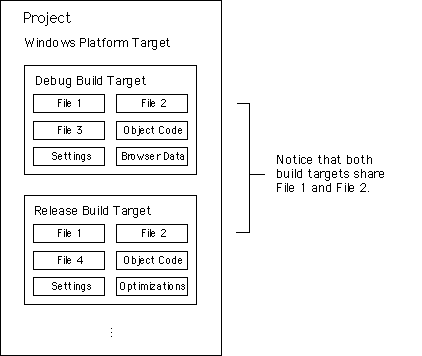
[ First ] [ Previous ] [ Next ] [ Last ] [ Manuals ]
Visit the Metrowerks website at: http://www.metrowerks.com
For assistance contact Metrowerks Technical Support at: cw_support@metrowerks.com
Copyright © 2000, Metrowerks Corp. All rights reserved.
Last updated: August 17, 2000