[ First ] [ Previous ] [ Next ] [ Last ] [ Manuals ]
Makefile Importer Wizard Options

The Makefile Importer Wizard, shown in Figure 3.8, presents several options that help you customize the makefile-conversion process. The wizard covers the following options:
After configuring these options as desired, click Finish. The Makefile Importer Wizard presents a summary window of current conversion settings. Click Generate to import the makefile according to these settings, or click Cancel to return to the wizard and make additional changes.
Makefile Location
Enter in this field the path to makefile that you wish to import into a CodeWarrior project file. Alternatively, click the Browse button to open a dialog box. Use the dialog box to locate the makefile. After you locate and select the makefile, click Open. The path to the makefile appears in the Makefile Location field.
Makefile Importer Wizard: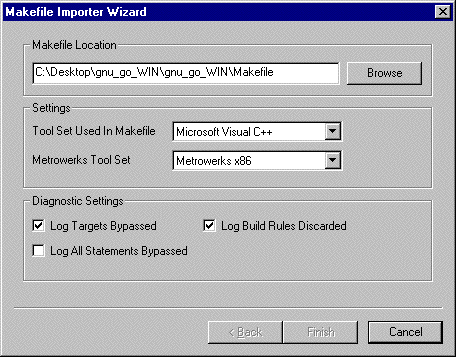
Settings
These options determine the tool set used for the makefile conversion as well as the linker selection for the new project file. The options include the following items:
Diagnostic Settings
The following checkboxes handle message reporting for various types of information generated during the conversion process:
After the conversion process completes, details about the generated information appear in a Message window, shown in Figure 3.9. For more information about using this window, see "Guided Tour of the Message Window".
Message Window: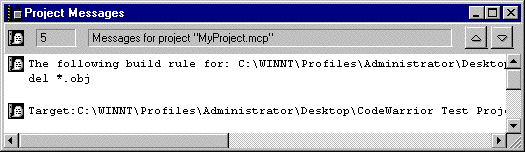
[ First ] [ Previous ] [ Next ] [ Last ] [ Manuals ]
Visit the Metrowerks website at: http://www.metrowerks.com
For assistance contact Metrowerks Technical Support at: cw_support@metrowerks.com
Copyright © 2000, Metrowerks Corp. All rights reserved.
Last updated: August 17, 2000