
To create a new build target in your project, follow these steps:
1. Go to the Targets view of the Project window.
Click the Targets tab at the top of the Project window to display the Targets view, shown in Figure 3.5. You create new build targets within this view.
2. Choose Project > Create Target.
The New Target dialog box shown in Figure 3.20 appears.
New Target Dialog Box: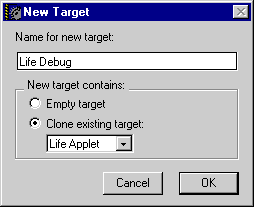
3. Enter in the Name For New Target field the desired name for the new build target.
4. Decide whether to create an empty build target or clone an existing build target.
Enable the radio button that performs the desired task:
You can associate the new build target with other build targets. You can use these associations to create complex build dependencies. To learn more, see "Creating Build-Target Dependencies".
To learn how to configure settings for a build target, see "Choosing Target Settings."
You can establish dependencies among build targets. For more information, see "Targets View" and "Creating Build-Target Dependencies".