[ First ] [ Previous ] [ Next ] [ Last ] [ Manuals ]
File Comparison and Merge Overview

The IDE's file comparison window displays two text files and the differences-insertions and deletions- between them. Figure 4.14 shows an example file comparison window. The window has controls to examine, add, and remove the differences between the files. The currently selected difference is shown with a darker color and outlined in black to contrast it from the other differences visible in the window.
The file comparison window has these parts:
Source file
Displays the source text file that IDE uses as a basis for its comparison with the destination file. This pane appears on the left side of the file comparison window.
Destination file
Displays the source destination file that's compared with the source file. This pane appears on the right side of the file comparison window. Differences between the source file and the destination may be added to or removed from the destination file.
File Comparison Window: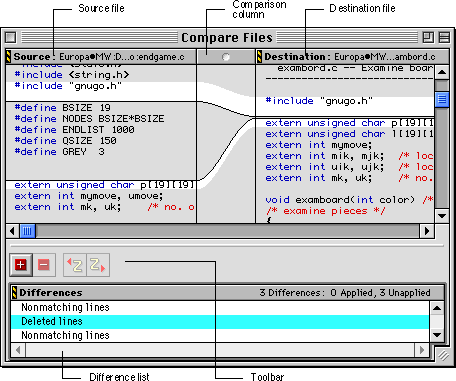
Comparison column
Shows a graphical representation of where text was added or removed between the source and destination files. This column appears between the source and destination panes in the comparison window.
Difference list
Lists the insertions, deletions, and lines of mismatching text between the two files. Selecting an item in the list displays the difference in the source and destination panes. The comparison column also shows how and where the difference occurs between the two files. Text in the difference list will appear in italics when a difference is applied.
Toolbar
Has buttons to apply or remove changes between the two files to the destination file. Table 4.1 describes the toolbar's buttons. The toolbar also has buttons to undo and redo changes to the source and destination files. For information on configuring toolbars, see "Customizing the IDE."
Common Toolbar Buttons:
[ First ] [ Previous ] [ Next ] [ Last ] [ Manuals ]
Visit the Metrowerks website at: http://www.metrowerks.com
For assistance contact Metrowerks Technical Support at: cw_support@metrowerks.com
Copyright © 2000, Metrowerks Corp. All rights reserved.
Last updated: August 17, 2000


