[ First ] [ Previous ] [ Next ] [ Last ] [ Manuals ]
Text-Editing Area

You use the text-editing area of the editor window to enter and edit text.
You can select and drag text out of an editor window to any destination that accepts a drop, such as another open editor window. You can also drag selected text into an editor window from other applications that support drag-and-drop.
For more information about drag-and-drop operations with text, see "Moving Text (Drag and Drop)."
Editor Window: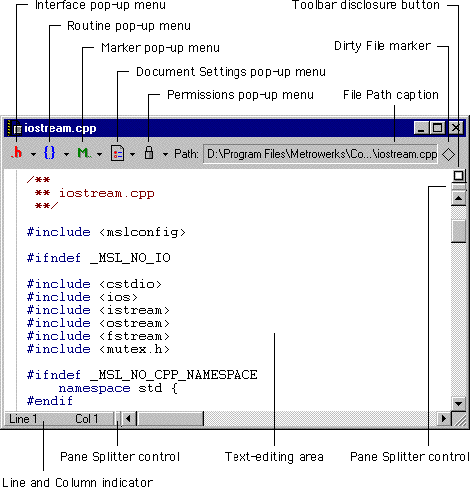
[ First ] [ Previous ] [ Next ] [ Last ] [ Manuals ]
Visit the Metrowerks website at: http://www.metrowerks.com
For assistance contact Metrowerks Technical Support at: cw_support@metrowerks.com
Copyright © 2000, Metrowerks Corp. All rights reserved.
Last updated: August 17, 2000