[ First ] [ Previous ] [ Next ] [ Last ] [ Manuals ]
Interface Pop-Up Menu

 Use the Interface pop-up menu, shown in Figure 5.2, to open interface or header files referenced by the current file. You can also choose the
 Touch and Untouch commands from this pop-up menu.
The Interface Pop-up Menu: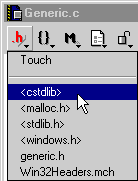
To open a file in the list, choose its name. In order to see a list of files in the menu, the project file must be open. The IDE cannot open certain files, such as precompiled header files and libraries.
For more information on opening files, see "Opening an Existing File."
To re-compile your file the next time the IDE builds the project, choose the Touch command. If you click the Interface pop-up menu again, you can choose the Untouch command to prevent the IDE from re-compiling the file.
To learn more about touching files, see "Touching and Untouching Files."
[ First ] [ Previous ] [ Next ] [ Last ] [ Manuals ]
Visit the Metrowerks website at: http://www.metrowerks.com
For assistance contact Metrowerks Technical Support at: cw_support@metrowerks.com
Copyright © 2000, Metrowerks Corp. All rights reserved.
Last updated: August 17, 2000