[ First ] [ Previous ] [ Next ] [ Last ] [ Manuals ]
Search Results

As the IDE performs a multi-file search, it opens the Search Results window, shown in Figure 6.8. This window shows information about the search in progress.
Search Results Window: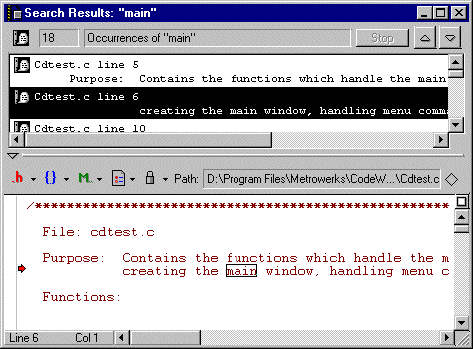
The top portion of the Search Results window lists all matching occurrences of the search text found so far. To stop a search in progress, click Stop. The window retains the list accumulated prior to stopping the search.
After you select an item in top portion of the Search Results window, the bottom portion of the window displays the matching occurrence of text within the selected file.
The Search Results window is similar to the Message window. For more information about the Message window, see "Guided Tour of the Message Window".
[ First ] [ Previous ] [ Next ] [ Last ] [ Manuals ]
Visit the Metrowerks website at: http://www.metrowerks.com
For assistance contact Metrowerks Technical Support at: cw_support@metrowerks.com
Copyright © 2000, Metrowerks Corp. All rights reserved.
Last updated: August 17, 2000