[ First ] [ Previous ] [ Next ] [ Last ] [ Manuals ]
Browser View

The Browser view is like a traditional class browser. You use this view to look at your data from a class-oriented perspective. Figure 7.2 shows what a Browser view looks like.
In the Browser view, you have a list of classes. For the selected class in that list, you see all of its member routines and its data members. When you select an item, the source code related to that item is displayed in the Source pane.
See "Browser Window" for details on the user interface elements in the Browser view.
A Browser view :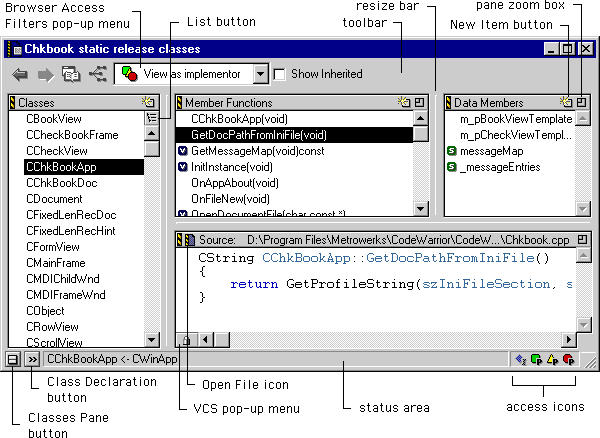
 NOTE
NOTE
The Browser view has a toolbar. To learn how to use and customize the toolbar, see "Customizing the IDE." The Browser view also has a tab control when browsing rapid application development (RAD) projects. For more information about the tab control, refer to "RAD Browsing".
[ First ] [ Previous ] [ Next ] [ Last ] [ Manuals ]
Visit the Metrowerks website at: http://www.metrowerks.com
For assistance contact Metrowerks Technical Support at: cw_support@metrowerks.com
Copyright © 2000, Metrowerks Corp. All rights reserved.
Last updated: August 17, 2000