[ First ] [ Previous ] [ Next ] [ Last ] [ Manuals ]
Preference Panels

The IDE Preferences window contains two parts. The left side of the window shows a hierarchical list of available panels. The right side of the window displays preferences for a selected panel. The available panels vary, depending on the CodeWarrior product that you use.
The preference panels affect the IDE as a whole and apply to all projects. To display a particular panel, select its name in the list. You can use the arrow keys or click the name of the panel. Figure 8.1 shows a selected panel in the IDE Preferences window.
Each panel contains related options that you can modify. After changing these options, you can save them, discard them, restore them, or reset them. See "Window Buttons" for more information.
Selecting a Preference Panel: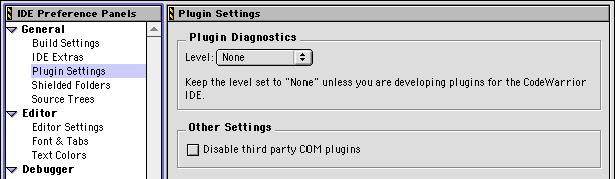
[ First ] [ Previous ] [ Next ] [ Last ] [ Manuals ]
Visit the Metrowerks website at: http://www.metrowerks.com
For assistance contact Metrowerks Technical Support at: cw_support@metrowerks.com
Copyright © 2000, Metrowerks Corp. All rights reserved.
Last updated: August 17, 2000