[ First ] [ Previous ] [ Next ] [ Last ] [ Manuals ]
Code-Generation Settings

The following panels customize the way the IDE generates code:
Global Optimizations
The Global Optimizations panel, shown in Figure 9.17, configures the way the compiler rearranges its object code. You can set up the compiler to produce smaller and faster-executing object code. Some optimizations remove redundant program operations, while other optimizations analyze an item's use in the program. The optimizations seek to improve your program's performance.
All optimizations rearrange object code without affecting the object code's logical execution sequence. In other words, an unoptimized program and its optimized counterpart produce the same results.
 NOTE
NOTE
Use compiler optimizations only after you finish debugging your program. Using a debugger on an optimized program might affect the debugger's ability to view source code.
To find specific information on how these settings apply to a build target, see "Targeting Documentation".
Global Optimizations Settings Panel: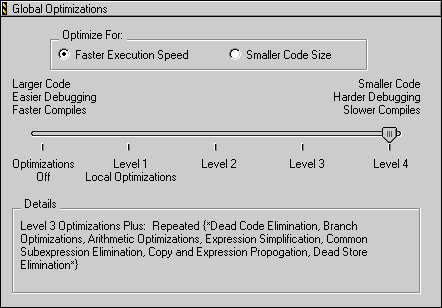
Optimize For
Use these options to configure how the CodeWarrior IDE optimizes your code:
Faster Execution Speed
This option improves the execution speed of object code. Object code is faster, but can be larger.
Smaller Code Size
This option reduces the size of object code produced by the compiler. Object code is smaller, but can be slower.
Optimization Level Slider
Use the slider to determine the optimizations that are applied to your code. You can choose to disable code optimizations entirely, or you can choose to apply different levels of optimizations. The higher the level you select, the more optimizations the IDE applies to your code.
Details
The Details field, below the Optimization Level Slider, lists the optimizations applied to the project. The following list describes each optimization:
-
Global Register Allocation-Stores working values of heavily used variables in registers instead of memory. This option also appears as Global Register Allocation Only for Temporary Values when you set the Optimization Level Slider to "Optimizations Off."
-
Dead Code Elimination-Removes statements that, logically, can never be executed or are never referred to by other statements. With this option enabled, object code is smaller.
-
Branch Optimizations-The optimizer merges and restructures portions of the intermediate code translation. These optimizations eliminate some branch instructions. With this option enabled, the object-code size is smaller and the execution speed improves.
-
Arithmetic Optimizations-Replaces intensive computational instructions with faster equivalent instructions that produce the same result. For example, a multiply instruction can replace several add instructions. Also, several multiply instructions can replace a library call for raising a variable to a specified power. These optimizations result in faster object code.
-
Expression Simplification-These optimizations find equivalent and simplified arithmetic expressions. For example,
p replaces 1*p, p+q replaces p-(-q), x&y replaces x&(x&y), and x replaces x&(x|y).
-
Common Subexpression Elimination-Replaces similar redundant expressions with a single expression. For example, if two consecutive statements both use the expression
a*b*c+10, the compiler generates object code that computes the expression only once and applies the resulting value to both statements. With this option enabled, object code is smaller and faster.
-
Copy Propagation-Replaces multiple occurrences of one variable with a single occurrence. With this option enabled, object code is smaller and faster. This option also appears as Copy and Expression Propagation for some build targets.
-
Peephole Optimization-Applies local optimizations to small sections of your code. With this option enabled, the optimized code sections are faster.
-
Dead Store Elimination-Removes assignments to a variable if the variable is not used before being reassigned again. With this option enabled, object code is smaller and faster.
-
Live Range Splitting-This optimization handles a local variable used in two completely separate contexts in a program. For example, note the two disjoint uses of the variable
i in Listing 9.1. The second use of the variable i can be replaced by a different compiler temporary variable. Live range splitting reduces the lifetimes of variables so that they can be optimally allocated. Long live ranges cause unnecessary spilling in registers.
Live Range Splitting Example:
int a[100], b[100], c[100], d[100], e[100], f[100];
foo(int n)
{
	int i;

	for(i=0; i<n; i++)
	{
		a[i] = b[i] + c[i];
	}

	for(i=0; i<n; i++)
	{
		d[i] = e[i] + f[i]
	}

}
Loop-Invariant Code Motion-Moves computations that do not change on the inside of a loop to the outside of the loop to improve the loop's speed. With this option enabled, object code is faster.
Strength Reduction-Replaces multiplication instructions inside loops with addition instructions to improve the loops' speed. With this option enabled, object code is larger but executes faster.
Loop Transformations-Reorganizes translated code for a loop in order to reduce the code overhead of setting up the loop or testing for loop completion. With this option enabled, object code executes faster.
Loop Unrolling-This optimization duplicates several times the code inside the looping structure. This duplication spreads over more operations the overhead of testing for loop completion and branching back to the beginning of the loop. This option improves execution speed, but the object code is larger. This option also appears as Loop Unrolling (Opt for Speed Only) when the optimization considers only speed improvements.
Vectorization-For processors that support vector optimizations, translates computations with arrays using code loops into the appropriate vector instructions. This option translates most types of code loops into vector instructions in order to accelerate object code.
Lifetime Based Register Allocation-Also known as Register Coloring. Uses the same processor register for different variables in the same routine if the variables are not used in the same statement. With this option enabled, object code executes faster.
Instruction Scheduling-Rearranges a program's instruction sequence to reduce conflicts with register use and processor resources. With this option enabled, object code executes faster.
Repeated-Iterates the optimizations listed between {* and *} in the Details field. Iterations provide additional optimization opportunities.
[ First ] [ Previous ] [ Next ] [ Last ] [ Manuals ]
Visit the Metrowerks website at: http://www.metrowerks.com
For assistance contact Metrowerks Technical Support at: cw_support@metrowerks.com
Copyright © 2000, Metrowerks Corp. All rights reserved.
Last updated: August 17, 2000