[ First ] [ Previous ] [ Next ] [ Last ] [ Manuals ]
The Array window (Figure 11.34) displays a contiguous block of memory as an array of elements and allows you to edit the contents of those elements. To open the Array window, select an array variable in a Variables pane (either locals or globals) and then choose Data > View Array
You can also choose Data > View Memory As
The Array window title bar describes the base address to which the array is bound. A base address can be bound to an address, a variable, or a register. Dragging a register name or variable name from a Variables or Registers pane to an Array window sets the array address. An array bound to a local variable closes when the routine in which the local variable is defined returns to its caller.
The Information pane shows the data type of the array elements, along with the base address of the array. To view more information about the array, click the hierarchical control in the Information pane. From the expanded Information pane, you can select the base address, the array size, and specific members to view if the array elements are of a structured type.
The Array window lists array contents sequentially, starting at element 0. If array elements are cast as structured types, a hierarchical control appears to the left of each array element, allowing you to expand or collapse the element.
Array Window: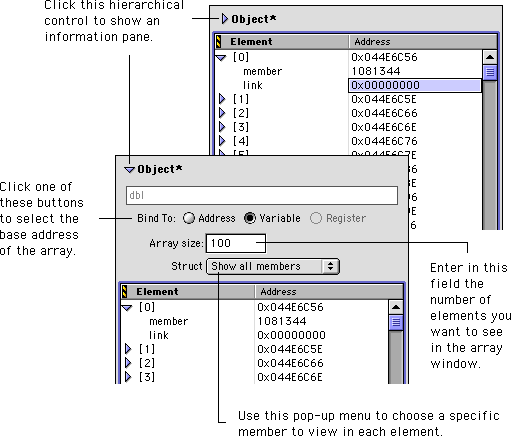
[ First ] [ Previous ] [ Next ] [ Last ] [ Manuals ]
Visit the Metrowerks website at: http://www.metrowerks.com
For assistance contact Metrowerks Technical Support at: cw_support@metrowerks.com
Copyright © 2000, Metrowerks Corp. All rights reserved.
Last updated: August 17, 2000
