[ First ] [ Previous ] [ Next ] [ Last ] [ Manuals ]
Memory Window

The Memory window displays the contents of memory in hexadecimal and corresponding ASCII character values (Figure 11.35). To open a Memory window, select a variable, routine name, or expression representing the desired base address in the Thread, Symbolics, or Expressions windows and choose Data > View Memory
 NOTE
NOTE
The
Memory Window: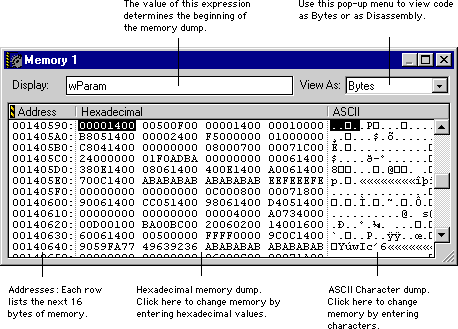
The source of the base address (which can be a variable, a routine, an expression, or a raw address like 0xCAF64C) appears at the top of the window. The Memory window appears blank if the IDE cannot access the base address.
To change the base address, enter a new expression in the Display field. You can also drag an expression to the field. If the expression does not produce an object in memory (an lvalue), then the base address uses the expression value. For example, the Memory window expression
PlayerRecord
shows memory beginning at the address of PlayerRecord.
If the expression result is an lvalue, then the base address uses the object address. For example, the expression
*myArrayPtr
shows memory beginning at the address of the object pointed to by myArrayPtr.
You can use a Memory window to change the values of individual bytes in memory. Click in the displayed data to select a starting point and start typing. If you select a byte in the hexadecimal display, you are restricted to typing hexadecimal digits. If you select a byte in the ASCII display, you can type any alphanumeric character. Certain keys (such as Backspace/Delete, Tab, Enter/Return, and so forth) do not work. New data you type overwrites the data already in memory.
Mac OS
If the expression is a pointer-sized register, then the base address uses the register contents. For example, ĻA0 (type Option-r for the first character) shows memory beginning at the address contained in the 68K register A0. Note that 64-bit floating-point registers cannot be used on a computer with a 32-bit central processing unit (CPU). The register size must have the size of the address bus of the CPU, so neither floating-point nor AltiVec registers can be used in the Display field.
 WARNING!
Arbitrarily changing the contents of memory can be very dangerous to computer stability and can result in a crash. Be sure you understand the consequences of any changes you make.
[ First ] [ Previous ] [ Next ] [ Last ] [ Manuals ]
Visit the Metrowerks website at: http://www.metrowerks.com
For assistance contact Metrowerks Technical Support at: cw_support@metrowerks.com
Copyright © 2000, Metrowerks Corp. All rights reserved.
Last updated: August 17, 2000