To prepare a build target for debugging, make sure it is the active build target. Then, choose Project > Enable Debugger. When debugging is enabled for a build target, the menu command changes to Disable Debugger. Choosing Disable Debugger turns off debugging for the build target and changes the menu command back to Enable Debugger.
See "Configuring Target Options" for more information about build target settings. To learn about symbolics files and their use within the debugger, refer to "Symbolics Files".
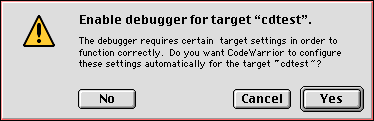
When you choose Enable Debugger, you might see an alert (Figure 11.1). CodeWarrior is reminding you that it will modify the build target settings to prepare the project for debugging. Click Yes to apply the debugging changes to your build target.
Enable Debugger: