[ First ] [ Previous ] [ Next ] [ Last ] [ Manuals ]
Setting Up a File for Debugging

After you enable debugging for the current build target, you have to set up your individual files for debugging. If you intend to debug your program, you typically enable debugging for all of your source files.
The Project window includes a debug column, as shown in Figure 11.2. For files, a mark in this column means that symbolic information is generated; no mark means that symbolic information is not generated. For group names, a mark indicates that debugging is enabled for every file in the group and no mark means that debugging is disabled for one or more files in the group.
Setting Debugging in the Project Window: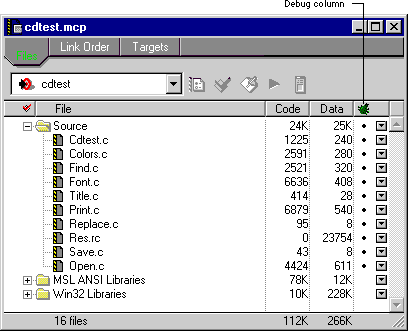
To toggle debugging for a file, click in the Debug column for that file. Clicking in the Debug column for a group name enables or disables debugging for all files in that group. If a file cannot be debugged (because it is a library or other non-source file), you cannot enable debugging for that file.
[ First ] [ Previous ] [ Next ] [ Last ] [ Manuals ]
Visit the Metrowerks website at: http://www.metrowerks.com
For assistance contact Metrowerks Technical Support at: cw_support@metrowerks.com
Copyright © 2000, Metrowerks Corp. All rights reserved.
Last updated: August 17, 2000