[ First ] [ Previous ] [ Next ] [ Last ] [ Manuals ]
Java Bean Wizard

The Java Bean wizard is divided into the following steps:
1. Choose a name and location for the Java bean.
2. Specify a base class and a list of implementations.
To use the Java Bean wizard, follow these steps:
1. Choose a name and location for the Java bean.
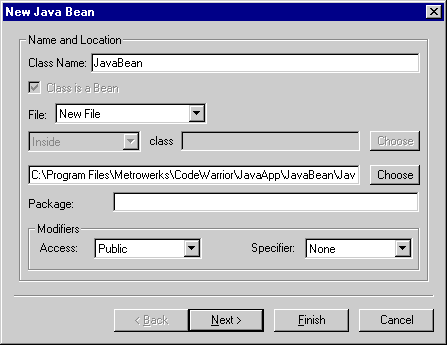
This section of the wizard, shown in Figure 12.11, lets you specify the name and location of the new bean, as well as the modifiers for the bean.
This section includes the following parts:
Class Name
Enter a name for the bean's class in this field. An example is provided below the field. The Class is a Bean checkbox below the field remains enabled. This status indicates that you are creating a Java bean.
 NOTE
NOTE
If you want the applet to be compatible with other development tools, the class name should match the applet file name.
File
This pop-up menu indicates that you are creating a New File. No additional options are available.
Type the path to which you want to save the file in the field above the Package field, as shown in Figure 12.11. Alternatively, click Choose next to the field. A window opens that lets you browse your computer's contents. Use the window controls to select the location to which you want to save the file.
Package
If you wish, you can enter in this field a package for the bean.
NOTE
If you want the applet to be compatible with other development tools, the file path and package path should match.
Modifiers
Use the Specifier pop-up menu to choose the method specifier for the new bean. Possible specifiers include None, Abstract, and Final. The Access pop-up menu in this section indicates that you are creating a bean with Public access. No additional options are available for this pop-up menu.
2. Specify a base class and a list of implementations.
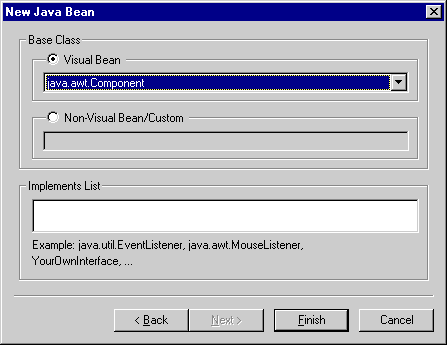
This section of the wizard, shown in Figure 12.12, lets you specify the base class and implementations for the new bean.
This section includes the following parts:
Base Class
The settings in this part determine the base-class type of the new bean. There are two possibilities:
Implements List
In this part, type a list of interfaces to be implemented by the base class. Example interfaces are provided. Separate multiple interfaces with commas.
[ First ] [ Previous ] [ Next ] [ Last ] [ Manuals ]
Visit the Metrowerks website at: http://www.metrowerks.com
For assistance contact Metrowerks Technical Support at: cw_support@metrowerks.com
Copyright © 2000, Metrowerks Corp. All rights reserved.
Last updated: August 17, 2000