[ First ] [ Previous ] [ Next ] [ Last ] [ Manuals ]
Object Pop-up Menu

The Object Inspector displays information about the object whose name is displayed in the Object pop-up menu. To inspect other items within the selected object's hierarchy, choose the item's name from the Object pop-up menu.
Windows
The arrow keys on the keyboard let you quickly access other objects in the current layout. After clicking the Object pop-up menu, press the Up Arrow key to select the object listed above the current one, or press the Down Arrow key to select the object listed below the current one. Press Enter/Return to confirm the selection and display the object's properties in the Object Inspector.
Object Inspector (Windows):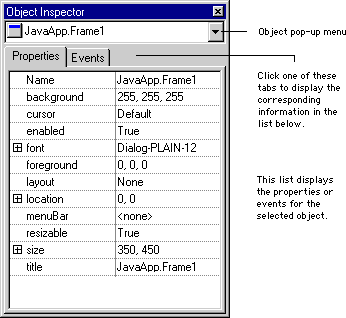
[ First ] [ Previous ] [ Next ] [ Last ] [ Manuals ]
Visit the Metrowerks website at: http://www.metrowerks.com
For assistance contact Metrowerks Technical Support at: cw_support@metrowerks.com
Copyright © 2000, Metrowerks Corp. All rights reserved.
Last updated: August 17, 2000