[ First ] [ Previous ] [ Next ] [ Last ] [ Manuals ]
Java Frame Wizard

The Java Frame wizard consists of one step:
1. Describe the frame class for the Java frame.
This section of the wizard, shown in Figure 13.5, lets you specify the class name, package name, and location for the new frame. Other options are available to further describe the frame.
This section includes the following parts:
Class Name
Enter a name for the frame's class in this field. An example name is provided.
Package Name
If you wish, you can enter in this field a package for the frame class. A sample package name is provided.
Java Frame wizard - Frame Class: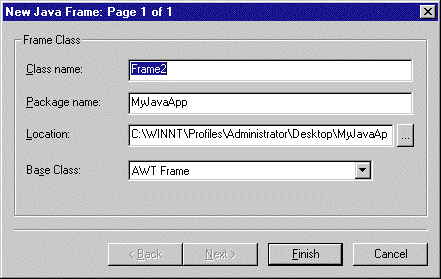
Location
In this field, type a location in which to save the frame class for the new layout. Alternatively, click the button next to the field. A standard window displays. Use the window controls to select a location.
Base Class
Choose from this pop-up menu the desired base-class frame type. You can choose AWT frame or Swing frame.
[ First ] [ Previous ] [ Next ] [ Last ] [ Manuals ]
Visit the Metrowerks website at: http://www.metrowerks.com
For assistance contact Metrowerks Technical Support at: cw_support@metrowerks.com
Copyright © 2000, Metrowerks Corp. All rights reserved.
Last updated: August 17, 2000