[ First ] [ Previous ] [ Next ] [ Last ] [ Manuals ]
Component Palette

The Component Palette displays graphical tools that represent the components from the current catalog. These tools help you to conveniently build the application's user interface. Choose Component Palette from the Window menu to display the Component Palette, shown in Figure 13.6.
Component Palette: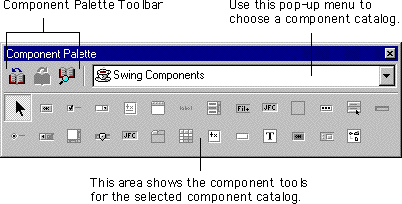
The Component Palette has three main parts:
[ First ] [ Previous ] [ Next ] [ Last ] [ Manuals ]
Visit the Metrowerks website at: http://www.metrowerks.com
For assistance contact Metrowerks Technical Support at: cw_support@metrowerks.com
Copyright © 2000, Metrowerks Corp. All rights reserved.
Last updated: August 17, 2000