[ First ] [ Previous ] [ Next ] [ Last ] [ Manuals ]
New Event Window

The New Event window helps you create a new event for a selected event set in the Browser window. To display this window, make sure that the Browser window is frontmost and that an event set is selected, then choose New Event command changes slightly, based on the framework you use to develop your code. For example, when developing a Java RAD project, the command changes to New Bean Event.
New Event window: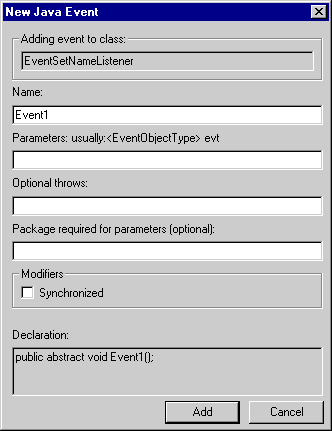
The New Event Set window is shown in Figure 15.13. This window consists of the following parts:
Name
Enter a name for the new method in this field. The name you enter must comply with naming conventions in the framework programming language. For example, you cannot use spaces in names for some languages.
Parameters
If desired, enter event parameters in this field. A sample construct for a parameter is listed above this field.
Optional throws
If desired, enter exception-handling information (throws) in this field.
Package required for parameters
If you wish, you can enter in this field a required package for the event.
Modifiers
Enable the Synchronized checkbox to modify the event accordingly.
Declaration
This section shows you the current form of the declaration as specified in the window. After you change a particular value or checkbox, the Declaration field updates to reflect your changes. This field displays information only after you complete the Name field.
Add and Cancel buttons
Click Add to confirm the current window information and add the new method, or click Cancel to discard your changes.
[ First ] [ Previous ] [ Next ] [ Last ] [ Manuals ]
Visit the Metrowerks website at: http://www.metrowerks.com
For assistance contact Metrowerks Technical Support at: cw_support@metrowerks.com
Copyright © 2000, Metrowerks Corp. All rights reserved.
Last updated: August 17, 2000