[ First ] [ Previous ] [ Next ] [ Last ] [ Manuals ]
The File Systems Dialog Box

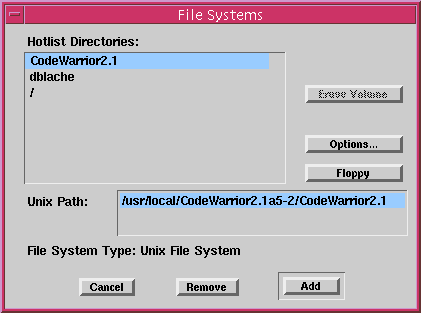
The File Systems dialog box contains the following items: Hotlist Directories, Erase Volume Button, Options Button, Floppy Button, Unix Path Text Box, File System Type Display, Cancel Button, Remove Button, Add Button.
Figure B.2 The File Systems Dialog Box
Hotlist Directories
This list shows all of the volumes currently mounted on your system. You can select any volume listed and then unmount or erase it, or display the volume's full pathname and file system type, according to the options you choose below.
Erase Volume Button
Pressing this button deletes all files in the chosen volume.
Options Button
When this button is pressed, the Options dialog box is displayed. This dialog box lets you set line breaks in files you mount. See "The File System Options Dialog Box" for more information.
Floppy Button
Lists any diskette in the diskette drive (in the Unix Path field) and enables the Mount button.
Unix Path Text Box
This text box contains the full UNIX pathname of the chosen volume. If no volume is currently chosen, you can type a path into this area to mount a volume by its path.
File System Type Display
This display shows the type of format for the chosen volume-UNIX or HFS.
Cancel Button
Pressing this button closes the dialog box without mounting any file systems.
Remove/Eject Button
If the chosen volume is on a hard drive, this option unmounts it. If the chosen volume represents a diskette, this option ejects the diskette from the diskette drive.
Add Button
Pressing this button mounts the currently selected volume. and closes the dialog box.
[ First ] [ Previous ] [ Next ] [ Last ] [ Manuals ]
Visit the Metrowerks website at: http://www.metrowerks.com
For assistance contact Metrowerks Technical Support at: cw_support@metrowerks.com
Copyright © 2000, Metrowerks Corp. All rights reserved.
Last updated: August 17, 2000