[ First ] [ Previous ] [ Next ] [ Last ] [ Manuals ]
The File System Options Dialog Box

Some applications may have difficulty representing line breaks appropriately as their files move from foreign operating systems to UNIX systems. The File System Options dialog box (Figure B.3) enables you to solve this problem by explicitly choosing how to represent line breaks in certain types of files. To view this dialog box, press the Options button described above.
Figure B.3 The File System Options Dialog Box
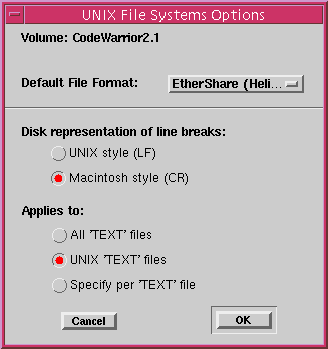
This dialog box contains the following items: Volume Display, Default File Format, "Disk representation of line breaks" button group, "Applies to" button group, Cancel button, OK button.
Volume Display
This display shows the name of the volume which will be affected by the settings in this dialog box.
Default File Format
This popup menu lets you specify the file format for any new files that will be created on the volume in question.
Disk representation of line breaks
This group of buttons determines how the IDE will convert line break characters when it reads or writes files on the current volume.
UNIX Style (LF)
If this option is chosen, line breaks are replaced with line feeds whenever a file on the current volume is read or written by the CodeWarrior IDE.
Macintosh Style (CR)
If this option is chosen, line breaks will be replaced with carriage returns whenever a file on the current volume is read or written by the CodeWarrior IDE.
Applies to
This group of buttons determines which files will be affected by your settings in the File Systems dialog. Only one of these buttons may be selected at a time.
All `TEXT' Files
If this option is selected, conversion will be applied to all text files read or written by the IDE on the current volume.
UNIX `TEXT' Files
If this option is selected, conversion will be applied only to UNIX (non-Macintosh) text files read or written by the IDE on the current volume.
Specify per `TEXT' Files
If this option is selected, a dialog box will be displayed each time a text file is read or written by the IDE, allowing you to specify how line breaks should be converted for that file.
Cancel button
Pressing this button dismisses the dialog box without applying any settings.
OK button
Pressing this button applies the selected settings and dismisses the dialog box.
[ First ] [ Previous ] [ Next ] [ Last ] [ Manuals ]
Visit the Metrowerks website at: http://www.metrowerks.com
For assistance contact Metrowerks Technical Support at: cw_support@metrowerks.com
Copyright © 2000, Metrowerks Corp. All rights reserved.
Last updated: August 17, 2000