This chapter discusses how to use the PowerPlant threads classes. You might use these classes in a PowerPlant application, or in non-PowerPlant program.
A task may require a substantial period of time to complete. In the context of a computer program, anything over one second is a substantial period of time. If you seize control of the computer for one second or more without allowing the user to perform typical actions such as choosing a menu item, your software can be seen as unfriendly or slow.
How can you undertake a computationally-intensive task without causing the machine to appear sluggish or non-responsive? The solution is to have time-consuming tasks running simultaneously with other operations, such as managing the user interface. One way to accomplish this goal is to run each task in concurrent but separate threads of execution.
Threads are sometimes called lightweight processes. They are like processes in that they represent the execution of some program code, and because they provide a mechanism for multitasking. They are lightweight in the sense that they don't require as much state information as normal processes. Therefore it is relatively cheap to create, destroy, and switch between threads.
The Thread Manager is an implementation of the threads concept for Mac OS computers. The Thread Manager provides a way for applications to divide their work into discrete, independent subtasks. The Thread Manager switches between the various threads. In essence, each application gets its own multitasking environment.
The topics in this chapter include:
There is a lot of material in this chapter, some of it very deep and involved. Do not let that frighten you. A straightforward implementation of threads in a PowerPlant application is actually quite simple. The code exercise at the end of the chapter demonstrates how easy it is to implement useful, custom threads with PowerPlant.
This chapter does not teach you the intricacies of the Thread Manager. For more information, consult Inside Macintosh: Thread Manager. The article "Concurrent Programming with the Thread Manager" in issue 17 of develop magazine may be of interest, although it might be slightly outdated because the Thread Manager no longer supports preemptive threads.
The Mac OS Thread Manager implements threads at a basic level. PowerPlant's approach enhances threads in two ways.
First, the PowerPlant classes provide a wrapper for the Thread Manager, insulating you from the Toolbox. This can make simple or typical threads very easy to implement.
Second, PowerPlant adds significant utility to the Thread Manager in the following ways:
The Thread Manager defines three possible thread states, current, ready and stopped. PowerPlant implements six thread states. In PowerPlant, a thread is always in one (and only one) of the states described in Table 3.1.
| State |
The thread is |
|---|---|
The current thread is the thread in control of the CPU. There
is always one (and only one) current thread. When the current
thread transfers control of the CPU to another thread, it goes
into the ready state. Threads move between the current and ready
states through a call to LThread::Yield(). The current state in PowerPlant corresponds to the Thread Manager's
current state.
A ready thread is a thread that is not current, but is otherwise eligible for execution. In other words, only a ready thread may become the current thread. The Thread Manager's scheduling algorithm schedules ready threads on a round-robin basis. This state corresponds to the Thread Manager's ready state.
A suspended thread is ineligible for CPU time. Call LThread::Suspend() to suspend a thread. Call LThread::Resume() to return the thread to the ready state. The suspended state
corresponds to the Thread Manager's stopped state.
A sleeping thread is ineligible for CPU time for a certain period
of time. Call LThread::Sleep() to put a thread to sleep. A sleeping thread returns to the ready
state when the sleep time expires, or if you call LThread::Wake().
A waiting thread is ineligible for CPU time while a semaphore
(flag) indicates it cannot run. When the semaphore is cleared,
the thread returns to the ready state. Call LSemaphore::Wait() to set a semaphore. Call LSemaphore::Signal() to clear a semaphore. See "Using Semaphores" for more information.
A blocked thread is ineligible for CPU time. It is waiting for
an asynchronous I/O call to complete. Call LThread::Block() to block a thread after making an asynchronous I/O call. Calling
LThread::ThreadAsynchronousResume() unblocks the thread. See "Asynchronous Operations" for more information on blocking and asynchronous I/O.
Figure 3.1 contains a simplified state transition diagram for thread objects.
State transition diagram for thread objects:.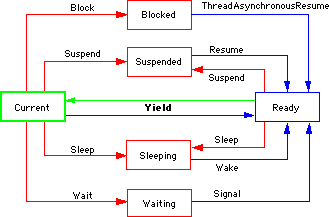
Transitions from stopped states make the thread ready, not current. A thread becomes current only by a yield from the current thread.
When multiple threads access the same data, big trouble can result if one thread changes data that another thread is using. Keeping shared data access under control is a major issue in concurrency.
The Thread Manager in the Toolbox has a feature for preventing
two threads from accessing the same data simultaneously. ThreadBeginCritical() turns off thread scheduling, so any yield has no effect. ThreadEndCritical() turns thread scheduling back on. In effect, these calls allow
you to temporarily convert your application into a single-threaded
program.
This mechanism is inadequate in more complex situations. You may want to yield to allow your application to be responsive, and yet still preserve the integrity of the data on which you are operating.
PowerPlant allows you to easily create semaphores that prevent other threads from modifying data until the semaphore is cleared. The classes involved are LSemaphore, LEventSemaphore, and LMutexSemaphore. The "mutex" is short for mutually exclusive. LMutexSemaphore defines a particular kind of semaphore where two or more threads are mutually exclusive. One and only one mutually exclusive thread may be ready. All others are put in the wait state.
You may want two threads to be able to communicate directly with each other. A typical situation is that one thread produces data that another thread uses. There is no mechanism in the Thread Manager to implement inter-thread communication.
PowerPlant has such a mechanism. You store shared data in a class derived from LLink. You then create a queue of data with LSharedQueue (derived from LQueue). You must have a queue of some sort, because you cannot expect the producing thread to generate data at the same rate that the consuming thread uses it. The LSharedQueue class also inherits from LMutexSemaphore so that you can ensure that the data production and consumption threads do not interfere with each other.
When you create the threads involved, you provide the single queue that each uses for data transfer. The producer puts data in the queue, and the consumer removes data from the queue as necessary.
PowerPlant has several classes related to thread support:
One group of classes relates directly to threads. Another group implements semaphores. A third groups implements thread linking and data queues. Figure 3.2 illustrates the class hierarchies.
The PowerPlant thread-related classes: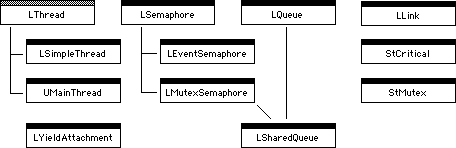
The grey bar on the LThread class indicates that LThread is an abstract class. Taken together, these classes form an independent module in PowerPlant. You can use these classes in non-PowerPlant code if you wish.
The LThread class forms the basis for thread support in PowerPlant. This is a complex class with many data members and member functions. This discussion covers those you are most likely to encounter directly. Use the PowerPlant Reference for complete information.
 NOTE
NOTE The LThread class includes support for preemptive threads, but you should not create preemptive threads. Earlier versions of the Thread Manager had preemptive thread scheduling as well as cooperative scheduling on 68K Macintosh computers. Future operating systems will not support preemptive scheduling within an application. As a result, the Thread Manager no longer supports preemptive scheduling.
The discussion of LThread covers the following topics:
Run() function
LThread has several data members you may find useful. Table 3.2 lists these members.
| Member |
Stores |
|---|---|
The "s" data members are static, and therefore are class variables. There is one current thread, one main thread, one thread queue, and one process serial number for the application. Those values are shared by all threads.
The mNextOfKin data member deserves special mention. This data member stores
a pointer to another LThread object. When the thread completes
its function and is about to be deleted, the next of kin is notified
and can retrieve the result generated by the dying thread. See
"The Run() function" for more information about a thread's result and next of kin.
LThread has a series of static member functions that are always available, even if you don't happen to have a thread object handy. Table 3.3 lists several static member functions.
Some LThread static member functions:
| Function |
Purpose |
|---|---|
The Yield() function is safe to call, even if the Thread Manager is not present.
This call causes the current thread to switch to the ready state.
The Thread Manager then switches another thread into the current
state and gives it control of the processor.
You can use the DoForEach() function to walk the list of threads for any purpose. You specify
an LThread-Iterator procedure to and pass any associated data required by that function.
The remaining functions are self-explanatory. Remember, each of these is static. You can use them at any time.
In addition to Yield(), LThread includes other non-static functions to change or query
a thread's state, as listed in Table 3.4.
| Function |
Purpose |
|---|---|
See the state transition diagram in Figure 3.1 for a graphic representation of the effect of these calls.
The Resume() function is very important. Threads are created in the suspended
state. No thread will operate unless you call Resume() after creating the thread. Calling Resume() results in a yield.
You specify the number of milliseconds in the Sleep() call. If you do not specify a value, the thread is put to sleep
indefinitely. Calling Sleep() also results in a yield.
There are a few more vital functions in LThread, listed in Table 3.5.
| Function |
Purpose |
|---|---|
LThread is an abstract class, but you call the constructor function from derived thread class constructors. "Creating Threads." You can use default values for the constructor parameters.
You can use the SwapContext() function to perform housekeeping chores necessary when a thread
comes into or goes out of current status. "Context Switching."
The remaining vital functions are all deeply intertwined with
the Run() function.
Run() is declared as a pure virtual function in LThread. You must override
and define this function in any derived class. The Run() function should perform the task for which the thread is designed.
You never actually call the Run() function. The Thread Manager executes this function when the
thread becomes current. When the Run() function completes, it returns a void pointer to data. That value
is automatically placed in the mResult data member.
However, the result is of limited use. The sequence of events when a thread completes is as follows:
Run() returns a value (a void pointer).
DeleteThread() is called automatically for the thread.
DeleteThread() calls SetResult() to store the return from Run() in mResult.
DeleteThread() prepares to destroy the thread.
The only time the value in mResult is useful is to the next of kin. When notified that a thread
is about to die, the next of kin can send the thread (which is
near death but not yet dead) a GetResult() message. If you wish to use this feature, call the SetNextOfKin() function after creating a thread. The next of kin will be notified
just before the thread is deleted.
If the thread generates data that you wish to survive beyond the
life of the thread's Run() function, and you do not use the next of kin feature, you must
store that data in some variable or object that persists outside
the scope of the thread object.
If the thread has completely run its course, there is no need to destroy the thread. PowerPlant takes care of that for you.
A thread may serve a short-term purpose. For example, you might
spawn a thread to perform a single calculation. A thread may also
last as long as the application runs. You might have a thread
running continuously to look for a particular event, perhaps an
incoming message from a network. A thread exists as long as the
Run() function does not return, and you do not call Delete-Thread().
 WARNING!
 If you wish to destroy a thread before it has completed its Run() function, you must use Delete-Thread(). Do not use operator delete to destroy a thread. There is a good deal of cleanup work required
to properly dispose of a thread.
LSimpleThread is a concrete subclass of LThread. It has two additional data members:
mProc-a ThreadProc pointer to the function you want to execute when the thread runs
mArg-a pointer to data you want passed to the ThreadProc
A ThreadProc function has the following prototype:
void MyThreadProc(LThread& thread, void* arg);
When you instantiate an LSimpleThread object, you specify the
ThreadProc pointer and the void pointer to data. The LSimple-Thread implementation of Run() simply calls the ThreadProc function and passes the argument. Here's the code:
void* LSimpleThread::Run()
{
	(*mProc)(*this, mArg);

	return (mResult);
}
The mArg parameter, because it is a void pointer, can hold any kind of
pointer. This includes pointers to objects. For example, you might
pass in a pointer to an LWindow object so the thread can manage
a window.
Note that LSimpleThread::Run() returns the value of mResult as a void pointer. This assumes that the ThreadProc function sets the value of mResult before returning. This value is NULL by default, and may remain NULL if you never use it.
LSimpleThread lets you implement threads with an absolute minimum
of pain. You don't have to declare or define any thread-related
classes. You write a function that matches the ThreadProc prototype. Then you instantiate an LSimpleThread to run that
function. In your ThreadProc function you should call LThread::Yield() regularly. If there are data synchronization issues you must,
of course, pay attention to them. We discuss many of these problems
in detail later in this chapter. Otherwise, you have everything
necessary to implement threads!
WARNING! Don't forget to call Resume() after you create the LSimpleThread.
UMainThread is a concrete implementation of LThread. You must create a UMainThread object (or derivative) when your application launches, and before you create any other thread objects.
This class declares no new data members or member functions. UMainThread's
implementation of Run() is empty. What you're really doing is creating a PowerPlant thread
object that corresponds to the Thread Manager's thread for your
process. The main thread typically includes the main event loop.
When you create the UMainThread object, it is already running.
You do not need to call Resume(). The UMainThread::Run() function should never be called or entered.
See also: "Initializing Threads."
The LYieldAttachment class derives from LAttachment. You should
not have to override this class in typical circumstances. This
attachment simply calls LThread::Yield().
There is one data member of interest, mQuantum. You provide the value of mQuantum when you create the attachment object. This value should be in
ticks (60ths of a second). It controls how the attachment yields.
The default value is -1.
If mQuantum is negative, the attachment yields once. If mQuantum has a positive value, the attachment sits in a loop until that
many ticks have passed, calling Yield() repeatedly.
In typical use, you specify -1 as the value for mQuantum. You then attach an LYieldAttachment object to the application
object. This ensures that the main thread (usually a UMainThread
object) yields repeatedly, because the attachment's ExecuteSelf() function will be called for every event.
Although commonly attached to the application object for the main thread, you can use LYieldAttachment with any host.
LSemaphore is the base class for PowerPlant's implementation of semaphores. Most of the data members and functions in LSemaphore are internal to PowerPlant. You won't have to concern yourself with their operation.
Each semaphore object has an mThreads data member. Functionally, this is a list of all threads waiting
for the semaphore to clear before accessing the flagged data.
The only two data members you will typically concern yourself with are:
In typical circumstances that's what happens. In fact, the sempahore
keeps a count of the waits and signals. Calling Wait() increments the counter, and calling Signal() decrements the counter. The state of the counter determines whether
the data is protected or not.
You may specify the number of milliseconds you are willing to
wait in the call to Wait(). If you do not, the default value of the parameter is that you
will wait forever.
See also: "Using Semaphores."
LEventSemaphore is a subclass of LSemaphore. It has two features that distinguish it from LSemaphore.
LEventSemaphore overrides the Signal() function. The LEventSemaphore::Signal() function simultaneously releases all threads waiting on this semaphore.
In addition, LEventSemaphore declares a new function, Reset(). This function is guaranteed to raise the semaphore so that no
thread can access the flagged data until the next call to Signal().
LMutexSemaphore implements a mutually exclusive semaphore. If a mutually exclusive semaphore is raised, only one thread may access the flagged data. When the semaphore is lowered, if there are waiting threads, only one waiting thread is returned to the ready state.
LMutexSemaphore declares a new data member, mOwner, the thread that currently owns the semaphore. Only the owner
may access the data protected by the semaphore.
LMutexSemaphore also overrides both Wait() and Signal() to implement the proper behavior.
See also: "Using Semaphores."
StMutex is a stack-based utility class to implement an exception-safe
and simple mutual exclusion semaphore. You create the semaphore
first. You pass the semaphore to the constructor. The constructor
calls Wait(). The destructor calls Signal(). If an exception is thrown while the semaphore is raised, the
destructor is still called and the semaphore is lowered correctly.
StCritical is a stack-based utility class to implement an exception-safe
and simple method for using the Thread Manager's ThreadBeginCritical() and ThreadEndCritical() functions. When you declare an StCritical object, the constructor
calls ThreadBeginCritical(). The destructor calls ThreadEndCritical(). If an exception is thrown during the critical segment, the destructor
is still called and the critical exclusion is released correctly.
The LLink class is an extraordinarily simple implementation of
a linked list. The class declares one data member, mLink, which is a pointer to the next LLink object.
There are two substantive member functions, SetLink() and GetLink(). These serve as accessors for the mLink data member.
You typically would not use this class directly. The true purpose of LLink is to serve as a base class for custom subclasses. A typical subclass of LLink adds data members that store data you wish to pass between threads in an LQueue object.
LQueue implements full linked list behavior for a list of LLink objects. It has the features you would expect to find in a class that manages a linked list.
There are three data members, as shown in Table 3.6.
| Data member |
Stores |
|---|---|
Every element in an LQueue is an LLink object. The member functions also work on LLink objects. Table 3.7 lists the LQueue member functions.
| Function |
Purpose |
|---|---|
LQueue implements a first in, first out (FIFO) queue. You may
only add items to the end of the list, and you may only get items
from the head of the list. Typically you would not call Remove() directly, but you can use it to remove any arbitrary item from
the list.
 TIP
TIP There is nothing that limits the use of LLink and LQueue to threads. You can use this combination of classes to implement a simple FIFO queue in any context.
LSharedQueue inherits from both LQueue and LMutexSemaphore. This class combines a queue with a semaphore so that you can protect the data in the queue. The design purpose of LSharedQueue is to allow two or more threads to share a common data queue.
As one thread adds items to the queue, other threads that read data from the queue are locked out to protect the integrity of the queue. Similarly, if a thread is retrieving an item from the queue, other threads are prevented from modifying the queue.
LSharedQueue declares a new member function, Next(). When retrieving data from an LSharedQueue, you should call Next() and not call NextGet(). The Next() function does the semaphore testing, and if the queue is available
calls NextGet(). The Next() function also allows you to specify how long you are willing
to wait for the data, because your access to the queue may be
blocked.
See also: "Inter-Thread Communication."
This section discusses the tasks you must perform to implement simple threads in PowerPlant code. The topics discussed include:
To use threads in PowerPlant you must do two things: ensure that the Thread Manager is available, and create a main thread.
Before creating thread objects, ensure that the Thread Manager
is available. PowerPlant sets the UEnvironment sFeatures data member at startup. To determine if the Thread Manager is
available, simply call UEnvironment::HasFeature(), as shown here.
if (UEnvironment::HasFeature
											(env_HasThreadsManager))
{
	// Thread Manager available
}
TIP If you check for the Thread Manager at application startup as
outlined above, you can use weak import for the ThreadsLib in PowerPC code. Weak import allows your application to launch
even if the Thread Manager is unavailable. If your application
requires threads, you can alert the user and quit gracefully.
The main thread is a thread that represents the principal flow of control in your application. It should contain your main event loop. This is the thread that's executing when your application starts up. Even though the Thread Manager automatically creates a thread for every application, you must still create a PowerPlant thread object for the main thread of control in your application.
Typically you create the main thread in the application object's constructor. The easiest way to create a main thread object is to instantiate a UMainThread object. The code snippet below shows how.
MyApp::MyApp()
{
	...
	LThread *myMainThread = new UMainThread;
}
If you need to customize the behavior of the main thread, you
can derive a class from LThread or from UMainThread. For example,
if you want to perform special actions when the main thread swaps
in or out, override the SwapContext() member function.
WARNING! There are two considerations to keep in mind with respect to the
main thread. First, you must create the main thread before any other threads. Second, do not call the main thread's Run() or Resume() functions. This thread is already running! You should not even
implement a Run() function for the main thread.
There are two principal issues involved with instantiating a thread object:
When creating thread objects, keep in mind that each thread actually requires two allocations: one for the thread object itself, the other for data maintained by the Thread Manager (mostly for the thread's stack).
Thread objects must be allocated dynamically (using operator new). It is illegal to create a static or automatic thread object,
or to embed one within another object. Pointers and references
to threads may, of course, be allocated automatically or included
as data members in other objects.
If you intend to use threads from a preallocated pool, you must
call AllocateThreads() to create the pool.
You cannot instantiate an LThread object directly, because LThread is an abstract class. You must instantiate objects based on a class derived from LThread. This might be LSimpleThread, or a thread class of your own design.
In your class constructor, you initialize any data members and perform any other task unique to your derived class. This is the same as it is for any constructor. In addition, you must call the LThread constructor in the constructor's initializer list.
The parameters you pass to the LThread constructor determine if the thread is cooperative or preemptive (it should always be cooperative), the size of the thread's stack, how the Thread Manager allocates memory for the thread, and where the Thread Manager will store the result of the thread.
The LThread constructor looks like this:
LThread(Boolean inPreemptive,
				UInt32 inStacksize = thread_DefaultStack,
				LThread::EThreadOption inFlags =
												threadOption_Default,
				void **outResult = NULL)
Table 3.8 lists the parameters, default values, and the purpose of each parameter.
LThread constructor parameters:
| Parameter |
Default value |
Purpose |
|---|---|---|
inPreemptive to false. The Thread Manager no longer supports preemptive threads.
With respect to stack size, you might want to use the default value early in development. The default stack size is usually sufficient. Later, you can monitor your stack usage and adjust the stack size accordingly. The 680x0 and PowerPC processors have different stack requirements.
PowerPlant defines several additive flags that you can combine in the inFlags parameter to control how the Thread Manager allocates memory for the thread you are creating. Table 3.9 lists the flags and their effects.
Memory allocation flags for threads:
Finally, the outResult parameter is the address of a 4-byte storage area where the Thread Manager will place the thread's result value. You may retrieve and change a thread's result with GetResult() and SetResult().
Except for the main thread, a thread is created in the suspended
state. The thread will not start executing until it is put into
the ready state. You do this by calling Resume() after creating the thread. For example:
MyThread * myThread = new MyThread(false,
			thread_DefaultStack, threadOption_Default);
myThread->Resume();
Do not call the thread's Run() function. The Run() function starts executing automatically the first time the thread
becomes the current thread.
Although you never call it, all concrete thread classes must define
a Run() function that has the following prototype:
virtual void *Run(void);
The Thread Manager calls this function when the thread starts
execution. The contents of this function define the behavior of
the thread. The Run() function may call any other application service. It does not
have to be self-contained.
See "The Run() function" for a discussion of what happens when the Run() function returns.
It is often useful to associate data with a thread. You can do
this easily by deriving a class from LThread and adding data members
to hold the necessary data. You can then access these members
normally from within the Run() function.
Once a thread is running, you use member functions to change the thread's state.
The simplest state change is to transfer control to another thread. Cooperative threads must call Yield() often in order to give other threads a chance to run.
You can also suspend a thread. A suspended thread receives no time until you resume it. For example, the following snippet suspends the main thread, does some processing, and then resumes the main thread. It isn't usually advisable to suspend the main thread, because the main thread typically manages the user interface and main event loop. This snippet is for illustrative purposes only.
void *MyThread::Run(void)
{
	LThread *mainThread = LThread::GetMainThread();
	// the main thread stops here
	mainThread->Suspend();

	// do some processing here

	mainThread->Resume();
	// the main thread continues here
	return (NULL);
}
You can also put a thread to sleep for a period of time. The following snippet executes some code after a four second delay.
void *MyThread::Run(void)
{
	while (true)
	{
		Sleep(4000); // go to sleep for 4 seconds
			// do some processing here
	}
		return (NULL);
}
You may also change a thread's state to waiting or blocked. See the Data Coherency and Asynchronous Operations topics in this chapter for information on using those thread states.
A thread is deleted automatically when the Run() function completes. See "The Run() function."
If you want to kill a thread before it completes, call the thread's
DeleteThread() member function. Do not call operator delete for a thread object. Deleting a thread in
PowerPlant requires a lot of cleanup. The LThread::Delete-Thread() function takes care of this cleanup for you.
Do not delete the main thread. Attempting to do so will cause an exception.
PowerPlant takes care of the details of deleting threads for you. In most cases, the thread is destroyed immediately and its memory released. However, what actually happens depends upon the thread's state, and also on the current thread. In certain cases, destruction or memory release may be delayed. There is a storage reclamation thread that handles the delayed release of memory. Table 3.10 lists what happens when you delete a thread in various states.
Effect of deleting threads in various states:
| State |
Effect |
With multiple threads comes the issue of data coherency. A threaded application must deal with the possibility that two threads may try to access, and possibly modify, shared data.
If a thread uses only data local to the thread, data coherency is not a problem. However, such threads are rare. To be effective, most threads must use other application services and data. It might be a global variable, a shared data structure, or some other form of data that exists and persists in a context outside of and shared by multiple threads.
There are several possible solutions to ensure that any shared data used by a thread is reliable. The four strategies supported in PowerPlant include:
You can prevent other threads from taking command by simply refusing to yield. However, relying on the absence of a yield is unwise. If you call some function that ultimately results in an unanticipated yield, your code could crash. It is not always easy to foresee every possible path of execution, so it can be difficult to rule out all chance of a yield occurring.
A wiser way to protect data is to lock out all other threads during critical operations. Declaring a critical operation is the simplest mechanism to ensure that data does not change while a thread uses it. If your thread is about to access shared data, you can seize control of the process and prevent any thread from switching into control.
Simply call the thread's EnterCritical() function at the beginning of the operation. At the end of the
operation, call ExitCritical(). Between these two calls, you are guaranteed that no other thread
will gain control. These calls can be nested.
Alternatively, you can declare an StCritical object at the beginning
of the critical block. The constructor calls the Thread Manager's
ThreadBeginCritical(). The destructor calls ThreadEndCritical().This has an added advantage in that the StCritical object destructor
is called even if an exception is thrown within the critical code.
The limitation of this approach is that you should not perform time-consuming operations in a critical block. Locking out all other threads defeats the purpose of a threaded strategy. However, these calls are very useful if you are going to use shared data for a very brief time.
Each thread has a context-the state information associated with that thread. When a thread becomes current, the Thread Manager switches in the thread's context. The previous thread's context is switched out.
If your thread uses a global variable, you can preserve a local
copy of the value when the thread goes out of context, and restore
it when the thread goes back into context. You can override the
SwapContext() function to do this. PowerPlant calls this function whenever
a thread is in the process of being switched in or out.
This process is analogous to preserving and restoring the A5 world during certain process switches. Listing 3.1 illustrates how to adjust when swapping thread context.
// global that must preserved for each thread
extern Boolean gAnImportantGlobal;
class MyThread : public LThread
{
	public:
	// member variables that preserve the global
	Boolean mSavedGlobal, mTemp;
	...
								MyThread();
	virtual void						 	SwapContext(Boolean swappingIn);
	...
};

MyThread::MyThread() : LThread(false)
{
	// initialize our member variable
	mSavedGlobal = gAnImportantGlobal;
}

void MyThread::SwapContext(Boolean swappingIn)
{
	if (swappingIn) // thread is being switched in
	{
		// first, call inherited swap function
		LThread::SwapContext(swappingIn);

		// then, do custom swap-in action;
		// we stuff the global with our saved value
		mTemp = gAnImportantGlobal;
		gAnImportantGlobal = mSavedGlobal;
	}
	else // the thread is being switched out
	{
		// first, do custom swap-out action;
		mSavedGlobal = gAnImportantGlobal;
		gAnImportantGlobal = mTemp;

		// then, call inherited swap function
		LThread::SwapContext(swappingIn);
	}
}
If you examined this sample code, you noticed that it called the
inherited SwapContext() function. The inherited function handles vital values related
to the A5 world, exception handling, the sCurrent-Thread data member, and performs other critical work.
WARNING! If you override SwapContext(), you must call the inherited SwapContext() function if you expect a threaded application to function properly.
Semaphores are really quite simple once you understand them.
A general-purpose semaphore (or flag) is simply a counter associated with data in an object. In PowerPlant, if the counter is greater than zero, the data is available. If the counter is zero or less, the data is not available. It's that simple.
If you want to attach a semaphore to data, you typically create a semaphore data member in the object. You may also create an independent semaphore object and associate it with the data you want flagged. The initial count provided to the semaphore determines the number of threads that can simultaneously access the semaphore.
Just before you access the shared data, you call the semaphore
object's Wait() function. If the data is available (the counter is greater than
zero), this call decreases the counter by 1 and returns immediately.
This gives you access to the data.
If the counter is already zero or negative when you call Wait(), the data is unavailable. The calling thread is entered into
the semaphore's list and put into the waiting state.
A thread can specify the amount of time it is willing to wait
when it calls the Wait() function. If the time expires before the thread gets access,
the wait times out and an error is returned.
After you are through accessing the data, you call the semaphore
object's Signal() function. This increases the counter by 1. If the count becomes
positive and there are threads waiting on the semaphore, one of
the waiting threads is returned to the ready state. A subsequent
context switch will give control to that thread. At that time,
the thread that had been waiting (but is now current) will return
from the call to Wait() and have access to the data.
In a nutshell, a semaphore is an automatic method of putting a thread in the wait state until the flagged data is accessible.
PowerPlant provides three semaphore classes. LSemaphore implements a general-purpose semaphore as described above. LEventSemaphore is useful when two or more threads need to be synchronized. Its distinguishing property is that when the semaphore is made available, all waiting threads are released simultaneously. LMutexSemaphore implements a mutual exclusion, or mutex, semaphore. This type of semaphore allows only one thread to claim the semaphore at any one time. It is very useful for implementing shared data structures.
Listing 3.2 illustrates how to use LMutexSemaphore on a simple implementation of a shared stack. In this example the stack contains LLink objects, but it could contain data of any type.
Mutually exclusive access to shared data:
class CSimpleSharedStack : public CSimpleStack {
public:
								CSimpleSharedStack();
	virtual void	 						Push(LLink *data);
	virtual LLink	* Pop(void);
private:
	LMutexSemaphore fAccess; // access to stack
};

CSimpleSharedStack::CSimpleSharedStack() : fAccess(FALSE) {}

void CSimpleSharedStack::Push(LLink *data)
{
	// wait for access
	fAccess.Wait();
	// do the work
	CSimpleStack::Push(data);
	// we've finished
	fAccess.Signal();
}

LLink *CSimpleSharedStack::Pop(void)
{
	LLink *data;

	fAccess.Wait();
	data = CSimpleStack::Pop();
	fAccess.Signal();
	return (data);
}
Calls to Wait() and Signal() bracket the calls to the base class that do the actual work.
It is guaranteed that no two threads can ever simultaneously execute
the code in between these two calls.
Notice that both the Push() and Pop() routines use the same semaphore. Because the semaphore applies
to the entire stack, if one thread is pushing data onto the stack,
no other thread can be pushing or pulling data off the stack.
Hence the term mutual exclusion.
Imagine this semaphore code is not in place. Now suppose a thread
calls the Pop() function. While executing the Pop() function, the thread is preempted by a second thread that calls
the Push() function. Unfortunately, data has not been fully removed by the
thread calling the Pop() function, and the stack pointer hasn't been updated yet. As a
result, the thread calling the Push() function damages the stack. Such a disastrous occurrence is perfectly
possible in threaded code.
Mutual exclusion is such a useful strategy that PowerPlant includes
the StMutex utility class to make writing the code easier, and
to release the semaphore even if the code throws an exception.
Simply declare an StMutex object in the block where you want the
data protected. The StMutex constructor waits on a semaphore and
the destructor signals it. Using this class, the Push() function would be written as follows:
void CSimpleSharedStack::Push(LLink *data)
{
	// mutex is constructed by waiting on fAccess
	StMutex mutex(fAccess);
	CSimpleStack::Push(data);

	// before returning, mutex is destroyed
	// by signalling fAccess
}
Semaphores can also be used to signal other threads that data
is not ready. For example, assume you are using the stack to pass
data from one thread to another. The stack remains empty until
the data is prepared and pushed onto the stack. Assume that if
an attempt is made to pop data from the empty stack, the stack
returns NULL.
A thread needing information from the stack in order to proceed would probably end up with code like this:
	// wait for some data from another thread
	while ((myLink = myStack->Pop()) == NULL)
		LThread::Yield();
	// got the data -- now process it
Even if the thread yields control to other threads from within its loop, it is still polling the stack object repeatedly. In fact it is busy-waiting. In the world of concurrent programming, this is a Very Bad Thing. It uses up CPU time without performing any useful work.
You can use an availability semaphore to create a more satisfactory solution. Set the semaphore whenever the stack is empty. Then, rather than spinning its wheels in a busy-waiting state and wasting processor time, the thread is put into a wait state until the data is ready. Listing 3.4 shows how to do this.
class CSafeSharedStack:public CSimpleSharedStack {
public:
								CSafeSharedStack();
	virtual void 							Push(LLink *data);
	virtual LLink* Pop(void);
private:
	LSemaphore fValueAvailable; // is stack empty
};

CSafeSharedStack::CSafeSharedStack() : fValueAvailable(0) {}

void CSafeSharedStack::Push(LLink *data)
{
	CSimpleSharedStack::Push(data);
	fValueAvailable.Signal();
}

LLink *CSafeSharedStack::Pop(void)
{
	fValueAvailable.Wait();
	return (CSimpleSharedStack::Pop());
}
The fValueAvailable.Signal() function is called every time something is pushed onto the stack.
Likewise, fValueAvailable.Wait() is called every time something is popped from the stack. Hence,
fValueAvailable's integer count encodes the number of elements on the stack.
If the count is non-positive, calls to Pop() will wait until a subsequent call to Signal() clears the semaphore and puts the waiting thread back in the
ready state. The busy-waiting loop shown above is replaced by
a call to Pop().
In the Using Semaphores section the example code demonstrated how to use a mutual exclusion semaphore to pass data from one thread to another. LSharedQueue does this for you automatically.
Suppose that an application contains two threads that need to share data. Because the threads execute asynchronously in relation to one another, passing data from one to the other becomes tricky. A straightforward solution is to decouple the data from both threads and place it in a thread-safe shared data structure.
Use an LSharedQueue object as a shared channel of communication. Because LSharedQueue stores LLink objects, you can create a linked list of any kind of data you want in the queue. Your data objects descend from LLink and add whatever data members are necessary.
When one thread has data for the other, it puts the data in the
queue by calling LSharedQueue::NextPut(). The other thread retrieves the data by calling LSharedQueue::Next(). LSharedQueue uses semaphores to ensure that the queue is thread
safe. The strategy is very much like that outlined in the Using Semaphores section.
Listing 3.5 demonstrates a typical pattern of data sharing, the producer-consumer relationship. One thread produces data that is consumed by the second thread.
Sample producer-consumer code:
class MyProducerThread : public LThread {
public:
	MyProducerThread(LSharedQueue *inQueue) :
		LThread(false)
		{ mQueue = inQueue; }
protected:
	virtual void Run(void);
	LSharedQueue* mQueue;
};

class MyConsumerThread : public LThread {
public:
	MyConsumerThread (LSharedQueue *inQueue)
							: LThread(false)
		{ mQueue = inQueue; }

protected:
	virtual void Run(void);
	LSharedQueue *mQueue;
};

void MyMakeThreads(void)
{
	LSharedQueue *queue;
	MyProducerThread *producer;
	MyConsumerThread *consumer;

	// this queue is used as a communication
	// channel between the two threads
	queue = new LSharedQueue;

	// create the threads, pass in the queue as the
	// thread argument
	producer = new MyProducerThread(queue);
	consumer = new MyConsumerThread(queue);

	// fire 'em up
	producer->Resume();
	consumer->Resume();
}

void MyProducerThread::Run(void)
{
	LLink *data;

	while (TRUE)
	{
		// get some data
		data = MyGetData();

		// send it to consuming thread
		mQueue->NextPut(data);
	}
}

void MyConsumerThread::Run(void)
{
	LLink *data;

	while (TRUE)
	{
		// get data from producing thread
		data = mQueue->Next();

		// process it
		MyProcessData(data);
	}
}
In summary, you derive your data class from LLink and add your
data to it. You can then put instances of your data class into
the queue using LSharedQueue::NextPut() and retrieve them using LSharedQueue::Next().
Setting up and running asynchronous operations is a process that goes hand-in-hand with threads. Threads attempt to provide for concurrent processes cooperatively. Asynchronous operations run at interrupt time, and allow you to implement the same kind of responsiveness for which threads are intended. You can start computationally intensive tasks running asynchronously, and regain control virtually immediately while the operation proceeds "in the background."
A problem may arise if a thread that begins an asynchronous operation must remain in existence until the operation completes. How does the thread know when the asynchronous operation is finished?
The LThread class contains functions that facilitate the use of asynchronous I/O. These functions obviate the need to write any code that runs at interrupt level. They also permit chained asynchronous system calls in a way that simplifies program maintenance.
NOTE Read "Asynchronous Routines on the Macintosh" in issue 13 of develop before attempting thread-blocking I/O.
For example, a thread's Run() method that reads data from a first file and writes it to a second
file might be written like this:
class MyFileCopyThread : public LThread
{
	SInt16 mInRefNum, mOutRefNum;
	...
	virtual void *Run(void);
};
void *MyFileCopyThread::Run(void)
{
	SThreadParamBlk								pb;
	char								buff[512];
	OSErr								err;

	// Fill parameter block
	pb.ioPB.F.ioParam.ioRefNum = mInRefNum;
	pb.ioPB.F.ioParam.ioBuffer = buff;
	pb.ioPB.F.ioParam.ioReqCount = sizeof(buff);
	pb.ioPB.F.ioParam.ioPosMode = fsFromStart;
	pb.ioPB.F.ioParam.ioPosOffset = 0;

	// Install special I/O completion routine that
	// resumes the thread. Needs to be done once.
	SetupAsynchronousResume(&pb);

	// start async read
	// note that we ignore the return code
	(void) ::PBReadAsync(&pb.ioPB.F);

	// If there is no error, block the thread. Upon
	// completion of the call, the thread will be
	// resumed and returns the error code from the
	// I/O parameter block.
	err = SuspendUntilAsyncResume(&pb, noErr);

	if (err != noErr)
	{
		// Handle read errors
	}

	pb.ioPB.F.ioParam.ioRefNum = mOutRefNum;
	pb.ioPB.F.ioParam.ioReqCount =
					pb.ioPB.F.ioParam.ioActCount;

	// Start async write & block thread
	(void) ::PBWriteAsync(&pb.ioPB.F);
	err = SuspendUntilAsyncResume(&pb, noErr);

	if (err != noErr)
	{
		// Handle write errors
	}

	return (NULL);
}
Note that the I/O parameter block, which is embedded in the SThreadParamBlk structure, is allocated on the stack (as is the I/O buffer).
Why are we ignoring the result from PBReadAsync and PBWriteAsync? Because async File Manager calls return garbage. For more information,
consult the develop article mentioned at the beginning of this
topic.
If you are calling a manager that returns meaningful result codes,
you should pass the result code to SuspendUntilAsyncResume(). For example:
SThreadParamBlk pb;
SetupAsynchronousResume(&pb);
error = ::PRegisterName(&pb.ioPB.M);
SuspendUntilAsyncResume(&pb, error);
What happens if the async call completes before returning to its caller? Because the thread is resumed from within the async call's completion routine, one might expect that the subsequent call to SuspendUntilAsyncResume() would leave the thread waiting for a resume that had already occurred-meaning that the thread would never wake up.
Luckily, the async call's completion routine is a little smarter than that. When it detects that the thread isn't yet suspended, it sets up a Time Manager task that delays for a short period of time. Between the time the completion routine returns and the time the Time Manager task fires, the calling thread will perhaps have had time to suspend itself. If so, the Time Manager task will resume it. If not, the cycle will begin again.
The SThreadParamBlk structure contains a union of the more commonly used I/O parameter
blocks. If you want to use a parameter block that isn't supported
in SThreadParamBlk, you can declare your own. For example, if you want to make asynchronous
calls to the PPC Toolbox, you can declare a structure like this:
typedef struct {
	LThread *ioThread;
	SInt32 ioGlobals;
// important: the param block must be preceeded
// by the two io variables!

	PPCParamBlockRec ioPB;
} MyPPCParamBlk;
When you perform asynchronous I/O, you just typecast your structure
to a SThreadParamBlk:
MyPPCParamBlk pb;


SetupAsynchronousResume(
	(SThreadParamBlk *) &pb, myPPCUPP);
	(void) ::PPCInformAsync(&pb.ioPB.informParam);
		err = SuspendUntilAsyncResume(
								(SThreadParamBlk *) &pb, noErr)
Note that a UPP was supplied to SetupAsynchronousResume(). Why? Because PPC Toolbox completion routines don't use the same
calling convention as, say, File Manager completion routines.
All of the I/O calls supported by the members of SThreadParamBlk use the "pointer to parameter block in A0" calling convention.
If you make any async call whose completion routine uses different
calling conventions, you need to supply a UPP. This UPP will be
used as the completion routine of the asynchronous call. It is
your responsibility to allocate and properly initialize this UPP.
In the example above, the actual procedure pointed to by the UPP
might look like this:
#include <stddef.h>
pascal void MyPPCToolboxCompletionProc
												(PPCParamBlockRec *ppcPB)
{
	MyPPCParamBlk *myPB;

	myPB = (MyPPCParamBlk *)
			(-offsetof(MyPPCParamBlk, ioPB)
			+ (char *) ppcPB);

	// note that the PPC Toolbox has set up
	// the A5 world
	LThread::ThreadAsynchronousResume(
																	myPB->ioThread);
}
In cases where asynchronous routines do not use the standard I/O parameter block, you cannot call LThread::SetupAsynchronousResume() nor LThread::SuspendUntilAsyncResume() but must instead block the thread yourself. For example, the following code sets up a speech channel, initiates speech synthesis, then suspends itself until the text has been completely spoken (see the Speech Manager documentation for more information).
Example of asynchronous use of the Speech Manager:
void MyMakeSpeech(VoiceSpec *voice, Ptr text,
									long textLen)
{
	extern pascal void EndSpeechProc(SpeechChannel,
									long refCon);
	LThread *thread = LThread::GetCurrentThread();
	SpeechDoneUPP speechDoneUPP;
	SpeechChannel *chan;
	OSErr err;

	// allocate UPP for callback
	speechDoneUPP = NewSpeechDoneProc(EndSpeechProc);

	// allocate speech synthesis channel
	err = NewSpeechChannel(voice, &chan);

	// set up callback parameters
	err = SetSpeechInfo(chan, soCurrentA5,
										(void *) SetCurrentA5());
	err = SetSpeechInfo(chan, soRefCon, thread);
	err = SetSpeechInfo(chan, soSpeechDoneCallBack,
										speechDoneUPP);
	// talk
	err = SpeakText(chan, text, textLen);

// Suspend ourselves until we're done speaking.
// Note that we use the Block call instead of the
// Suspend call. This will prevent the thread from
// being killed before the async call completes.

	if (err == noErr)
		thread->Block();

	// we've been resumed via the callback
	// (or SpeakText returned an error)
	err = DisposeSpeechChannel(chan);

	// clean up UPP
	DisposeRoutineDescriptor(speechDoneUPP);
}

// This function called at interrupt time by the
// Speech Manager when all of the text has been
// spoken.

pascal void EndSpeechProc(SpeechChannel, long refCon)
{
	// note that the Speech Mgr has set up our A5 world

	LThread::ThreadAsynchronousResume(
															(LThread *)refCon);
}
Note that LThread::ThreadAsynchronousResume() is the only function in the PowerPlant threads classes that may be called
from interrupt-level code. This means that it is illegal to access
any other member function or variable of an object belonging to
the threads classes from within an I/O completion or other interrupt-level
routine.
The field of concurrent programming is full of possibilities and complications. PowerPlant provides classes that help you master the problems and realize the benefits of a threaded strategy.
You can create simple threads easily using LSimpleThread, and UMainThread. You can extend these threads easily by deriving from LThread or LSimpleThread and adding your own data.
If your threads share data, PowerPlant provides you with a set of semaphore classes that easily and almost automatically protect shared data from inadvertent disaster.
If your threads must communicate shared data, the LLink, LQueue, and LSharedQueue provide a simple mechanism. In fact, the LLink and LQueue classes can be used as a general purpose FIFO queue for any kind of data.
The code exercise for this chapter uses LSharedQueue to facilitate communication between two threads.
In this exercise you create an application that uses threads. Each thread has a visual representation, so you can see how far along it is in its task.
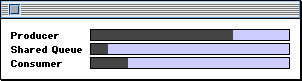
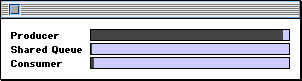
The PPob resource and visual interface for this application have been provided for you. Each window you create has three progress bars, as shown in Figure 3.3. One thread produces data, the other consumes it. The threads communicate with each other via a shared queue. As the producer thread does its work, the progress bar empties. The queue begins to fill, and then the consumer thread starts taking data off the queue.
The progress bar code is provided for you. Each of these objects-the two threads and the queue-has its own progress bar object.
In this exercise you write the code to initialize threads in PowerPlant, instantiate the necessary threads, start the threads running, and destroy the threads. You also create the shared queue.
Before starting, examine the main() function in CThreadsApp.cp to see how the code checks for the Thread Manager at startup
and exits gracefully. In addition, look at how the ThreadsLib
file is imported in the project file. It uses weak import so that
the application can launch even in the absence of the Thread Manager.
To accomplish this task, you create a main thread and attach an LYieldAttachment to the application object. A handy place to accomplish both tasks is in the application object constructor.
// Create the main thread. new UMainThread;
// Add a yield attachment.
AddAttachment( new LYieldAttachment( -1 ) );
Note that the attachment is set to -1, so it yields immediately when called. This attachment gets control from the main event loop. The main event loop is part of the main thread. The net effect of the attachment is to ensure that the main thread yields regularly-once for every event received.
2. Create the threads and queue.
FinishCreateSelf() CThreadWindow.cp
In this step you first create a queue object, and then the two thread objects. For each object you get its associated progress pane, and then instantiate the object. After that, you start each thread running.
The CThreadWindow class has three data members, mSharedQueue, mProducerThread, and mConsumerThread. Feel free to explore the class declaration.
The queue constructor requires a pointer to a CProgressPane object.
The existing code gets that pointer for you. After that, allocate
a new CVisualSharedQueue object. Store the pointer to the new
queue in the mSharedQueue data member.
b. Create the producer thread.
The existing code gets a pointer to the progress pane for this
object. The constructor requires both the shared queue and the
progress pane. Allocate a new CProducerThread object. Store the
pointer to the new thread object in the mProducerThread data member.
c. Create the consumer thread.
The consumer thread is an object of the CConsumerThread class.
The existing code gets a pointer to the progress pane for this
object. The constructor requires both the shared queue and the
progress pane. Allocate a new CConsumerThread object. Store the
pointer to the new thread object in the mConsumerThread data member.
Call each thread's Resume() function. The code for all four substeps is listed below.
// Create the shared queue. mSharedQueue = new CVisualSharedQueue(
theProgressPane );
ThrowIfNil_( mSharedQueue );
// Get the producer's progress pane.
theProgressPane = (CProgressPane *) FindPaneByID( kProducerProgressPane
		);
Assert_( theProgressPane != nil );
// Create the producer thread.
mProducerThread = new CProducerThread(
mSharedQueue, theProgressPane );
ThrowIfNil_( mProducerThread );
// Get the consumer's progress pane.
theProgressPane = (CProgressPane *) FindPaneByID( kConsumerProgressPane
		);
Assert_( theProgressPane != nil );
// Create the consumer thread.
mConsumerThread = new CConsumerThread(
mSharedQueue, theProgressPane );
ThrowIfNil_( mConsumerThread );
// Start the threads.
mProducerThread->Resume();
mConsumerThread->Resume();
3. Write a thread constructor.
CProducerThread() CProducerThread.cp
In this step you write a CProducerThread constructor. The CConsumerThread constructor is identical. It has been provided for you.
The CProducerThread constructor must call the LThread constructor. Set the LThread parameters properly. Make the thread a cooperative thread. Don't forget, several of the LThread constructor parameters have default values that you may find acceptable. Then initialize the CProducerThread data members. The value for the two data members are passed in as parameters to the call.
CProducerThread::CProducerThread( LSharedQueue* inQueue,
CProgressPane* inProgressPane )
: LThread( false ), mQueue( inQueue ),
mProgressPane( inProgressPane )
{
This code creates a cooperative thread, and uses default values
for all other LThread constructor parameters. It initializes the
values of mQueue and mProgressPane appropriately.
4. Write the Run() function for the producer.
Because this is a demonstration, a couple of unusual things happen
with the Run() function for the producer thread.
First, this thread simply creates an LLink object and puts it on the queue. There is no real data attached to the LLink object.
Second, the state of the progress bar actually controls the thread, rather than the other way around. The producer progress bar starts out full and becomes empty over time. When the progress bar is empty, the thread suspends itself. The function repeatedly puts data on the queue and decrements the progress bar.
The Run() function should do four things.
a. Suspend the thread upon completion.
When Run() returns, the thread deletes itself. In this case you don't want
the thread to delete itself. You'll delete the thread when you
close the window that contains the thread, because this thread
is attached to a visual object.
The existing code has an if test for theValue. If theValue is less than or equal to the minimum value, call Suspend() to suspend the thread.
b. Put data in the shared queue.
Use the mQueue object's NextPut() function and pass it a new LLink object.
c. Decrement the progress bar value.
Send the mProgressPane a SetValue() message. The local variable theValue holds the current value. Decrement theValue by one before passing it.
if ( theValue <= mProgressPane->GetMinValue() ) {
Suspend();
}
// Put data in the shared queue.
mQueue->NextPut( new LLink );
// Decrement the progress bar value.
mProgressPane->SetValue( theValue - 1 );
// Yield so that other threads may get time.
5. Write the Run() function for the consumer thread.
In this step you write the consumer thread's Run() function. This is the converse of the code you wrote in the previous
step.
Because this is a demonstration, you simply delete the data you retrieve. There are five tasks to perform.
a. Suspend the thread upon completion.
When Run() returns, the thread deletes itself. In this case you don't want
the thread to delete itself. You'll delete the thread when you
close the window that contains the thread, because this thread
is attached to a visual object.
The existing code has an if test for theValue. If theValue is greater than or equal to the minimum value, call Suspend() to suspend the thread.
b. Get data from the shared queue.
Send the mQueue object a Next() message to get the next link. Receive the return value in a local
LLink* variable.
This is really the meat of of the entire process. The call to
Next() will suspend the thread until data is available.
Delete the LLink object you just retrieved. This line of code
won't execute until after the call to Next() returns (which means the data was available, the thread has become
active, and the data has been retrieved.
d. Increment the progress bar value.
Send the mProgressPane a SetValue() message. The local variable theValue holds the current value. Increment theValue by one before passing it.
Rather than yield, put this thread to sleep for a brief period. This slows the thread down with respect to the producer, so you can see data accumulate in the shared queue. Remember that putting the thread to sleep also causes a yield, so you accomplish two things at once. Fifty milliseconds is a good time to sleep.
if ( theValue >= mProgressPane->GetMaxValue() ) {
Suspend();
}
// Get data from the shared queue.
LLink* theData = mQueue->Next();
// Just delete it.
delete theData;
// Increment the progress bar value.
mProgressPane->SetValue( theValue + 1 );
// Go to sleep for a while.
Sleep( 50 );
~CThreadWindow CThreadWindow.cp
The threads never return because you suspend them before they return. Therefore, they do not delete themselves. You destroy these threads when you close the window that contains them.
Simply call DeleteThread() for both threads in the window. The existing code then cleans
up the shared queue.
// Delete the producer thread. if ( mProducerThread != nil )
mProducerThread->DeleteThread();
// Delete the consumer thread.
if ( mConsumerThread != nil )
mConsumerThread->DeleteThread();
7. Build and run the application
When the project builds correctly and you run the application, a window appears as shown in Figure 3.4. The producer thread progress bar starts out full. It immediately begins to empty as the thread it represents places data on the queue. Shortly after that, the consumer thread starts to remove data from the queue.
Next, make several windows. In the process two important things are happening, one obvious, one subtle. The obvious feature of threads is that no matter how many windows you make, all the threads operate concurrently. The Thread Manager and PowerPlant work together to ensure that all threads get time. This is cool.
The subtle feature of threads is the responsiveness of the application. After you make one window, the application is busy calculating and retrieving data. In a non-threaded application, once that process begins, the application is tied up and unresponsive. In a threaded application, the user interface (the main event loop) is also part of a thread. Therefore, even while computationally intensive operations are in progress, your application can still receive and handle events! This is very cool.
Finally, remember that the shared queue implements a semaphore that protects the integrity of the queue. Experiment with various sleep times for both the producer and consumer thread, and put this mechanism to the test. As it is now, the producer creates threads faster than the consumer retrieves them. Slow down the producer and speed up the consumer. The consumer will be put into a waiting state automatically until data appears. The queue may always appear empty, because the consumer will remove data as soon as it appears on the queue. However, the consumer does not become "busy-waiting" and the data queue remains safe and intact.
If you'd like to explore further, here's a problem you can solve. While the threads are running in one or more windows, open the application's About box. What happens to the threads? They stop dead in their tracks. See if you can put the About box into a thread so that it doesn't seize control of the processor.
Here are two suggestions for how you might accomplish this task. A PowerPlant solution would be to use a PowerPlant-based movable modal dialog for the About box. Effectively, this makes the About box part of the application's main thread.
A non-PowerPlant solution would be to create an event filter proc
for the modal dialog. This event filter would call LThread::-Yield().