This chapter discusses how to use the PowerPlant network classes to create a network-savvy application.
In today's working environment more and more software applications are becoming collaborative in nature. Individuals and groups working together require applications that can communicate with other applications-sometimes across great distances over the global Internet.
The Internet is the largest computer network in the world and connects millions of computers in hundreds of countries. These computers, although running different operating systems and applications, can all "speak" to one another by means of a standard protocol known as the Internet Protocol (IP). IP provides the basis for connectionless, best-effort data packet delivery between computers.
The Transmission Control Protocol (TCP) builds upon the functionality of IP by providing reliable, full-duplex, connection-oriented, stream communications. That is, once the two ends of a TCP connection are established, data can be sent and received between the two, simultaneously, until the connection is closed or broken. Together these protocols are often referred to as TCP/IP and they form the basis for Internet communication.
The Mac OS supports two mechanisms for implementing TCP/IP:
The PowerPlant network classes support both MacTCP and Open Transport in order to provide the most compatible and optimized implementation depending on the currently running system software. The classes provide numerous high-level functions so you do not have to worry about the details of MacTCP or Open Transport directly. When you implement your application using the PowerPlant network classes, you need not be concerned if the user has MacTCP or Open Transport installed on their computer-the classes will handle the details for you.
The PowerPlant network classes also allow you to perform simple UDP implementations. UDP is the User Datagram Protocol and allows you to send data to a remote computer without having to maintain a connection to that computer. This is discussed briefly in the section entitled "Connectionless Datagram Communications."
The topics in this chapter include:
Networking Strategy-PowerPlant's approach to networking Networking Classes-a detailed look at the PowerPlant classes involved in network support Implementing a Network-Savvy Application-how to implement simple networking in your application Summary of Networking in PowerPlant Code Exercise for Networking
 NOTE
NOTE The PowerPlant network classes that are included with CodeWarrior 11 or later are not compatible with versions included before CodeWarrior 11. Any code that you've written prior to CodeWarrior 11 that uses the PowerPlant network classes will need to be updated to use the new architecture. See the PowerPlant network classes release notes on your CodeWarrior CD for more information on specific changes between versions of the classes.
This chapter does not teach you the intricacies of data communications, using TCP/IP with MacTCP or Open Transport, or any of the standard Internet protocols such as HTTP (World Wide Web HyperText Transfer Protocol), FTP (File Transfer Protocol), or SMTP (Simple Mail Transfer Protocol). It also assumes that you are familiar with basic communications techniques in general. You should note that writing communications software is not for the faint of heart, even with great tools like the PowerPlant network classes. There are many intricate details to writing robust communications code that only experience can teach you. For more information regarding these topics, you may wish consult the following books and documentation. This material will help you learn how to implement Internet-savvy applications.
Comer, Douglas E. Internetworking With TCP/IP, Volume I, Principles, Protocols, and Architecture. Prentice Hall. ISBN 0-13-216987-8
MacTCP documentation available from Apple Computer, Inc. at ftp://ftp.apple.com/devworld/Development_Kits/MacTCP/
Open Transport documentation available from Apple Computer Inc., and also on your CodeWarrior CD.
InterNIC at http://rs.internic.net/
Internet Engineering Task Force at http://www.ietf.cnri.reston.va.us/home.html
The WebStar site also has useful information for developers who are interested in writing Internet code at http://www.starnine.com/
The Netscape site at http://home.netscape.com/
The PowerPlant network classes make use of either the MacTCP or Open Transport system software. Given this, before you can use the classes in your program you must have this system software installed and configured properly. You must also have some type of TCP/IP connection such as directly to an Ethernet network or to an Internet access provider using PPP (Point-to-Point Protocol) software.
How to configure your machine and network is outside the scope of this document. However, there are plenty of places to learn more. If you do not know where to turn, consider purchasing the Apple Internet Connection Kit from Apple Computer, Inc. This kit includes everything you need to get connected to the Internet.
The PowerPlant network classes also require the PowerPlant Threads
classes which in turn require the Thread Manager from Apple Computer,
Inc. If you are running the most recent version of the Mac OS
System Software then you most likely have the Thread Manager already
installed. If not, you can obtain a copy of the Thread Manager
from the Apple Computer, Inc. web site at http://www.apple.com/
It should also be noted that the PowerPlant network classes require
the use of the Open Transport Client Developer libraries version
1.1.1 or later. These libraries can be found on your CodeWarrior
CD or on Apple's Open Transport web site at http://devworld.apple.com/dev/opentransport/. They are installed automatically when you use the installer
on your CodeWarrior CD.
NOTE If you are running Open Transport 1.1 or later, the Open Transport API will be called from 68k code when running on a PowerPC. If you are running versions of Open Transport prior to 1.1, MacTCP will be called from 68k code when running on a PowerPC. This is due to the fact that versions of Open Transport prior to 1.1 were never shipped for 68K Macintosh computers, therefore it is assumed that MacTCP is available instead. For the adventurous, you can set or reset the OPENTPT_ON_68K compile option, but the default is to use Open Transport whenever possible. You should also understand that older code written using MacTCP only should run with little or no modification under Open Transport.
The PowerPlant network classes implement both MacTCP and Open Transport compatibility while providing a single, common API to TCP/IP communication. This API shields you from the intricacies of both MacTCP and Open Transport so you can concentrate on the functionality of your application and not low-level communications details. The API resembles the form and function of Open Transport, the newest communications technology for the Mac OS.
NOTE The PowerPlant network classes were designed to be used either within the PowerPlant framework or without it. Therefore, you can include the functionality provided by the network classes in your application without making use of any of the other classes in PowerPlant, except the required PowerPlant Threads classes.
When implementing network support in your application, you need only concern yourself with a small number of classes to provide support for establishing connections, sending data and receiving data. These are the basic functions that are necessary for Internet communications. Collectively these classes are known as the generic network interface and consist of:
UNetworkFactory is a utility class that creates network endpoints and mappers using the best configuration (MacTCP or Open Transport) given the current running system software.
LInternetAddress represents both IP and DNS style Internet addresses. It will automatically map between DNS style and IP style addresses for you as necessary.
NOTE IP addresses refer to numbered addresses, such as 127.0.0.1. DNS addresses refer to named addresses such as www.metrowerks.com.
LTCPEndpoint represents a TCP/IP style network connection. It establishes a connection between your application and another on a remote computer using the Transmission Control Protocol. When created it will use the best configuration (MacTCP or Open Transport) given the current running system software.
LUDPEndpoint represents a UDP style network connection. It establishes a connection between your application and another on a remote computer using the User Datagram Protocol. When created it will use the best configuration (MacTCP or Open Transport) given the current running system software.
Other classes exist in the PowerPlant network classes. However, they implement low-level, internal methods that are not discussed in this chapter. You need not be concerned with them in order to implement networking in your PowerPlant application. You should feel free to explore them as your understanding of networking increases, however, the Generic Network Interface classes shield you from the details within them.
As mentioned earlier, the PowerPlant network classes make use of the PowerPlant Threads classes. In this way, your entire network implementation is "threaded" and therefore is extremely optimized for communications. By using threads, the network classes are able to take advantage of all the features that the Thread Manager and PowerPlant Threads classes have to offer. Other advantages include:
Now that you have an idea of what the individual network classes do, let's take a more in-depth look at the functionality of each. Figure 4.1 illustrates the class hierarchy that you will be concerned with when implementing networking in your PowerPlant application.
The classes that you will use directly: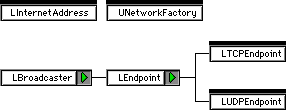
Classes discussed in this section include:
The UNetworkFactory utility functions allow you to easily create TCP endpoints and mappers based on the current running system software. Calling simple functions in this utility class automatically choose MacTCP or Open Transport support transparently to you and your program.
UNetworkFactory includes only a few but very important functions as follows:
Some vital UNetworkFactory functions:
| Function |
Purpose |
|---|---|
NOTE It is unlikely that you will ever need to create a mapper object
(using CreateInternetMapper()) yourself since the endpoint objects (discussed below) can
accept address objects as arguments when connecting to a remote
computer. Also, the endpoint objects will perform any necessary
DNS lookups automatically for you. CreateInternetMapper() is provided as a convenience if you need to perform DNS name
or address lookups without maintaining a connection to the remote
computer.
LInternetAddress represents both IP and DNS style Internet addresses. It will automatically map between DNS style and IP style addresses for you as necessary.
LInternetAddress includes numerous constructors allowing you to pass various parameters to the object including a numbered address, a named address and a port number. It also contains many useful functions as follows:
Some vital LInternetAddress functions:
| Function |
Purpose |
|---|---|
NOTE Something that we have yet to touch on is the fact that all TCP connections occur on ports. There are over 65000 ports to choose from on any one computer. Some ports are "well known" or "reserved" such as port 80 which is used by HTTP (World Wide Web) servers. Servers usually "listen" for incoming connections on a particular port. Outgoing connections, however, usually use any port that is available at the time the endpoint binds. Binding is the task of telling the computer that you want to make use of a particular port. If the IP or DNS address is the "street name" then the port number being used is your "house number" on that street. As long as someone knows how to get to your street, and knows what number your house is, they can contact you.
LTCPEndpoint forms the basis for TCP/IP networking in PowerPlant. This is a simple class that inherits from the abstract base class LEndpoint. When you call the UNetworkFactory function CreateTCPEndpoint() an LTCPEndpoint will be created for you automatically in the form of either an LOpenTptTCPEndpoint or an LMacTCPTCPEndpoint depending on the current system software. Either way, the calls that you make to bind, connect, transfer data and disconnect will be the same.
TCP/IP is used for many session-oriented protocols such as HTTP (World Wide Web HyperText Transfer Protocol), FTP (File Transfer Protocol), POP (Post Office Protocol) and SMTP (Simple Mail Transfer Protocol).
 TIP
TIP Be sure to explore the PowerPlant Internet classes, found on your CodeWarrior CD. These classes implement many popular protocols on top of the PowerPlant network classes including HTTP, FTP, POP and SMTP. Not only do they offer your PowerPlant application these popular services, with a minimum of effort on your part, but they are also an excellent example of implementing session-oriented protocols using the PowerPlant network classes.
This section covers those functions that you are most likely to encounter directly. Use the PowerPlant Reference for detailed and complete technical information.
LTCPEndpoint and its related classes have numerous member functions that you will find useful in order to allow you to bind to a local port, connect to a remote computer and send and receive data.
Some vital LTCPEndpoint functions:
| Function |
Purpose |
|---|---|
One item to keep in mind when using the SendData function is that the 65K single buffer size limitation of MacTCP has also been implemented in the Open Transport code of the classes. This was done to keep the API the same for both MacTCP and Open Transport without causing subtle differences between the implementations. If you must send more than 65K of data in one burst, you should split it up into multiple buffers before sending.
NOTE For consistency and simplicity of end user code design, threads are blocked after a ReceiveData() call until there is data on the endpoint. Thus, you can create simple receive loops that block the thread without having to do your own "Receive - If (no data) Yield()" type loop as was required in previous versions of the PowerPlant network classes. The downside of this functionality is that since the receive has been blocked you are most likely to get hit with unexpected messages (usually disconnects) while in this state. Since you have asked specifically for a receive, anything that is not a typical completion for receive gets thrown back to you as an exception. Most of the time, you can expect this to be a disconnect or an orderly disconnect. While these are not necessarily "error conditions" in terms of the connection, they are unexpected events and get thrown back to you as such.
LUDPEndpoint forms the basis for sessionless (connectionless) networking in PowerPlant. This is a simple class that inherits from the abstract base class LEndpoint. When you call the UNetworkFactory function CreateUDPEndpoint() an LUDPEndpoint will be created for you automatically in the form of either an LOpenTptUDPEndpoint or an LMacTCPUDPEndpoint depending on the current running system software. Either way, the calls that you make to bind and transfer data will be the same.
UDP is used for many sessionless protocols such as NTP (Network Time Protocol) and for implementing echo, ping and traceroute functionality.
This section covers those functions that you are most likely to encounter directly. Use the PowerPlant Reference for detailed and complete technical information.
LUDPEndpoint and its related classes have numerous member functions that you will find useful in order to allow you to bind to a port and send and receive data.
Some vital LUDPEndpoint functions:
| Function |
Purpose |
|---|---|
TIP For more information on how to implement communications protocols, handle communications errors robustly, and take advantage of communications programming tactics, consult a communications text-book. See also "Where to Learn More About Networking".
Implementing network support in your application is relatively simple when using the PowerPlant network classes because the classes shield you from the details of the OS networking implementation. Although there are numerous ways to use these classes, one example of implementing simple network support follows.
When you implement network applications you write a client, a server, or a client/server application. A client application is one that requests information from a server. A server application is one that supplies information to a client or clients. A client/server, or peer-to-peer application, includes both client and server functionality in the same application. A chat program that allows two individuals to communicate directly with each other is an example of a client/server application.
In this section we discuss the steps required to build both the client and server side of a network application. Because the PowerPlant network classes make use of the PowerPlant Threads classes you may wish to review the chapter which discusses them before continuing.
One thing to keep in mind is that most of the functions dealing with binding, connecting, sending and receiving data are all being called from within a thread. Many times the functions that you call will block the thread until the asynchronous task completes. This makes it extremely easy to implement protocols and client architectures from within the Run() method of your thread.
Each topic in this section reflects a task you may need to perform when writing your own network applications. This section includes the following topics:
More specialized topics follow including:
Implementing Threads Connectionless Datagram Communications
A client is the end of the connection that initiates the communication between itself and a server. If you've ever used any Internet software such as a browser, file transfer application, news reader, etc. then you have used a client application.
Before you implement your client application you need to know which protocols you will be supporting. In order to write a program that is useful it must support a protocol above TCP/IP such as HTTP, FTP, or a protocol of your own design.
TIP You may choose to use the PowerPlant Internet classes to provide your protocol support. The PowerPlant Internet classes support many common protocols used on the Internet today. Review the PowerPlant Internet classes documentation for complete information.
You first need to create a client class that creates and maintains any user interface elements you may need-such as a window and controls. Once your window is created you can offer the user some simple controls to allow them to pick the address of a remote computer to connect to.
In order to connect to a remote computer you must know its address on the network. Addresses come in a variety of forms, as discussed earlier. Normally you request the remote address from the user of your application as a string of text, either dotted decimal or DNS name, and simply create an LInternetAddress object from it. This is used later to connect to the remote computer.
Before you can communicate with the remote computer you must create
an endpoint. Every connection between a client and server has
two endpoints, one on each end of the connection. You create your
client endpoint by calling UNetworkFactory::CreateTCPEndpoint(). If you were creating a connectionless UDP endpoint you would
call UNetworkFactory::CreateUDPEndpoint() instead.
Now that you have created your client endpoint you need to bind it to a local port in order to communicate. As you may recall, your client machine has an Internet address but also has thousands of possible ports on the machine that it can use to communicate through. By binding to one of these local ports you are making it possible for the server to find your application easily amongst any other applications that might be simultaneously using IP on your computer.
To bind to a local port you need to create an LInternetAddress object. Pass zero for both the host address and the host port in the constructor. These parameters mean that you will use any available port as the outgoing communications "channel." Because the client is initiating the connection, the port number really doesn't matter.
Pass the LInternetAddress object to LEndpoint::Bind() to perform the bind. You should also pass zero for the inListenQueueSize function parameter to Bind(). You pass a different value as inListenQueueSize when you create a server. Servers are interested in listening
for incoming connections, clients are not. The thread that is
handling your client side of the equation will be blocked until
the bind completes.
To actually connect to the remote endpoint, you simply need to pass the LInternetAddress object to the endpoint via its Connect() member function.
At this point the thread will be blocked once again and upon it being resumed the connection will have either taken place or failed. Assuming the connection was made, you can continue to send and/or receive data from within your thread. If the connection failed your try/catch block will have caught any exceptions and you can handle them accordingly.
NOTE Servers refuse connections for a variety of reasons. For example, if an FTP server has too many users transferring files at the moment you connect, it refuses your connection. It may also refuse your connection because you entered the wrong password or don't have access to the server. If you try to connect to a machine that you think is running a particular server but it is not, your connection will also be refused by the TCP software on that machine because there are no listeners on that particular port.
To send data to the remote computer you merely need to call any one of the Send() member functions depending on the type of
data you are sending. You can rest assured that the data will arrive at its destination
in the majority of cases because TCP/IP does its best to guarantee
this. If you are using a UDP endpoint, however, the data is not
guaranteed to arrive and you will need to call the UDP specific
send function instead.
To receive data from the remote endpoint you merely need to call
any one of the Receive() member functions depending on the type
		and size of data you are receiving.
If you are using a UDP endpoint, however, the you will need to
call the UDP specific receive function instead.
If you wish to initiate a disconnect, simply call either the Disconnect() or SendDisconnect() member functions. In most cases you will just need to call Disconnect() when you are ready to close a connection. After calling the Disconnect() function the thread will block and upon being resumed you should call Unbind() to release the local port you bound to earlier.
NOTE If you are connecting via UDP instead of TCP, remember that you need not (and can not) call Connect() and Disconnect(). Otherwise, using UDP is similar to TCP in the sense that you bind, send, receive and unbind.
If, at any time in your threaded send and receive loop, you receive
a OrderlyDisconnect_Error message you should call AcceptRemoteDisconnect() immediately and continue by deleting the local endpoint. This
message is telling you that the remote endpoint initiated a disconnect
and you should oblige.
 WARNING!
 Sending data after receiving a OrderlyDisconnect_Error message is risky business. Because the remote endpoint may have already closed its end of the connection or may ignore incoming data, the data may never be received.
A server is the end of the connection that listens for incoming requests from one or more clients. Servers usually offer information that the client can request once connected. Servers are more difficult to write than clients in most cases.
Before you implement your server application you need to know which protocols you will support. A useful application must support a protocol above TCP/IP such as HTTP, FTP, or a protocol of your own design.
NOTE When writing a server, you may opt to have a server class and a responder class. The server class listens for incoming connections. When one occurs, the server creates a responder object that completes the connection and handles the exchange of data between the client and itself. The responder can function very similarly to the client class mentioned above. An exception is that it need not call Bind(), because when it connects by calling AcceptIncoming() the bind happens transparently.
You first need to create a server class that listens for incoming connections, and a responder class that responds to these connections.
Your responder class is almost identical to your client class in many respects, because it handles the exact same protocol. The only major difference is in the way it connects, instead of initiating a connection by calling Connect(), it accepts an incoming connection request, discussed below.
Servers spend most of their time listening for incoming connection requests. When a server receives a request it can decide whether or not to accept the request based on the IP or DNS address of the computer that the request has originated from, the number of users currently logged into the server, or other criteria that you choose.
To listen for incoming connection requests your server object
should first create the server endpoint by calling UNetworkFactory::CreateTCPEndpoint().
Secondly, create an LInternetAddress object. Pass in the port number that you want to listen to for incoming connection requests. For example, if you are writing an HTTP (World Wide Web) server you will use "well-known-port" number 80.
Next, pass the LInternetAddress object to the Bind() member function. Your server thread will be blocked and upon
it being resumed you will be bound to the port you specified.
You should pass any number greater than zero for the inListenQueueSize function parameter when calling Bind(). This tells TCP/IP that you want to listen for up to inListenQueueSize incoming connections at once. Therefore, while one connection
is being serviced, others will not be turned away.
NOTE You should not arbitrarily set the inListenQueueSize function parameter. For each connection you offer to service,
more RAM is required for use by your application and the TCP/IP
subsystem. You should experiment with the number of connections
that best suits your needs and memory requirements. You may also
wish to allow the user to set this value via a preference setting
but remember that they may also need to increase the memory partition
of your application as well.
Assuming the bind completed with no errors, your server object is now listening for incoming connections.
Incoming connection requests are flagged by the T_LISTEN message.
When your server object receives a T_LISTEN message you can evaluate
the incoming connection request to see if you would like to service
it. Immediately after you receive the T_LISTEN message you should
call Listen() to inform the server endpoint that you will be dealing with the
latest incoming connection request.
The easiest way to manage this in your thread is to simple Suspend() your thread once the bind has completed successfully. Upon receiving a T_LISTEN message your thread will be automatically resumed. You can then call the Listen() member function of the server endpoint.
If you choose to reject the incoming connection request, after
calling Listen(), you simply need to call the RejectIncoming() member function of the server endpoint and return to waiting
for other T_LISTEN messages.
Assuming you choose to accept the incoming connection request, you should create a responder object and pass the endpoint on to it. This forces the responder to connect to the remote requester.
Your responder first creates another endpoint using UNetworkFactory::CreateTCPEndpoint(). Once created, the responder's thread calls the server endpoint's
AcceptIncoming() member function, passing in the newly created responder endpoint
as the inEndpoint function parameter. This is an extremely important
step and can be considered the "hand-off." The server endpoint
is handing off the connection to the responder endpoint.
The responder thread will then be blocked and will resume when the hand-off is completed. From this point on the responder can act as if it is a client, following the protocol as defined. The responder is now connected to the client on the remote computer and can freely send and receive data with it.
TIP When writing a peer-to-peer application (such as a chat program) where the two ends function as both a client and a server, you may opt to derive your responder and client classes from a common base class. In many cases each object, once connected, must handle the exact same protocol as the other with very few, if any, differences.
Threaded implementations can be extremely useful when dealing with query/response protocols such as POP or SMTP. That is, a protocol that simply sends a query and then awaits a response is a good candidate for a thread-based implementation.
As mentioned, the PowerPlant network classes depend on the PowerPlant Threads classes in order to function. The heart of your network applications will contain threads that do the majority of the network tasks such as binding, connecting, sending, receiving, disconnecting and unbinding. The internal implementation of the PowerPlant network classes depend on this and make use of blocking,. suspending and resuming of your threads in order to implement an elegant and optimized networking architecture.
For complete examples of how to implement your threaded network implementation, see the SimpleClient and SimpleServer examples on your CodeWarrior CD and their associated Code Exercise below.
TIP When writing threaded network classes, it is easiest to write the logic of your Run() member function of your Thread class first. Due to the convenient blocking, suspending and resuming of threads, you can easily implement the structure of your entire protocol in your Run() member function.
So far we've mainly discussed TCP. However, the PowerPlant network classes also support UDP, User Datagram Protocol. Whereas TCP offers a reliable, full-duplex, connection-oriented stream service, UDP offers best-effort, connectionless datagram delivery with an optional checksum. UDP still allows you to specify a port on the remote computer, however, which differentiates it from the lower-level IP.
UDP is extremely easy to use. In fact, it is very similar to TCP except for the fact that you do not call Connect() and Disconnect(). Once you bind to a local port, the functions you need to make use of are SendPacketData() and ReceiveFrom(). By calling these functions you can send and receive datagrams (small packets of data that stand on their own) between two remote computers. Protocols that simply return the local time, or a short text message such as a quote, lend themselves to UDP quite nicely.
NOTE Using UDP is simpler than TCP but don't use it unless you need to. Some simple protocols support UDP for convenience, but UDP is not reliable. TCP has built-in functionality to ensure reliable delivery of data, quickly, in both directions. UDP communications are prone to errors if the connection is not pristine in quality. Only experienced network programmers should use UDP.
Communications and networking between applications is becoming increasingly important in today's diverse computer culture. TCP/IP is an important protocol for applications to implement because it is cross-platform in nature. A TCP/IP application on a Macintosh can communicate easily with a TCP/IP application on a PC running Windows, a UNIX or NeXT workstation, a BeBox or a mainframe.
There are numerous standard protocols today that you can implement using the PowerPlant network classes including HTTP, FTP, and SMTP. You can also define your own protocols built upon the TCP/IP implementation to extend your application and make it "Internet-savvy." The ability to access remote computers and make use of their resources makes your application that much more powerful.
The SimpleClient and SimpleServer applications show how to implement both a client and server application using the PowerPlant network classes. Although there are numerous ways to use the classes provided here, these examples should give you a simple introduction to one implementation. In this section we cover two code exercises:
In the first part of this exercise you implement portions of the SimpleClient application.
The purpose of this exercise is to give you experience using networking in PowerPlant-the functions you override and the tasks you perform. This exercise is not intended as a tutorial on general networking techniques. For more information on networking in general you should consult a text on Internet protocols and computer networking. A short list was mentioned earlier in this chapter.
SimpleClient is just that, a simple client. It implements a Telnet-like terminal that allows you to type characters which are sent to the remote computer and are echoed back to the terminal and displayed. Although you can connect to most any server, the SimpleServer application (discussed below) is designed specifically to be used with SimpleClient.
Let's take a look at the important steps needed to implement client-side networking in your application. In the first part of this exercise you write the code to:
StartSession() CClientConnection.cp
Before you can communicate via TCP you must create a TCP endpoint. You use the UNetworkFactory::CreateTCPEndpoint() function to do this. As usual, in these exercises existing code is in italics.
mTCPEndpoint = UNetworkFactory::CreateTCPEndpoint(); mTCPEndpoint->QueueSends();
mTCPClientThread = new CTCPClientThread(mTCPEndpoint, mTerminalPane,
		this);
mTCPClientThread->Resume();
Note that we also enable the "Queue Sends" mechanism at this time. Because this is an option for the endpoint, this is the perfect time to enable it.
You should also note that the existing code that follows creates a thread for our endpoint and immediately "kick-starts" the thread by calling the Resume() function which begins execution of the thread's Run() method. The Run() method is the heart of our client implementation.
2. Bind to the local endpoint.
After you have created your TCP endpoint, you must bind to it. Binding "connects" you to the endpoint and allows you to properly communicate through it. Because we are initiating the communications we don't care which local port we communicate through, therefore we create an LInternetAddress object passing 0 for both the host address and host port. Once instantiated we pass the address to the endpoint's Bind() method.
LInternetAddress address(0, 0); mEndpoint->Bind(address);
Because we are using threads, the Bind() method will block the thread until the bind is complete. When it is complete the thread will be resumed automatically and will continue to execute.
Note that if the bind fails for any reason, our try/catch block will catch the exception and essentially abort the Run() method.
3. Open an outgoing connection.
Once we have the port in our control we need to actually open an outgoing connection using the port. This is a very simple task. First we create an LInternetAddress based on the address that the user entered when they initiated the connection. This might be in the form of a dotted-decimal IP number (127.0.0.1) or a name (www.metrowerks.com). Once we have the LInternetAddress object created we can simply pass it to the Connect() method of the endpoint. The Connect() method will automatically block our thread, perform any needed DNS lookups, connect to the remote computer and the resume our thread.
LInternetAddress* remoteAddress = mClientMaster->GetRemoteAddress();
mEndpoint->Connect(*remoteAddress);
Note that if the connect fails for any reason, our try/catch block will catch the exception and essentially abort the Run() method.
4. Send data to the remote computer.
InternalSend() CClientConnection.cp
Now that we have a connection open between our client and a server on the remote computer, we can easily send and receive data between the two processes. This is as simple as passing the data to any of the numerous "send" functions supported by the endpoint. In this case we use the Send() method passing in a pointer to the data and the length of the data.
mTCPEndpoint->Send(theData, theLength);
Because we enabled the queue sends mechanism when we created the endpoint, the Send() method will return immediately allowing our program to continue with no delay. It will then send the data "behind the scenes" as we continue other processing.
5. Receive data from the remote computer.
In order to receive data from the remote computer we first must know what type of data we will be receiving. In this case we know that the data is sent a character at a time and is echoed back to us in the same format. Therefore, we can easily call the endpoint's ReceiveChar() method to receive a character of data at a time. In our Run() method we simply loop, receiving characters, until we either initiate a disconnect or the remote endpoint does so.
char theChar; mEndpoint->ReceiveChar(theChar, 5);
mTerminalPane->DoWriteChar(theChar);
The ReceiveChar() method is called passing a buffer to store the received character in as well as a timeout value. In this particular case, if no characters are received within 5 seconds, the function will return and our loop will continue. You will also note that once received, we immediately write the character to our terminal pane so the user can see it has been echoed.
6. Disconnect from the remote computer.
When we are ready to disconnect from the remote computer we simply call the Disconnect() method of the endpoint. Our thread will block, the disconnect will take place, and our thread will resume.
mEndpoint->Disconnect();
Once the Disconnect() method resumes our thread we continue the process by unbinding from the port. This is as simple as calling the Unbind() method of the endpoint.
mEndpoint->Unbind();
One thing to note is that you don't have to unbind at this point. If you were going to open another connection immediately you might choose to use the same port. In this case you may forego the unbind and simply open a connection to another remote computer instead.
When your application quits, the most important thing you have to do is call LCleanupTask::CleanUpAtExit(). This function ensures that all tasks are cleaned up and are properly destroyed before the application quits. Not calling this function can cause a crash. Even if you don't crash, other TCP/IP applications may not function properly until you restart your computer.
LCleanupTask::CleanUpAtExit();
9. Build and run the application.
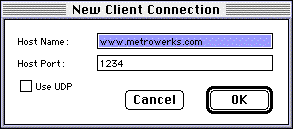
When the application builds successfully and runs, select New Session from the File menu and enter in the name and port number of the remote computer you wish to connect to. Once entered press the OK button.
Once connected you can type text into the terminal and it will echo back to you. To disconnect simply close the terminal window.
Congratulations! You've implemented a network-savvy application using the PowerPlant network classes.
In the second part of this exercise you implement portions of the SimpleServer application.
SimpleServer is just that, a simple server. It implements a Telnet-like server that allows you to send characters to it which are immediately echoed back to the sender.
Let's take a look at the important steps needed to implement server-side networking in your application. Much of what you see here will be similar to what you implemented on the client side except for a few important differences which we outline below. In the second part of this exercise you write the code to:
WaitForConnections() CSimpleTCPServer.cp
Before you can communicate via TCP you must create a TCP endpoint. You use the UNetworkFactory::CreateTCPEndpoint() function to do this. As usual, in these exercises existing code is in italics.
mEndpoint = UNetworkFactory::CreateTCPEndpoint(); mEndpoint->AddListener(this);
Note that we also add the CSimpleTCPServer object as a Listener to the endpoint. This allows us to receive the T_LISTEN message from the endpoint when a remote connection request is received. This makes use of the standard Broadcaster/Listener relationship used throughout the PowerPlant framework.
2. Bind to the local endpoint.
Binding to the TCP endpoint is performed much the same as the client side of the connection with two notable exceptions. The first being that we must specify a local port number to bind to. This is so the client application knows how to contact our server. Remember, when you connect to a remote computer using TCP you not only supply the address of the computer but also the port number on that computer. When we actually call the Bind() method of the endpoint we also pass in the maximum number of connections we would like to listen for. This allows TCP to pass multiple connection requests to our server simultaneously instead of simply turning them away.
LInternetAddress address(0, mPort); mEndpoint->Bind(address, mMaxConnections);
mServerMaster->BindCompleted();
You will also note that after the bind has completed (our thread is blocked by the bind then resumed) we call a function of the master server object called BindCompleted(). This is simply a mechanism to pass a message back to the object that handles our user interface to let it know that the bind has completed successfully and it can safely display our server's window.
3. Listen for an incoming connection request.
There is actually nothing to do to begin our server listening for incoming connection requests. Because we passed in a value to the Bind() method specifying how many listeners we can handle, we are automatically listening once the bind is complete. We do however choose to suspend our thread until an actual connection request is received.
Suspend();
When a connection request is received, you will remember that the endpoint is set up to broadcast a T_LISTEN message to the CSimpleTCPServer object. When this message is received by the CSimpleTCPServer object it simply resumes the server thread. See CSimpleTCPServer::ListenToMessage().
4. Accept an incoming connection request.
Once our thread is resumed (by the reception of the T_LISTEN message) we simply call the Listen() method of the server endpoint.
mEndpoint->Listen();
After this point we can easily create a new TCP endpoint, known as the responder endpoint (see CTCPResponder::Accept()), create a new responder thread (see CTCPResponderThread::Run()) and within it call the AcceptIncoming() method of the server endpoint, passing our responder endpoint as the only parameter. This effectively hands off the connection currently serviced by the server endpoint to the responder endpoint and opens the connection fully.
From this point onward you can perform the same tasks in the responder as you did in the client. This includes sending and receiving data, disconnecting, unbinding and quitting your application. The responder, in many cases, can even descend from the same base class as your client. What could be easier?
As extra credit, walk yourself through the code exercises again but now looking for the UDP specific code as opposed to the TCP specific code that we outlined above.
This program can be extended in many exciting ways. You could easily send complex data across the connection, not just single characters. For example, you might have a picture display. You could send a picture pasted into the display to the remote computer.
You might also consider using the Sound Manager to send live audio across the connection. How about MIDI data? You could even send Event Manager events to the remote computer. Whenever you click the mouse in a window on your computer it causes a click to occur on the remote computer! This could be the beginnings of a collaborative drawing application. And how about Apple Events across the Internet?
The possibilities are limitless. Good luck, and happy networking!