This chapter discusses how to use the PowerPlant Internet classes to create a variety of Internet-enabled programs.
The global collection of networks known as the Internet has grown in size at a staggering rate. Businesses, schools, governments, and individuals are making use of the interconnected nature of the Internet to conduct their daily affairs. Many tools help in these endeavors: electronic mail, the World Wide Web, and file transfer being but a few.
The primary networking protocol stack used on the Internet is the collection of protocols known as Transmission Control Protocol/Internet Protocol (TCP/IP). On top of this foundation exists a large collection of mostly standardized, task-specific protocols. These protocols are specified in the Request For Comment (RFC) documents which are the definitive source for implementation details.
Several of these task-specific protocols have been implemented in the PowerPlant library of classes. Electronic mail is represented with classes covering the Simple Mail Transport Protocol (SMTP) for sending messages to mail servers, and the Post Office Protocol version 3 (POP3) for retrieving messages from mail servers. The main protocol of the World Wide Web, the Hierarchical Text Transfer Protocol (HTTP), is provided. File transfer is included with the File Transfer Protocol (FTP) classes. Finally, a collection of helper classes exist to make preparing and interpreting data sent by these protocols simpler to code.
The PowerPlant implementations of these classes are built on top of the PowerPlant network classes documented elsewhere in this manual. By using the network classes as the foundation, the Internet classes work well with either MacTCP or Open Transport installed on the target Macintosh.
 WARNING!
 The Internet classes make use of the threaded version of the PowerPlant network classes. You will need to check that the Thread Manager is installed on the host computer for your application to work properly.
This chapter's topics include:
The Internet is always changing, and even the protocols that are described in this chapter are constantly evolving. This chapter shows you how to make use of the protocol classes, but does not teach you the intricacies and nuances of the protocols themselves. For that, we recommend that you review the ultimate resource for the protocols, the Request For Comment (RFC) documents. RFCs describe in great depth how protocols function, and they explain some of the implementation details that are useful to understand when writing Internet software.
This chapter's descriptions of the PowerPlant Internet classes and their application assumes that you have a basic familiarity with Internet protocols and creating networking software. You should also understand the fundamentals of using Mac OS Threads and the PowerPlant classes that support them. There are many issues that you must consider when implementing a robust communications program, and experience is the best guide. There are many other books and resources that you can read to learn about Internet protocols and programming.
Comer, Douglas E. Internetworking with TCP/IP, Volume 1, Principles, Protocols, and Architecture. Prentice Hall.
Comer, Douglas E. Internetworking with TCP/IP, Volume 3, Client-Server Programming and Applications. Prentice Hall.
Stevens, W. Richard. TCP/IP Illustrated, Volume 1-3. Addison Wesley.
Internet Engineering Task Force at http://www.ietf.cnri.reston.va.us/ (for RFCs)
The PowerPlant Internet classes require several pieces of system software. MacTCP (also known as "classic networking") or Open Transport must be installed and properly configured for the Internet classes to operate. If you want to be able to connect with other machines, the computer on which your application runs must also be connected to a network that supports TCP/IP. The Internet classes will work just fine regardless of whether you are connected via Ethernet, a serial connection using Point to Point Protocol (PPP), or some other physical connection. However, you may want to adjust the operation of your software depending on the performance of the link.
Additionally, the Thread Manager must be installed if it is not already part of the version of the Mac OS running on the target computer.
The PowerPlant Internet classes implement a general foundation that easily supports Internet protocols modeled on a command and response scheme. On top of this foundation is support for some of the most common Internet standard protocols. The different protocol APIs provide a simple interface that allows you to concentrate on the operation you wish to complete, not the underlying details.
 TIP
TIP Depending on your programming situation, you may want to use the Internet classes apart from the rest of PowerPlant. The Internet classes currently require the following other components of the PowerPlant library: the Internet Class hierarchy, the Network hierarchy, the Thread classes, LPeriodical, LArray, UMemoryMgr utilities, LBroadcaster, LListener, and the ANSI library.
This section discusses the following topics:
Many Internet protocols follow the same general pattern in how they communicate between two computers. The connection is opened by the sending computer, the receiver acknowledges the connection, then the sender starts writing command sequences with optional data one at a time. The receiver accepts each command and replies with a response code and optional data.
The Internet classes implement this generic behavior with two base classes:
LInternetProtocol is used to create the connection between your program and the destination program on a remote computer. This base class provides the infrastructure for protocols that follow the command and response model.
LInternetResponse embodies the typical format of a response that you will receive from the remote program when it acknowledges your program's commands.
The PowerPlant Internet classes implement several of the more popular Internet protocols in use today. These classes all follow the general command and response model of communication. The classes currently implemented include:
LSMTPConnection and LSMTPResponse implement the Simple Mail Transport Protocol (SMTP) which is the primary transmission protocol for electronic mail messages. The classes implement the basic command set of the SMTP specification (RFC822).
LPOP3Connection and LPOP3Response implement the Post Office Protocol version 3 (POP3). This set of classes can be used to retrieve mail from a compliant mail server. The classes implement some of the optional POP3 commands such as TOP and APOP, an alternate authentication method (RFC1725).
LHTTPConnection and LHTTPResponse implement the Hierarchical Text Transport Protocol (HTTP). HTTP is used most frequently for communication with World Wide Web (WWW) servers. These classes give you all of the necessary tools for using the basic features of HTTP version 1 including the GET, POST, and HEAD methods (IETF draft 4-see RFC web site).
LFTPConnection and LFTPResponse implement the File Transfer Protocol. These classes allow you to send, retrieve, and manipulate files as described in the FTP specification (RFC959).
 NOTE
NOTE This chapter does not describe the inner workings of the various Internet protocols supported by the PowerPlant Internet class library. The ultimate source of information for these protocols can be found in their specifications in the Request For Comments documents which can be found at the address given earlier in this chapter.
Some Internet protocols, such as SMTP and HTTP, require that data be sent in a special format (RFC822). These encapsulated messages are composed of two parts:
1. a collection of headers which provide protocol specific information regarding the handling of the data, and
2. a message body that contains your data (perhaps encoded in a certain way).
The PowerPlant Internet classes support this concept with a collection of classes that implement messages:
LHeaderField LHeaderFieldList LMailMessageList
LInternetMessage is a base class that implements the basic behavior of an RFC822 message. This class provides the ability to easily manipulate the headers and body of a message.
LMailMessage is a message for electronic mail and is used by both SMTP and POP3. It provides a simple interface for accessing mail specific header fields. The class supports simple MIME enhancements including multipart messages.
NOTE MIME stands for Multipurpose Internet Mail Extensions (RFC1521) and is a specification for a set of message headers that describe a variety of enhanced message body types and content. MIME messages can include special encodings, multiple parts, binary information, etc.. HTTP 1.0 is not fully MIME compliant. HTTP uses the MIME headers to determine the content type of the message, but only supports a small subset of the available types at this time.
LHTTPMessage is a message specifically formatted for HTTP. It provides a simple interface to access header fields unique to the protocol. The class implements the minimal MIME support required by the HTTP specification.
LHeaderField is a utility class used by the message classes to store and construct RFC822 style header fields.
LHeaderFieldList is another utility class that maintains an array of header fields during the construction of a message.
LMailMessageList is a utility class that maintains an array of pointers to LMailMessage objects.
The PowerPlant Internet classes make use of a number of general utility functions and classes:
LDynamicBuffer is used throughout the Internet classes to provide storage buffers that can grow or shrink whenever you change their contents.
UInternet contains a number of useful utility functions that includes routines to encode data for a variety of different protocols.
MD5 is a collection of C functions that implement the MD5 message digest encryption algorithm.
UUEncode is a collection of C functions that implement the uuencode character encoding algorithm (based on RFC1113).
NOTE The details of the different encoding routines are beyond the scope of this chapter. You should refer to a standard text on character encoding and encryption for more details.
Depending on which protocol you choose to use in your program, there are really two levels of detail you can explore within the PowerPlant Internet classes:
The first choice gives you "fire and forget" functionality for the most common tasks in each protocol. You should use this option when you want to add basic Internet functionality to your program and don't need fine control over the connection.
The second choice is more appropriate if you need a high degree of control over the flow of the session. One example might be when you are implementing a full client application for your chosen protocol. In this kind of program, you want to manage the transaction each step of the way. Adding an Internet protocol to your program is still a relatively simple procedure. You open a connection to the desired remote computer, alternate between sending commands with optional data and receiving their responses, and finally closing down the connection.
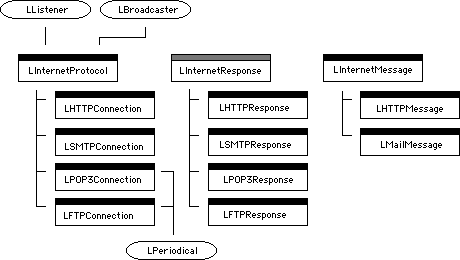
Before reading this section, you should have a basic understanding of the operation of the PowerPlant Internet class library. You should read "Internet Programming Strategy" to review the general concepts of the library. In this section, we will take a closer look at the primary classes, and describe their more important functions and behaviors. Figure 5.1 is an illustration of the classes that we will cover and their relationship to one another.
The gray bar indicates an abstract class.
NOTE These classes were designed so that you can make use of them with a minimal amount of PowerPlant. See "Internet Programming Strategy" for a list of dependencies if you wish to use the Internet classes in non-PowerPlant code.
This section discusses the following classes:
LDynamicBuffer LHeaderField Other Classes
LInternetProtocol is the foundation on which PowerPlant's Internet functionality is based. It is the base class for implementing those protocols that follow a command and response model of communication. It is a subclass of LListener so that it may capture networking events generated from its LTCPEndpoint object. LInternetProtocol also inherits from LBroadcaster and uses this functionality to provide a progress notification mechanism for clients of the protocol object.
LInternetProtocol is itself relatively simple, providing the basic tools to implement specific protocols. This description outlines the primary member functions you are likely to use in your code. For more details, refer to the PowerPlant source code.
LInternetProtocol's data members are all protected from direct access, you should make use of the provided accessor functions if you need to get or change values.
NOTE By making use of accessor functions to manipulate shielded data, you protect your code from being compromised by future changes in the underlying PowerPlant Internet class architecture.
| Function |
Purpose |
|---|---|
LInternetProtocol is a base class that handles all of the details of the network connection for you. Perhaps its most helpful trait is that it hides (and handles) interaction with the lower level network classes. It creates an LTCPEndpoint, handles addressing, binding, connections, data transfer, and other minutia.
LInternetProtocol doesn't implement a specific protocol, but rather provides the basic tools with which HTTP, SMTP, POP3, and other command and response protocols can be constructed. You will rarely need to instantiate a plain LInternetProtocol object.
The protocols written on top of LInternetProtocol have many convenience functions that are particular to the individual protocols. You will most frequently make use of the convenience functions and not need to worry about the functions implemented at this level. One specific example is the connection management functions. The wrapper functions are simple interfaces in the protocols detailed below that handle the opening and closing of connections for you.
An important aspect of this class is that LInternetProtocol and its derivatives are intended to be created from within an LThread object. The standard procedure is to create a thread for each instance of the protocol (often for each separate connection), and within the thread's body, create the protocol object. See the code exercises below for an example.
NOTE The Internet classes make heavy use of threading. You should be familiar with Mac OS threads in general, and the PowerPlant LThread class hierarchy in particular. See the chapter on Threads for more information about using threads in your projects.
A typical scenario for using a connection can be summarized like this:
LSMTPConnection implements the Simple Mail Transport Protocol (SMTP). Internet clients usually use SMTP to send electronic mail messages to SMTP aware servers. The current PowerPlant implementation of SMTP is designed with this behavior in mind. LSMTPConnection is a very simple class, providing member functions that wrap the process of sending mail messages into one function call.
Important LSMTPConnection functions:
| Function |
Purpose |
|---|---|
The protocol command functions SendMessages() and SendOneMessage() handle the opening and closing of a connection. You will rarely
need to use the Connect() function.
SMTP defaults to TCP port 25, and if you do not specify otherwise, LSMTPConnection will use the standard port number. LSMTPConnection implements the basic SMTP protocol as defined in RFC821.
NOTE SMTP has been extended in later RFCs to provide more advanced and efficient data handling (SMTP Service Extension--RFC1651). LSMTPConnection does not currently support these extensions.
LPOP3Connection implements the Post Office Protocol, version 3 (POP3). POP3 is used to retrieve electronic mail messages from a compliant mail server. It offers authenticated access to a remote mail box and has the ability to retrieve all or portions of a mail drop.
When implementing a mail retrieval client, you will often want more functionality than simply gathering mail messages from a remote host. You may want to retrieve some messages and leave others on the server. You may want to provide your user with house-keeping functionality, such as the ability to just check mail message headers, or to delete mail without downloading messages first. LPOP3Connection provides both simple to use wrapper functions for retrieving mail and functions for more detailed access to the POP3 command set.
LPOP3Connection multiply inherits from both LInternetProtocol and LPeriodical.
Important LPOP3Connection functions:
The protocol command functions GetOneMessage(), GetMessages(), and GetHeaders() are wrapper functions that handle the opening and closing of
a connection. If the connection is already open, they will not
automatically close it. Likewise, if the connection is closed,
the connection will be closed on completion of the function.
The lower level protocol command functions require that the connection be open and the user be authenticated. If this is not true, the functions will throw exceptions.
Many of the LPOP3Connection member functions require a message number as one of their parameters. As described in the POP3 specification, message numbers do not uniquely identify a mail message across different connections to the mail server. Only rely on a number during a single session. If you need a unique identifier for a message, try to use the UIDL results to match the unique id to the current message number. See the RFC for details.
POP3 defaults to TCP port 110, and all connection related functions will use the standard port unless you supply another port number. LPOP3Connection implements the standard POP3 version as described in RFC1725. It includes implementations of the optional commands UIDL, TOP, and APOP. Most, but not all, POP3 servers support this optional command set. Your code should prepare for the worst. Be especially careful when using the header related functions-they use the TOP command, which is often not implemented on older POP3 servers-and be sure to trap any exceptions.
WARNING! POP3 connections are often open through a series of command and
response exchanges. Some servers will close the connection to
your program if they reach some arbitrary time-out period. To
counter this, LPOP3Connection also inherits from LPeriodical.
When the SpendTime() member function reaches a designated delay period, it tickles
the server by sending a NOOP POP3 command. If you use the Internet
classes outside of the normal PowerPlant framework, you will have
to account for this functionality by periodically calling the
SpendTime() function yourself.
LHTTPConnection implements the Hierarchical Text Transfer Protocol (HTTP) for connections to software such as Web server programs. HTTP is a stateless protocol, it requests and potentially receives its data in a single transaction with the remote computer. The connection is opened and closed between each transaction. Usually the remote system does not maintain information about your program between these transactions (hence, the statelessness).
HTTP offers a variety of commands, called "methods" in the HTTP specification. LHTTPConnection supports three of the more popular commands: GET for retrieving a resource, HEAD for retrieving information about a resource, and POST for sending information.
Important LHTTPConnection functions:
| Function |
Purpose |
|---|---|
In most cases, you will want to allow the different functions
that implement the protocol commands (e.g. RequestResource(), etc.) to handle the opening and closing of the connection. It
is relatively rare that you will need to use the Connect() and Disconnect() member functions.
HTTP defaults to TCP port 80, and if you do not specify otherwise, LHTTPConnection will use the standard port number. LHTTPConnection implements HTTP version 1.0.
NOTE Uniform Resource Locators (URLs) are a way by which any item on the Internet can be specified and found. Think of URLs as your complete home address, by giving someone your URL they can locate and go directly to your resource. See RFC1738 for a detailed explanation of the URL format and how they can be used.
LFTPConnection implements the File Transfer Protocol (FTP). FTP offers authenticated access to a remote file system and it permits a variety of file and directory manipulation operations. FTP is most frequently used to send and retrieve files between computers.
FTP is a full featured protocol containing many different commands to manipulate file system objects. FTP was designed to abstract away the differences between file systems on different operating systems. When implementing an FTP client, you may want to have detailed control over the FTP session. Other times you may want to simply retrieve or send a single file. LFTPConnection implements easy to use wrapper functions for the simplest of cases while also providing a rich set of functions for detailed manipulation of the protocol.
LFTPConnection multiply inherits from both LInternetProtocol and LPeriodical.
Important LFTPConnection functions:
| Function |
Purpose |
|---|---|
The protocol command functions GetFile() and PutFile() are wrapper functions that handle the opening and closing of
a connection. If the connection is already open, they will not
automatically close it. Likewise, if the connection is closed,
the connection will be closed on completion of the function.
The lower level protocol command functions require that the connection be open and the user be authenticated. If this is not true, the functions will throw exceptions.
Unlike other protocols, FTP makes use of multiple connections between the client and server computers. A control connection is maintained throughout the lifetime of the FTP session and is used to send commands and receive their status responses. FTP uses TCP port 21 as the default command connection port for all commands unless you specify otherwise. A separate connection-called the data connection-is created when file system objects are transmitted to or from the client. Data connections use a separate TCP port for their connections.
LFTPConnection provides an abstraction of the entire FTP session. The LFTPConnection object maintains the command and response connection. An internal class, LFTPDataConnection, is used by LFTPConnection to manage the data portion of a command transparently.
LFTPConnection implements the basic subset of commands found in RFC959.
WARNING! FTP connections are usually open through a series of command and
response exchanges. Some servers will close the connection to
your program if they reach some arbitrary time-out period. To
counter this, LFTPConnection also inherits from LPeriodical. When
the SpendTime() member function reaches a designated delay period, it tickles
the server by sending a NOOP FTP command. If you use the Internet
classes outside of the normal PowerPlant framework, you will have
to account for this functionality by periodically calling the
SpendTime() function yourself.
Internet protocols that follow the command and response model tend to have a similar scheme for formatting their response data. These responses are usually ASCII strings which start with a code (often a numeric code), followed by a separator (a space), then optional text that is often used to supply human readable equivalents to the initial code. Most protocols terminate the response with a standard delimiter, usually a carriage-return and line-feed (CRLF).
LInternetResponse is a simple class that encapsulates the response concept.
Important LInternetResponse functions:
| Function |
Purpose |
|---|---|
LInternetResponse is an abstract class. The Internet classes will automatically create the proper response object for the protocol you use. There are subclasses of LInternetResponse for each protocol implemented in PowerPlant.
The specific LInternetResponse subclasses are:
NOTE The Internet classes rely on the standard C++ exception mechanism to report errors and unexpected events during operation. When a problem occurs, the classes will usually throw an LInternetResponse derived object. You should be familiar with how to use the C++ exception mechanism when using the Internet classes. Remember that some protocols may signal a problem that has to do with conditions of the transaction, and that you will want to check the response codes to determine if your code can work around the situation (such as remote computer being busy).
SMTP responses use the same format as the one described in LInternetResponse. SMTP uses numeric response codes with optional text to relay the state of the transaction.
Important LSMTPResponse functions:
| Function |
Purpose |
|---|---|
POP3 responses do not use a numeric status code, but rather a simple success and failure indicator. Some POP3 commands are requests for additional information. The protocol embeds the resulting information in the response following the optional text and the CRLF delimiter.
Important LPOP3Response functions:
| Function |
Purpose |
|---|---|
| returns the success code cast to a Boolean type | |
HTTP uses numeric codes and optional text to indicate success or failure. HTTP responses are used differently than mail (SMTP and POP3) responses. In most cases, HTTP transactions are composed of a single command and response cycle. The resulting response contains the requested data (if any) or an error description which is frequently in Hierarchical Text Markup Language (HTML). LHTTPResponse builds an LHTTPMessage object to hold this data.
Important LHTTPResponse functions:
| Function |
Purpose |
|---|---|
| returns true if ASCII response contains an apparently valid response code | |
WARNING! Notice that the meaning of GetStatus() in LHTTPResponse and LPOP3Response is different. In the former,
it is an indication that GetResponseCode() will return a supposedly valid code number. In the latter, it
returns true if the response code indicates success.
FTP responses use a numeric code and optional text to indicate the success or failure of a command. Some FTP commands are requests for additional information. The protocol embeds the resulting information in the response within the optional text area.
Important LFTPResponse functions:
| Function |
Purpose |
|---|---|
| returns Boolean true value if response code equals FTP success code | |
Some Internet protocols encapsulate the data they transport inside of specially formatted messages (RFC822). A message is composed of two parts, a set of descriptive headers and a message body. Headers are composed of one or more field/value pairs. Individual protocols designate the desired order of fields in a header as well as which fields are expected and valid.
LInternetMessage is the base class that implements a storage object that models the RFC822 format. It has member functions that maintain a generic set of headers and a message body. When your program is ready to use the contents of the object, it builds a correctly formatted, complete message on demand.
Important LInternetMessage functions:
| Function |
Purpose |
|---|---|
| parses the supplied buffer into header and body components | |
| returns LDynamicBuffer of the combined header fields | |
There are two subclasses of LInternetMessage:
LMailMessage adds support for electronic mail oriented header fields. LMailMessage also provides basic MIME 1.0 functionality to support standard and multipart message bodies.
Most of the member functions manipulate specific mail header fields:
Some Important LMailMessage functions:
| Function |
Purpose |
|---|---|
| appends to existing To: addresses | |
| appends to existing CC: addresses | |
| stores a copy of the Subject: string | |
LMailMessage has accessor functions for other mail related header fields. Please see the PowerPlant source code for a complete list.
NOTE LMailMessage will support the MIME type multipart/mixed if you supply multiple message bodies, otherwise it defaults to text/plain. If you want to use another MIME type, you will need to set the MIME content type yourself and handle the type's behaviors.
LHTTPMessage implements support for HTTP 1.0 header fields. This class implements the partial support for MIME that is expected in standard HTTP exchanges. You will need to remember to supply the correct MIME content type when you construct an LHTTPMessage object from scratch. Set the user agent field if you want to notify the remote computer of what kind of client it is communicating with. LHTTPMessage implements the basic HTTP authentication mechanism for you.
LHTTPMessage provides many functions to manipulate HTTP headers:
Some Important LHTTPMessage functions:
| Function |
Purpose |
|---|---|
| sets If-Modified-Since conditional date buffer | |
LHTTPMessage has accessor functions for other HTTP related header fields. Please see the PowerPlant source code for a complete list.
TIP HTTP is not really MIME compliant, but it uses some MIME fields to indicate how to handle message contents. You should be sure to set the content type value of LHTTPMessages you create. The default type of text/plain will probably not be the type you are usually sending.
You will encounter several utility classes while using any of the PowerPlant Internet classes. Two classes are particularly prevalent:
LDynamicBuffer encapsulates a generic resizable buffer that grows or shrinks as its content changes. Since it is often difficult to predict how much data will be returned when using a number of the different Internet protocols, this class provides a simple, efficient solution. Many of the functions that return arbitrary data in the Internet classes will return LDynamicBuffer objects.
Some Important LDynamicBuffer functions:
| Function |
Purpose |
|---|---|
LHeaderField is a utility class that embodies the message header field concept described in "LInternetMessage." This class maintains the title of the field and its value, and builds a standard header string on demand.
Some Important LHeaderField functions:
| Function |
Purpose |
|---|---|
LMailMessageList, LHeaderFieldList, and UInternet are utility classes that are generally used internally to the PowerPlant Internet class library. You may need to infrequently use their capabilities. Please see the PowerPlant source code to learn details about these classes.
Adding support for an Internet protocol to your application requires a simple set of tasks when you use the PowerPlant library. The Internet classes abstract away many of the mundane details of Internet programming, allowing you to focus on the actual functionality you want to implement. Much as PowerPlant relieves you of having to worry about standard user-interface issues when you use the LPane hierarchy, the Internet classes implement the underlying network code and give you an easy interface to the Internet.
When it comes to working with Internet technologies, a vast number of options are open to you. This chapter focuses on the protocols currently implemented in PowerPlant. It shows you how to use of some of the features of the Internet classes to implement simple, frequently sought features. You can use these examples as a guide in your own work, and can pattern more complicated programming on the simple examples shown here.
NOTE The "Internet Example" sample code and this chapter's exercise (MIST) on your CodeWarrior CD both include an implementation of a client that makes use of the protocols described in this chapter.
Many Internet protocols share the feature of one computer establishing a connection to another, and then issuing a number of commands. For each command, the receiving computer will usually send back a response. The communication between computers is often characterized as a client and server relationship (or sometimes called a consumer and producer relationship). The originating computer is the client, and its purpose is to either retrieve or send information to another program. The remote computer is often labeled the server machine. In actuality, a client machine can subsequently play the role of server, and vice-versa. Note also that it is possible for the two programs to be on the same machine, in which case, the relationship between the programs still remains the same.
Programs that send mail messages via SMTP or retrieve messages with POP3 are usually called mail clients (or user agents in mail protocol lingo). A program that gets Web pages via HTTP is a web client (or often a browser, depending on how it uses the information). An FTP client will connect to an FTP server to retrieve files to the client's computer or send files to the remote system. The PowerPlant Internet classes do not restrict you in the types of programs you can write. You can create clients, servers, or even both within the same program.
This section describes the steps you will take to create a typical client that uses an Internet protocol. The general procedure is the same regardless of the protocol you use. The following topics are included in this section:
Even before you can decide whether you are creating a client or server program, you need to understand which protocol is necessary to accomplish your desired task. If you know that you are communicating with a particular kind of server, then the choice may be trivial. If you are creating your own set of programs for both ends of a communication link, then you may need to better understand the features of the individual protocols to better match a protocol to your project. You may find that none of the protocols match your needs, and subsequently, you may need to create your own. You should note, however, that the protocols that currently exist in PowerPlant provide a rich set from which to start.
If you are dealing with electronic mail, then you will want to focus on the SMTP and POP protocol classes. You should examine the protocols to understand to what level of detail you need access. If you are sending simple messages, or want to have a simple way to check for waiting mail messages, you may be able to use the basic wrapper methods to get functionality up and running quickly. If you are creating a more complicated program--perhaps one that will act as a full featured mail agent--you will want to look at the advanced methods.
If you need to communicate with a web server, you will want to examine the HTTP classes. These classes give you access to the most common communication techniques for interacting with the servers in place today. HTTP is a simple protocol, and much of its flexibility derives from the fact that you can send pretty much any kind of message embedded within its data stream. If you need to retrieve resources from a web server, want to send feedback using an HTML Forms-like mechanism, or want to tap into other Common Gateway Interface (CGI) processing, this class will help you get started.
If you want to manipulate remote files at a more detailed level, then FTP may be the protocol you are looking for. You can retrieve remote files, send local files to the remote site, list, delete, and rename remote files, and do many other tasks required to manage a file system.
Once you have decided which protocol you are going to use, you will need to build the surrounding infrastructure in your program to support the protocol classes. Generally you will want some kind of user interface that provides a way to manipulate the data that you will be interacting with on the server.
The client will be the originator of the communications link that you are creating, regardless of the protocol. The client will also be the code responsible for managing that connection. It constructs the local content that may need to be sent, properly formats the messages for transmission, gets the proper addressing information to contact the remote system, creates the communications thread, handles any errors that may occur, sends commands and data, receives responses and requested data, and cleanly closes the communications link when finished.
You may choose to have your main client code create or gather the data necessary for transmission over the protocol you have chosen. The data may be text of an email message and its accompanying email addresses or it may be something as simple as responses to a dialog that you will send to an HTTP server for processing as an HTML form.
You can decide to create a fully formed message within your client code, or just collect the raw information. Minimally, you will need to know the addressing information of the remote system in order to establish the connection. Other data depends on your use of the protocol.
If you are using a protocol that will send some kind of data to the remote system, it is largely a matter of programming style and knowledge of your program's resource requirements as to whether your client just holds the raw data or creates an LInternetMessage (or derivative) based object to hold the data.
The protocols represented by the PowerPlant Internet classes are all well established Internet protocols, and as such, have assigned TCP/IP port numbers. The classes default to these standard port numbers. You will usually just need to provide an Internet address in DNS format when establishing your connection. (DNS names being in the form of "www.metrowerks.com".) The Internet classes require that the address be in the form of a pascal string (Str255).
If your situation requires that you connect to the remote host using a port number other than the standard number, you will also have to supply that information when you create the connection.
Internet class connections rely on the threaded network mechanism
of the underlying network class hierarchy. You will need to create
a thread to drive each connection that you open. Depending on
the complexity of the communications task, creating a thread subclass
is a matter of subclassing LThread, and creating a Run() function that implements your task. Listing 5.1 illustrates a simple function used to request a resource via
HTTP.
Once the thread is instantiated, it will handle all communications duties. You can pass a client object pointer to the thread for easier access to data stored within the client. The client object is frequently where raw data is stored until an LInternetMessage based object needs to be constructed.
Threads are usually responsible for deleting themselves once their task is complete and this model is followed when using the Internet classes. You can fire and forget the thread from your client code. If you require more interaction with the thread during a session, you will want to establish some kind of signaling mechanism between the client and the thread. See the chapter on using the PowerPlant Thread classes for more information on how to program with threads.
If you are using a protocol to send data, such as an email message, you will want to build a properly formatted message before you start the connection. Depending on whether your client already created the message, or has been holding raw data collected from the program's user interface, the start of the thread is a good time to construct the LInternetMessage based object.
Simple HTTP Thread Run() Method:
void *
CHTTPSendMsgThread::Run()
{
   try {
      LHTTPResponse theResponse;
   // connection will report progress to the thread
   // (this thread is an LListener)
      LHTTPConnection connection(*this);
      connection.AddListener(this);

   // constructs the message from raw data stored elsewhere
      LHTTPMessage theMessage;
      BuildMessage(theMessage);

      connection.Post("\pecho.metrowerks.com",
                      "\p/cgi/register.cgi",
                      theMessage,
                      theResponse);
      connection.RemoveListener(this);
   // connection is cleaned up as we leave try scope
  }
   catch (...) {
   // errors and problems from the Post wrapper should be
   // handled here if possible
   }

return nil;
}
The PowerPlant Internet classes provide a number of different ways to interact with the protocols they model. Frequently you will want to accomplish a very simple task, such as sending a single mail message, or retrieving one picture from a web server. Other times you will need to manage each command as it is sent to the remote computer, and work with each response given. To facilitate this kind of need, the classes provide both simple, "one-shot" methods, that wrap up all of the steps required to complete a task in that protocol into one function call. In some of the classes-POP and FTP in particular-you can work at a finer level of detail, and drive the session by sending individual or small sets of commands.
When you are working with the complete transaction wrappers, such
as LSMTPConnection::SendOneMessage() or LHTTPConnection::Get(), a connection will be opened for you and closed after all of
the task's intermediate steps have completed. When you use these
commands, you do not need to worry about the state of the connection,
but rather you can think on the higher level of your task.
On the other hand, all of the protocols provide the means for
you to open a connection to a remote computer using the classes'
Connect() functions. When you use this mechanism, you have a finer level
of control over whether the connection stays open after a transaction
completes-you can keep it open for subsequent usage. When you
open a connection manually, you supply a computer's DNS address
in the form of a Str255 (e.g. "\pwww.metrowerks.com") and can
supply an optional port number. If you omit a port number, the
default port number for the protocol is used.
Regardless of whether you then use the "one-shot" wrapper methods or the more detailed functions, the link will stay open for your use. This may be desirable for performance or other reasons.
NOTE If you want to use some of the more advanced connection methods within a protocol-such as the individual commands within POP3 or FTP-you will have to open the connection for yourself.
Whether you manually opened a connection or are relying on the automatic mechanism, sending content to the remote computer is a simple matter of properly formatting the data within the appropriate LInternetMessage derived object (if applicable), and passing it to one of the messaging functions.
Depending on the protocol, you will need to supply different pieces of data when you build the message. The LInternetMessage class accumulates the data you provide as you supply it within different header fields and the message body itself. The class knows how to assemble this data into a properly formatted data buffer for transmission via the selected protocol. You can concentrate on supplying the basic information and the class will do the rest.
The protocols implemented with the PowerPlant Internet classes follow the command and response model of communication. Responses are issued by the remote computer after receiving-and possibly acting upon-a command or piece of data from the local computer. Of course, it is possible for this arrangement to be reversed, think of the response as the acknowledgment given by the receiving computer, whichever it may be.
Responses are generally of the form of some code which represents the success or failure of the action, followed by additional data, possibly including some form of embedded message. Responses in this class library are derived from the base class LInternetResponse.
The protocol wrappers shield you from much of the details of the protocol's transactions, but it is a good idea to understand the general meaning of the responses that your client can receive. You should look at the appropriate RFCs for a listing of possible responses. In most cases, the connection classes will translate the individual protocol's response codes into the generic message codes used when broadcasting progress messages to your client.
In protocols such as HTTP, where the transaction is only composed
of a single command, the response will include the requested resource
or some other server generated message-often in HTML-that is supplied
in the form of an LHTTPMessage. In POP3, the response when using
the GetOneMessage() includes an LMailMessage object. Some protocols' responses are
simple error codes that indicate the state of the server and the
results of the command.
Some function calls result in a series of commands being issued to the remote computer, or perhaps transfer large quantities of data. In these cases, the connection object will issue progress messages at each stage of the transaction. With long data transfers, some of the protocols will periodically notify you of the status of the transfer. Your use of these progress messages is optional, but they can help you keep your client abreast of the connection's state.
The progress mechanism broadcasts a generic message (see Table 5.16) and includes a pointer to the progress object. The progress structure (see Listing 5.2) includes counts of the number items (mail messages, files, etc.) that it is operating upon, and (where appropriate) how many bytes are involved with the transmission.
Generic Protocol Progress Messages:
| Message Constant |
Generic Meaning |
|---|---|
You should note that the message transmitted by the BroadcastProgress() function is a standard code that is used in all protocols to
indicate what the Internet class library is currently doing. The
actual meaning of the codes are somewhat context sensitive, some
make more sense in certain protocols than in others. The code
does not necessarily reflect the protocol specific state or response
code of the active protocol. For that, you should refer to any
LInternetResponse derived objects you may receive either directly
via the various function calls or indirectly by the exception
mechanism.
struct SProgressMessage {
   LInternetProtocol *theProtocol;// src protocol object
   LStr255   currentItem;         // descriptive text for item
                                  //   currently being manipulated
   UInt32    totalItems;          // total items involved
                                  //   in transaction
   UInt32    completedItems;      // completed count in items
   UInt32    totalBytes;          // total bytes in transaction
   UInt32    completedBytes;      // completed count in bytes
};
To receive progress messages, you need to attach an LListener to the LInternetProtocol you want to monitor. You will usually do this when you create the protocol object. See Listing 5.1 for an example.
If you are using the simple wrapper functions for the LInternetProtocol object in your program, and if you haven't manually opened the connection, the protocol object will handle the disconnection and cleanup of your communication link for you.
If you have manually opened the connection with Connect(), the wrapper functions will not close down the connection. Use
Disconnect() to accomplish this task.
You should be sure to capture any exceptions during the use of both the simple wrapper functions and the more detailed protocol functions. Most of the communication-oriented functions do not close the connection on an exception, so you will need to do that yourself.
If you just destroy the LInternetProtocol object, its LEndpoint
object will be destroyed, but the proper protocol rundown procedure
does not occur. The correct closing sequence for each protocol
is implemented in its Disconnect() member function.
When a problem occurs during the operation of a protocol, such
as an error message being returned from the remote computer, the
LInternetProtocol object will throw an appropriate LInternetResponse
based object. You should usually get into the habit of surrounding
your networking code with try and catch blocks to capture these exceptions. Many times, you may be able
to correct the problem, or at least notify your user of the problems
existence, and then carry on with the operation.
The Internet classes are built on top of the PowerPlant network classes and this leads to another source of possible exception codes. The network classes will throw exceptions when they encounter errors in the operating system networking code. In most cases, these exceptions will be propagated up through the Internet classes. You should be prepared to catch and handle these exceptions in your code.
Serious errors coming from programming mistakes within your client code will also frequently cause exceptions to be thrown. When a protocol detects that it is in an illegal state for the operation you are attempting, it will throw an exception based on the boolean result comparing the current state with the expected state. One example of this is when you forget to open a connection (or the connection doesn't open properly) and you proceed to try to use a function that sends data.
TIP You may want to have separate catch blocks for the different kinds of exceptions thrown by the Internet
classes. The first could catch LInternetResponse objects, the
second could check for exceptions such as PowerPlant network class
error codes or false assertions, and a third should catch all
other exceptions.
Adding Internet awareness to your programs is becoming more and more important each day. Whether you want to be able to register your user over the Internet by taking advantage of your Web site, or you want the user to send technical support questions via electronic mail, there are an unlimited number of capabilities you can add to your application by taking advantage of just a few standard Internet protocols.
The PowerPlant Internet classes provide implementations of the most frequently used protocols on the Internet today. By giving you access to HTTP, SMTP, POP3, and FTP, you can concentrate on inventing new features for your program that take advantage of this foundation, and you can avoid the drudgery of constantly reinventing the wheel.
The Mini Internet Support Tool program (MIST) illustrates how to build selective Internet protocol functionality into your application to add common support features. It shows one use of each of the main protocols provided by the PowerPlant Internet class library. Although there are many different ways to use each protocol, this example should give you a basic understanding of the classes, and how simple it is to add Internet capabilities.
The purpose of this exercise is to give you experience using the Internet classes in PowerPlant. You will learn about some of the more common member functions and how to format, send, and receive Internet messages. This exercise does not delve into the details of the individual Internet protocols, nor is it a tutorial on network programming in general. You should examine the topic "Where to Learn More About Internet Protocols" for that kind of information.
In this exercise, you will create portions of the Mini Internet Support Tool program. As you gain experience with the Internet classes, you will notice that many of the steps to add a protocol into your program are similar for each of the other protocols.
Before we begin the exercise, there are some issues you should note. This code is structured in a simple manner to make it easier to understand the steps needed to add Internet functionality into your application. The code avoids heavy error checking and does not capture all of the possible return results from the remote computer. This exercise also makes use of the precompiled header feature of PowerPlant, so you will notice that header files for non-Internet classes are not included in most files.
Let's look at the steps you will take to add simple Internet functionality. In this exercise you will write code to:
SendRegistrationMessage() CRegisterViaHTTP.cp
The protocol code for each of the Internet classes expects to
run from within the body of an LThread derived object. You must
subclass a thread object and override its Run() method to make your calls to the remote computer. You will usually
instantiate the thread object from within your client code and
use LThread::Resume() to get it started.
As usual, the existing code is in italic.
   mThread = nil;
   mThread = new CRegisterViaHTTPThread(this);
   if (mThread)
      mThread->Resume();
BuildMessage() CRegisterViaHTTP.cp
In the HTTP protocol, data is exchanged between computers using LHTTPMessages to package the information into the format specified in the protocol's RFC. When you create an empty LHTTPMessage object, you need to populate the minimum header fields for the operation you are trying to complete.
MIST collects information from the user to send to an HTTP server to complete an on-line registration form. The MIST program mimics the operation of a Web browser's form capabilities by using an HTTP POST command to send data that has been specially formatted using an HTML form encoding.
After setting the body data you need to set the content type of the data, and to be helpful to the Web server, the type of client program sending the data.
theMessage.SetMessageBody(*theFormH,theLength);
theMessage.SetUserAgent("MIST");
theMessage.SetContentType("application/x-www-form-urlencoded");
The LHTTPMessage automatically sets other headers when you supply body data to correctly identify the length of the message.
3. Post HTTP data to a web server.
Your thread is now running and has some data to transmit to the
Web server. You need to create the protocol object, and tell it
to send the data using the wrapper function LHTTPConnection::Post().
LStr255 theHost(STRx_HTTP, str_HOST);
LStr255 theResource(STRx_HTTP, str_URL);
LHTTPResponse theResponse;
LHTTPConnection connection(*this);
connection.AddListener(this);
connection.Post(  theHost,
                  theResource,
                  theMessage,
                  theResponse);
DisplayResponse() CRegisterViaHTTP.cp
When the POST command completes, it returns a status value from the remote computer in the LHTTPResponse object. You should check the return value to determine the success or failure of the POST command. An HTTP transaction is composed of one command and response cycle. If you receive a status code that indicates an error, you will need to reissue the command after possibly correcting the message contents, host, or resource specifier.
SInt32 theResponseCode;
theResponseCode = theResponse->GetResponseCode();
if (kHTTPRequestOK == theResponseCode ||
    kHTTPRequestNoResponse == theResponseCode)
   mProgress->SetDescriptor(
      LStr255("Registration transmission was a success"));
else
   mProgress->SetDescriptor(LStr255("Failure"));
5. Create a thread to run SMTP.
SendRegistrationMessage() CSendQuestionSMTP.cp
Like the other protocol objects in the Internet class library,
you need to create an LThread based object to run the SMTP transaction.
Once the client code has gathered up all of the desired data,
create your thread, and start it running by calling its Resume() function.
mThread = nil;
mThread = new CSendQuestionSMTPThread(this);
if (mThread)
   mThread->Resume();
BuildMessage() CSendQuestionSMTP.cp
Electronic mail messages are modeled by LMailMessage objects.
Like the LHTTPMessage class, LMailMessage adds support for setting
the most frequently used header fields geared towards email. LSMTPConnection
sends LMailMessages to the destination addresses you provide.
Minimally, you need to specify a To and From address to send a
mail message. It is helpful to add a Subject to the message as
it both helps the recipient know what the mail message is about,
and the Subject string is used by LSMTPConnection's progress mechanism
to notify you of which message it is sending. In this exercise,
you need to add a special header field "X-Mailer" so that you
can tag the message with the type of email client that was used
to send the message. You can use the LInternetMessage::SetArbitraryField() function to add any field that doesn't have its own specific
access function.
ThrowIfNot_(mExample->GetEmail(anEmailAddr));
p2cstr(anEmailAddr);
theMessage.AddTo((char *) anEmailAddr);
theMessage.SetFrom((char *) anEmailAddr);
theMessage.SetSubject("MIST: Tech Support Question");
theMessage.SetArbitraryField("X-Mailer", "MIST");
ThrowIfNot_(mExample->GetQuestion(aQuestionH));
UInt32 theQuestionSize = ::GetHandleSize(aQuestionH);
StHandleLocker theLock(aQuestionH);
theMessage.SetMessageBody(*aQuestionH, theQuestionSize);
7. Send a mail message with an SMTP wrapper function.
The bulk of the code to implement a protocol's transaction is
frequently located in the thread's Run() function. Once you have constructed your LMailMessage and decided
on its destination, you can make use of the LSMTPConnection::SendOneMessage() wrapper function. By using the simpler API of the wrapper functions,
you avoid all of the complicated details of running the protocol.
LSMTPConnection connection(*this);
connection.AddListener(this);
connection.SendOneMessage( theHost, theMessage);
connection.RemoveListener(this);
8. Capture an exception generated by the connection.
The LInternetProtocol derived classes report status and error information using two principal methods. They will throw an exception when an unexpected event or error occurs and they can report general status information through the progress mechanism.
You should be sure to place try and catch blocks around your protocol function calls to handle the exceptions
generated by them.
catch (ExceptionCode err) {
   SysBeep(30);
   if (err_AssertFailed == err)
      DisplayProgress("Message was not sent, no connection");
   else
      DisplayProgress("Connection failed due to unknown reason");
}
If you are using the progress mechanism, you will need to add
the appropriate test for the progress message error codes in your
thread's ListenToMessage() function. LSMTPConnection will report a msg_SendItemFailed status code if the LMailMessage can't be sent.
switch (inStatusCode) {
   case msg_SendItemFailed:
      sprintf(statusMessage, "Failed to send: %#s",
              theMsg->currentItem);
      DisplayProgress(statusMessage);
      SysBeep(30);
      break;
   default:
      break;
	}
9. Retrieve mail message headers via POP3.
You can make use of the various LInternetProtocol derived classes'
wrapper functions to help you make decisions about more sophisticated
processing. Suppose that you want to selectively handle email
messages depending upon the kind of mail client that was used
to send the message. You can retrieve mail headers without having
to download the potentially bulky message bodies by using the
LPOP3Connection::GetHeaders() function.
LMailMessageList theHeaderList;
POP3Connection connection(*this);
connection.AddListener(this);
connection.GetHeaders(
   theHost,
   theUsername,
   thePassword,
   &theHeaderList,
   mExample->GetUseAPOP());
connection.RemoveListener(this);
The GetHeaders() function returns an LMailMessageList of LMailMessage objects.
These LMailMessage objects do not contain the body portion of
the mail message.
10. Scan mail messages for arbitrary header fields.
ScanListForMIST() CCheckPOP.cp
Now you can scan through the list of LMailMessage headers looking
for messages sent using the MIST client. A header field that describes
the type of email client that sent a message is not always supplied.
Furthermore, the RFCs which define the format of mail messages
do not include a standardized header field that gives this kind
of information. Therefore, you will look for an experimental field
called "X-Mailer" which you always provide in any outgoing mail
messages sent by the MIST client. You use the LInternetMessage::GetArbitraryField() function to find fields that are not supported directly by the
Internet classes' access functions.
SInt32 msgCount = 0;
LHeaderField tmpField;
LMailMessage *currMsg;
LArrayIterator iter(theMsgList);
while(iter.Next(&currMsg))
{
   if (currMsg->GetArbitraryField("X-Mailer", &tmpField))
   {
      if (0 == strcmp("MIST", tmpField.GetBody()))
         ++msgCount;
   }
}
11. Retrieve a directory listing via FTP.
CLoadListFTPThread::Run() CRetrieveUpdateFTP.cp
Suppose you have released a series of update files for your user
and you would like her to pick a file from a list that best meets
her needs. You can cull such a list from the files stored on your
FTP server. By using the LFTPConnection::ListFolder() function, you gather the names of all of the files in a directory,
and can use that data to build a pick list in your user interface.
progress.currentItem = theHost;
connection.BroadcastProgress(msg_OpeningConnection,
                             progress, true);
connection.Connect((ConstStr255Param) theHost);
connection.BroadcastProgress(msg_Connected,
                             progress, true);
connection.ListFolder(&theListBuffer, p2cstr(theRemoteDir), true);

progress.currentItem = theHost;
connection.BroadcastProgress(msg_ClosingConnection,
                             progress, true);
connection.Disconnect();
connection.BroadcastProgress(msg_Disconnected,
                             progress, true);
Because ListFolder() is not a wrapper function, you will need to initiate the remote
connection yourself. You might want to keep the connection open
after this call in anticipation of the user selecting a file from
the list and wanting to start a download. If you follow the leave-it-open
strategy and later use one of the wrapper functions to download
a file, you will have to remember to close the connection manually.
The wrapper functions leave connections in the state they find
them in. In this example, we are closing the connection so that
later use of a wrapper function will reopen the link.
TIP Notice the calls to BroadcastProgress() in the CLoadListFTPThread::Run() function. Wrapper functions contain calls to the progress mechanism
to notify your code of the state of a connection. However, if
you manually open and close a connection, and use various utility
routines in-between, you will have to insert your own calls to
the BroadcastProgress() function if you want your code to generate progress messages.
CRetrieveFTPThread::Run() CRetrieveUpdateFTP.cp
Now that a file has been picked for downloading, it is really
easy to initiate a file retrieval operation using the wrapper
function LFTPConnection::GetFile(). In this example, we are using the username "anonymous" with
a password that is equivalent to our email address. This is the
standard access information for a guest connection on many FTP
servers.
connection.AddListener(this);
connection.GetFile( (ConstStr255Param) theHost,
                    "anonymous", "MIST@metrowerks.com", "",
                     FTPASCIIXfer, p2cstr(theRemoteFile),
                     &theSaveFile);
connection.RemoveListener(this);
13. Build and run the application.
After the application compiles and runs successfully, you will
be able to make one of four choices in the Tools menu.
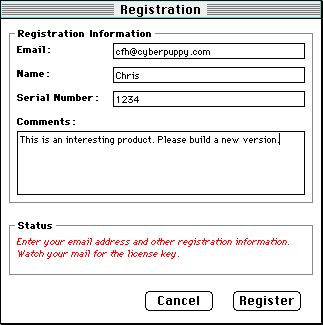
The Register command brings up the window shown in Figure 5.2. Enter your correct Internet mail address in the email field,
and any other values for the rest of the form. When you press
the Register button, the window's contents are packaged into an
LHTTPMessage and transmitted to the remote computer (a Web server
at Metrowerks, in this case). If you supplied a correct email
address, a mail message will be sent to you containing a display
of the values you supplied in the form.
To use the next two tools, first go to the Preferences command (found under the Edit menu). Enter your SMTP and POP3 DNS host names in the dialog
and press OK. You will now be ready to run the rest of the exercise
code.
You can choose the Contact menu item to send a simulated technical support question via
SMTP. The window in Figure 5.3 requires that you enter your own email address and a question.
(If you have set the appropriate server addresses in the Preferences
dialog, the message you send will be echoed back to you by the
mail server.) You could use a mail feature like this in one of
your programs to automatically send questions to a well know email
address (such as technical support) from within your application.
Technical Support Question via SMTP: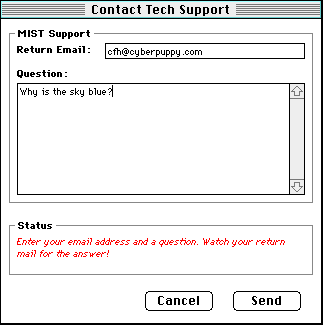
Next, if you select the Check menu item, you will be presented with a window as shown in Figure 5.4. Here you should enter the POP3 user name and password for your
email account. If your POP server is appropriately specified in
the Preferences dialog, the program will log on to your POP server
and it will scan your mailbox for any messages that were sent
to you from the MIST client. You can send one or two messages
from either the Contact Tech Support window or the Register window
to give the scanner something to look for. The code demonstrates
a technique for selectively finding and operating upon specific
mail messages waiting on a remote server.
Checking for MIST Mail via POP3: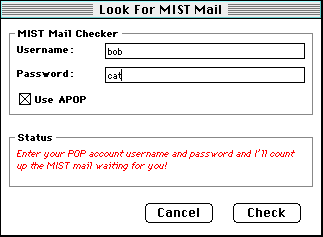
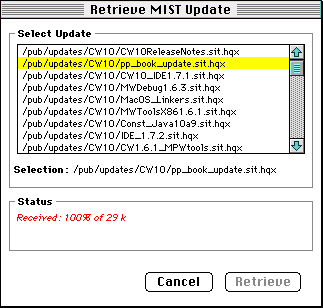
Lastly, if you select the Retrieve Update menu item, you will see a window as shown in Figure 5.5. If MIST can connect to the remote FTP server, it displays a
list of files in the target working directory. If you double-click
on a file from the list and press the Retrieve button, MIST will download the file to your local hard drive.
The code demonstrates a technique for finding and retrieving specific
files on a remote server. You could use this technique in your
own program to provide a way for the user to automatically get
updates or enhancements to your application.
MIST is a simple collection of examples whose main purpose is to illustrate just how easy it is to use the Internet protocols as implemented in PowerPlant. With this new arsenal of tools, you should be communicating across the Internet in no time!