This chapter discusses how to implement undo and redo functionality using PowerPlant action classes.
From a user's perspective, the ability to undo an action is a wonderful feature in an application. We all make mistakes, and it is very nice when we can wipe out the mistake with a single keystroke or menu command. In addition, the ability to easily undo and redo an action lets the user toggle quickly between two alternate states. The user can then compare the two options and decide which is best.
In this chapter we discuss how you can implement undo functionality in a PowerPlant application. The ability to undo implies the ability to redo. In PowerPlant the two go hand-in-hand.
Implementing undo functionality in PowerPlant is remarkably straightforward, once you understand the strategy behind the PowerPlant approach. The topics discussed include:
PowerPlant's undo strategy is based on the concept of an action. An action is a command or option that causes the state of the application to change. For example, if you issue a command to sort a list, you have changed the state of the data in the application.
PowerPlant encapsulates the concept of an action in the LAction class. An LAction object has both undo and redo capability, and preserves whatever data is necessary to restore the state of the application to its previous condition. For example, if you change a selected font, an LAction object might preserve the previous and the new font numbers or names. The object can then toggle between then two fonts as the user issues undo or redo commands.
As you know, commander objects handle commands in a PowerPlant application. When the user issues a command, the commander posts an action instead of acting directly. The process of posting the action also causes the action to occur for the first time. The action can then be undone and redone repeatedly.
The bridge between the LCommander object and the LAction object is an LUndoer object. The undoer is an attachment hosted by a commander. The undoer owns the action object. In response to the commander's messages, the undoer attachment tells the action to do, undo, or redo.
A commander typically has one undoer attachment. An undoer attachment may have one and only one action.
For more information on commanders, see Chapter 10 of The PowerPlant Book., "Commanders and Menus."
For more information on attachments, see Chapter 15 of The PowerPlant Book, "Periodicals and Attachments."
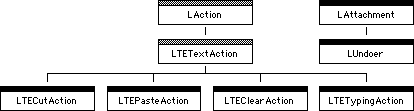
There are four major classes involved in PowerPlant's implementation of undo functionality. They are:
In addition, LTETextAction has four subclasses for cut, copy, paste, and typing actions, as shown in Figure 8.1.
Both LAction and LTETextAction are abstract classes.
The LUndoer class inherits from LAttachment. There are no classes in PowerPlant derived from LUndoer.
The LCommander class is fully discussed in Chapter 10 of The PowerPlant Book. With respect to actions and implementing undo, there are two functions of the LCommander class of interest. They are:
PostAnAction() is a static member function that posts an action to the current
target. Because it is a static function, it is available to any
object that needs to post an action. If there is no current target,
the function attempts to execute the action and then deletes the
action. No undo is possible in this circumstance, because undo
functionality requires an LUndoer object attached to a commander.
PostAction() is the function a commander uses to post an action. This function
sends a msg_PostAction message to attachments. This gives the LUndoer an opportunity
to respond. If no attachment intercepts this message (for example,
because there is no attached undoer), then the function attempts
to execute the action and then deletes the action. Again, no undo
is possible in this circumstance, because undo functionality requires
an LUndoer object attached to a commander.
LAction is an abstract base class that encapsulates do, undo, and redo behavior together with the data required to restore state.
LAction has three data members, listed in Table 8.1
| Data member |
Stores |
|---|---|
When you implement undo, you typically modify the text of the
Undo item in the Edit menu to reflect the nature of the command being
undone or redone. For example, if your most recent action was
to change the size of an object, the Undo item might read Undo Size. If you choose the Undo command, the text for the item would change to Redo Size.
When you create an LAction object, you specify the resource ID
for the redo item text. The undo item text must be in a resource
with an ID one greater than mStringResID. If your redo strings are in an 'STR#' resource with ID 1000, your undo strings must be in an 'STR#' resource with the ID 1001.
There are no data members used for storing application state. The information you preserve depends upon the nature of the action and the structure of your application. You would typically provide additional data members in subclasses derived from LAction.
| Function |
Purpose |
|---|---|
The IsPostable() function always returns true in LAction. You should override
this function to return false if an action cannot be undone (that
is, the action is not undoable).
If you post a new action to an undoer, the previous action is
deleted. Before deleting the action, PowerPlant calls Finalize(). This gives you an opportunity to do something with the action
before it disappears. For example, you might want to preserve
it to implement a multilevel undo.
Concrete subclasses of LAction must override RedoSelf() and UndoSelf() to implement the correct behavior.
You do not typically modify or override other functions in LAction. In fact, you do not even call any of these functions directly in a typical application.
If LAction is the core of PowerPlant's implementation of undo, LUndoer is the mover and shaker. LUndoer does most of the work of control and dispatch required for undo support.
There is only one data member, mAction. This data member stores a pointer to the action object that
encapsulates the user's most recent action. Because the undoer
owns the action, it can send messages to the action object telling
it to redo or undo itself.
In a typical implementation of single-level undo you should never have to call or modify the LUndoer member functions Table 8.3 lists the member functions.
| Function |
Purpose |
|---|---|
As with all attachments, the ExecuteSelf() function intercepts messages for the host. LUndoer is always
attached to a commander, and responds to three messages. They
are:
msg_CommandStatus-calls FindUndoStatus()
msg_PostAction-calls PostAction()
msg_Undo-calls ToggleAction()
Notice that the LUndoer attachment identifies and handles the
situation when the user issues either an Undo or Redo command from the Edit menu. Both come to the attachment as msg_Undo. The undoer knows which operation to perform based on the action's
done state. If the action has just been done, the undoer tells
the action to undo. If the action has just been undone, the undoer
tells the action to redo itself.
 NOTE
NOTE LUndoer::PostAction() is not the same as LCommander::PostAction(). LUndoer::PostAction() replaces the contents of mAction after calling LAction::Finalize(), and ensures that the menu item is updated.
The LTETextAction class provides a basis for four PowerPlant action classes to support undo for text operations. The four PowerPlant classes derived from LTETextAction are:
There is no LTECopyAction. A copy operation does nothing except put a copy of data on the clipboard. Restoring the clipboard to its previous condition would be problematical at best. The data on the clipboard could very well have been placed there by another application and may exist in types your application does not understand.
These action classes follow the pattern discussed for an action
class in general. Each has data members to store both the new
and original data. Each has an UndoSelf() and RedoSelf() function to undo or do the action.
You can use these classes to support undo in TextEdit-based panes such as LEditField and LTextEdit. See the PowerPlant Reference and the source code for details on these classes. You can also study these classes to see practical implementations of the LAction concept.
Implementing single-level undo in a PowerPlant application requires laying careful groundwork. After setting up the pieces, making it all run properly is trivial. There are three steps in this process:
This section also discusses how to:
As your first step towards supporting undo functionality, you
declare and define a series of subclasses of LAction. Each subclass
should represent an action (command) that occurs in your application,
typically an undoable action. If the action cannot be undone,
you must override the IsPostable() function to return false.
In each subclass of LAction, you add the data members necessary to restore the application to its condition before the action is implemented. Because the undoer object toggles between two states (undone and redone), you typically save both the current state and the former state of the application in your action object. For example, if you move an object, you store both its former position and its new position in data members of the action class.
After that, you write the code that defines the UndoSelf() and RedoSelf() functions. Precisely what these functions do depends upon the
nature of the action and how you store your data. In a typical
implementation, each calls some function that makes something
happen, and provides the necessary data to that function. In most
cases, this is the function that you would have called directly
from the commander before implementing undo.
Continuing with our movement example, to redo a move action you would call your routine that relocates the object to its new position. To undo the routine, you call the same routine to relocate the object to its former position.
Don't forget to set up at least two 'STR#' resources for the redo menu item text and the undo menu item
text.
When the user issues a command, some commander intercepts the command. It might be the application object or a subcommander, it doesn't matter.
Any commander that handles an undoable command must have an undoer attached to it for undo to work correctly. Typically you create the undoer when you create the commander. You might do this right after you successfully instantiate the commander. The code to do this is very simple:
theCommander->AddAttachment( new LUndoer );
This code snippet assumes that theCommander contains a pointer to an LCommander object of some type.
When the user issues a command (for example, by choosing a menu
item), a commander's ObeyCommand() function gets control. In response to the command, you do two
things:
To create the action object, you instantiate an object of the action class that corresponds to the user's command. You provide whatever data is necessary to properly initialize the action object.
After creating the object, call PostAction(). That's all there is to it. PowerPlant takes care of everything
else.
When you call PostAction(), the action is executed. PowerPlant uses the RedoSelf() function to perform the initial command. PowerPlant then takes
care of the menu item text. If the user chooses either the Undo or Redo commands, the undoer identifies the command and performs the
appropriate action.
Each action object encapsulates all the information necessary to restore the application to a previous state. A series of action objects can be used to march backward or forward through the history of the user's actions.
PowerPlant does not have an automatic or standard method for implementing
multilevel undo. You might go about accomplishing this goal in
a variety of ways. Whatever approach you take, the Finalize() function in LAction might serve as a useful hook.
Because Finalize() is called after the user creates a new action object for an undoer,
but before the previous action is deleted, you can make a copy
of the action object and preserve it. This is the critical distinction
between single-level undo (where the action is deleted when it
is replaced) and a multilevel undo (where the action is preserved).
In a multilevel undo, you no longer toggle between two states and discard all previous actions. The undoer must serve as a means of traversing the entire action history.
You might create an LMultiUndoer attachment that maintains two stacks of action objects, one for undo and one for redo. When you do an action for the first time, you push it onto the undo stack. At the same time you would typically delete any items in the redo stack. By taking a new action, the user is abandoning any future redo of previously undone operations.
When you undo an action, you simply pop it from the undo stack, and push it onto the redo stack.
There are other complications. Rather than a single Undo item in the Edit menu, you need two items, one for Undo and one for Redo. As an action is undone, the Undo item updates to reflect the current undo action, and the Redo item updates to reflect the current redo action.
Exactly what design you use and how you implement multilevel undo is up to you. However, your users will love you for it.
Implementing undo in PowerPlant revolves around the LAction class.
You declare and define an action class for each different kind
of user action. The action object stores necessary state information.
You create resources for the Undo and Redo menu item text. You attach an undoer object to each commander
that handles an undoable action. When the user issues a command,
you create the appropriate action object and post the action.
Use the LAction::Finalize() function as a hook to support multilevel undo.
In this exercise you create an application named "Actions." This exercise demonstrates in as simple a fashion as possible how to implement undo functionality in a PowerPlant application.
The code in this exercise builds on the code from Chapter 10, "Commanders and Menus" in The PowerPlant Book. You may wish to review that code exercise if you are unfamiliar with commanders.
When you run the Actions application, a window appears that contains some text, as shown in Figure 8.2. Remember that a caption simply displays text. You cannot edit the text in this window.
The Actions application in action: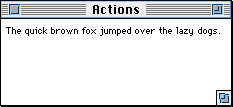
The application has the usual text-related menus, including Font, Size, and Style. In this exercise, you modify the behavior of the CDynamicCaptionCmdr
object so that any menu command from these three menus can be
undone or redone. In the process you will perform the three general
tasks necessary to implement undo. In steps 1-5 you create an
action class. Then you attach an undoer to the commander, and
post an action in response to a menu command.
1. Examine the class declaration for action classes.
The CDynamicCaptionActions.h file declares all the action classes in this program. Figure 8.3 shows the class hierarchy. For simplicity, we'll refer to the
CDynamicCaptionAction classes using the shorthand CDCAction.
CDynamicCaptionAction class hierarchy: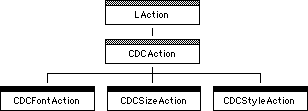
The CDCAction class is abstract because it does not define the
UndoSelf() and RedoSelf() functions. CDCAction has two data members:
In fact, these are the same object. However, storing a pointer to the caption object twice as different data types eliminates the need for typecasting later on.
The CDCAction class also defines CanRedo() and CanUndo() for all subclasses. Each function ensures that the commander
is on duty before returning a value indicating that the action
can be redone or undone.
Finally, you should take a look at the constructor for the CDCAction class. You don't have to write this code, it is provided for you. Here's the code for reference.
CDynamicCaptionAction::CDynamicCaptionAction(
	SInt16											inDescriptionIndex,
	LCommander									*inDynamicCaptionCmdr,
	CDynamicCaption									*inDynamicCaption,
	Boolean			 						inAlreadyDone )
		: LAction( rSTRx_RedoText,
			inDescriptionIndex, inAlreadyDone )
{
	// Save the commander and dynamic caption.
	mDynamicCaptionCmdr = inDynamicCaptionCmdr;
	mDynamicCaption = inDynamicCaption;
}
This code calls the LAction constructor and passes the resource
ID number of the 'STR#' resource containing the redo text for the Edit menu. It also passes the index number for the actual string in
that resource to use, and a boolean value indicating that the
task has already been done. In addition, the body of the function
stores the pointer to the commander and the caption. In a subsequent
step you will call this constructor yourself when you build a
subclass of -CDCAction.
The CDynamicCaptionActions.h file also declares three concrete
action classes, one each for font, size, and style actions. In
the rest of this exercise you implement the size action. The font
and style actions are essentially the same, with minor differences
to accommodate the data required to preserve state. In general,
each concrete action class has data members to preserve state
information, and defines the RedoSelf() and UndoSelf() functions.
2. Complete the class declaration for a size action.
CDynamicCaptionSizeAction CDynamicCaptionActions.h
The size action class must have two data members to preserve the
previous and current font size. In addition, you must declare
the RedoSelf() and UndoSelf() member functions. The necessary code is listed here.
protected: SInt16 mSize;
SInt16 mSavedSize;
virtual void RedoSelf();
virtual void UndoSelf();
Make sure you add this code to the correct class declaration. Before closing the file, take a look at the class constructor. It receives three parameters: the new size, and the pointers to the commander and caption object. In the next step you write the constructor function.
3. Define the size action constructor.
CDynamicCaptionSizeAction() CDynamicCaptionAction.cp
To complete this constructor you need to perform three tasks. You must call the base class constructor, store the new size, and preserve the current size. In other words, you are saving state information for the new and previous font size.
a. Call the base class constructor.
In the initializer list, call CDynamicCaptionAction(). You must pass the index value for the redo size string. It is
the constant kSTRx_Size. Also pass the pointers for the commander and the caption.
In the body of the function, set the mSize data member to the value you receive in inSize.
Use the mDynamicCaption data member, and send the caption a GetSize() message to get the current size. Store the result in mSavedSize. You have now preserved both the new size and the previous size
in the action class's data members. The code for all the substeps
is listed here.
CDynamicCaptionSizeAction:: CDynamicCaptionSizeAction(
SInt16 inSize,
LCommander *inDynamicCaptionCmdr,
CDynamicCaption *inDynamicCaption )
: CDynamicCaptionAction( kSTRx_Size,
inDynamicCaptionCmdr, inDynamicCaption )
{
// Copy the size.
mSize = inSize;
// Get the current size.
mSavedSize = mDynamicCaption->GetSize();
CDynamicCaptionSizeAction::UndoSelf()
CDynamicCaptionAction.cp
Make sure you modify the UndoSelf() function for the CDynamicCaptionSizeAction class. This file actually
has three UndoSelf() functions, one for each concrete action class.
In the body of the function, simply send the caption object a
SetSize() message. Pass the original size, stored in the mSavedSize data member.
mDynamicCaption->SetSize( mSavedSize );
CDynamicCaptionSizeAction::RedoSelf()
CDynamicCaptionAction.cp
Make sure you modify the RedoSelf() function for the CDynamicCaptionSizeAction class. In the body
of the function, simply send the caption object a SetSize() message. Pass the new size, stored in the mSize data member.
mDynamicCaption->SetSize( mSize );
Remember, the redo action is also the "do" action when the action is first posted. That's why redo sets the new size.
You have now successfully completed the first and toughest chore, declaring and defining an action class. Note how this class preserves the necessary state information, and then uses that information to modify the state of the application as necessary when you undo and redo the action.
All that remains is to attach an undoer to the commander, and to post the action when the user issues a command. Each task requires one line of code.
6. Attach an undoer to the caption commander.
The undoer is an attachment. It should be attached to the caption
commander. You create the commander when you create the window.
After successfully creating the caption commander, send the caption
an AddAttachment() message and add a new LUndoer object. The pointer to the caption
commander is in a local variable, theCaption.
theWindow->SetLatentSub( theCaption );
// Add an undoer to the caption.
theCaption->AddAttachment( new LUndoer );
ObeyCommand CDynamicCaptionCmdr.cp
When the user chooses an item in the Size menu, post a size action.
Call PostAction(). The action you are posting is a new CDynamicCaptionSizeAction.
The new size the user chose is in theSize. Pass a pointer to the current object for the other two parameters
required for the CDynamicCaptionSizeAction constructor.
::StringToNum( theMenuText, &theSize );
// Set the caption size.
PostAction( new CDynamicCaptionSizeAction(
In the original commander defined in Chapter 10 of The PowerPlant
Book, the commander did not post an action. Instead, it sent a
SetSize() message directly to the caption (in this case, itself).
This simple fact highlights the difference between a strategy that supports undo, and a strategy that does not. The undo strategy imposes a minor indirection. Action-related information is created and preserved in the action object. Because the action object persists for a while, and because it stores the necessary state information, you can implement undo.
The font and style actions are effectively identical to the size action. The commander posts the appropriate action object when necessary. Each action object preserves the necessary state, and each implements the undo and redo behaviors by sending the appropriate message to the caption object.
8. Build and run the application.
When the application builds successfully and runs, the caption
window appears as shown previously in Figure 8.2. You cannot change the content of the text, but you can make
choices from the Font, Size, and Style menus.
Before you make a choice in any menu, examine the Edit menu. It
is disabled, and the first item is Can't Undo. Now, make a choice in the Size menu, and then examine the Edit menu again.
The Edit menu is enabled, and the first item is Undo Size. Undo and redo the action and study what happens in the Edit menu. Change font and style, and see what happens.
In each case, you can undo and then redo the most recent action.
The Edit menu updates appropriately.
Remember your most recent action in a window. Create a second window, and perform some actions in that window. Then switch back to the first window. The most recent action in that window is available for undo or redo. Each commander has its own undoer, and its own action. Not bad.
Congratulations! You have fully implemented single-level undo in an application. If you'd like to explore further, there are two areas ripe for improvement.
PowerPlant includes classes to support text actions such as cut, paste, and typing. Modify the application so that you can enter text, and add support for typing actions.
If you want a real challenge, implement multi-level undo. Read the hints in "Implement Multilevel Undo." Good luck, and have fun!