This chapter discusses topics that are useful to consider when targeting the AMD-K6® and AMD-Athlon® family of processors.
The CodeWarrior IDE is capable of generating code that takes full advantage of speed optimizations available with AMD® processors. The AMD-K6, AMD-K6-2®, AMD-K6-III®, and AMD-Athlon processors are fully supported, as is 3DNow! technology.
You can find information about developing for these processors on the World Wide Web at:
http://www.amd.com/swdev/swdev.html
For data sheets and other programming notes for AMD-K6 processors (for example), go to:
http://www.amd.com/K6/k6docs/index.html
This section discusses optimizations that are incorporated in the Metrowerks compiler. The information in this section is useful for writing code optimized for speed. It gives guidelines and information on some of the optimizations that are available.
The topics in this section are:
When writing code for AMD processors, you should be aware that
the Win32 __stdcall calling conventions exact a performance penalty on the execution
of AMD or MMX code.
If you enable the use of special calling conventions, the compiler will generate code that preserves fewer registers in the AMD processor, enabling faster execution. To enable these calling conventions, enable the Use MMX/3DNow! Calling Convention option in the x86 Processor panel. See "x86 Processor" to learn how to do this.
When using 3DNow! calling conventions, the entire application program (all source files and library source files) should be compiled using 3DNow! calling conventions. Any inconsistency caused by intermixing calling conventions in source files, library code, and assembler code can lead to runtime errors.
 WARNING!
 The Use MMX/3DNow! Calling Convention option is inappropriate for functions that are exported as external entry points, and, thus, can be called from other binaries that are not aware of 3DNow! calls. Returning from MMX or 3DNow! code to x86 code in another module without having done an FEMMS is very bad news.
The key to achieving faster runtime performance with AMD processors
is minimizing mode switching. For this reason, 3DNow! mode performs better with code that contains int and float types. If your code contains math that uses float and double types, you will incur more mode switching, which will be expensive
at runtime because of the AMD mode switch operation.
Since the C and C++ languages assume that floating-point constants
are doubles unless explicitly labeled otherwise, you need to be
careful how you write your code. If you intend to write your code
to keep only int and float types, but you want to avoid double variable types, you need to do take some special steps. For example,
if you need to define a floating-point constant called MyFudgeFactor having a value of 2.0 as a float type, you would write:
#define MyFudgeFactor 2.0f
#define MyFudgeFactor 2.0
The compiler assumes that you want a type double for the constant if you do not specify 2.0f. This is because
the ANSI C/C++ standard specifies that all un-suffixed floating-point
constants need to be treated as double by default.
The CodeWarrior compilers perform a limited amount of vectorization of the optimized code.
In order to get this performance benefit, the code has to be written in a certain way. See "Loop Vectorization" for more information on writing code that takes advantage of vectorization.
 NOTE
NOTE Some of the restrictions on vectorization may be relaxed in a future release of the tools. See "Loop Restrictions" for a list of these restrictions.
The restricted keyword is a C++ language feature that is supported in the IDE.
Refer to "Code Generation Pragmas" for more information.
Loop vectorization is a transformation that enables the compiler to generate vector instructions for a processor that supports these instructions, such as a Pentium with MMX and AMD 3DNow!. The optimizer looks at operations and operands in loops to decide whether vector instructions can be used to combine operations and operands. This results in a larger number of operations per cycle and less loop branching per iteration. which means faster code.
Loop vectorization will be utilized if the code is a counted loop that goes up, only contains assignment statements, and has no control code or pointer references. This is useful for doing operations on static or local arrays (arrays with a known base value). In other words, vector analysis generally succeeds if the code contains static objects, meaning that the bases are known at compile time.
The example in Listing 13.1 shows the loop form that the optimizer can improve for AMD targets.
Proper loop vectorization format:
for( i = initial; i op N; i = i + 1 ) {
	... = a[ i + k1 ];

	a[ i + k ] = ...;
	... = a[ i + k2 ];

	a[i+k3] = ...
}
In this example, "i" is the loop index and "a" is a static array. The references on the right side of the assignment
represent loads of "a" and the references on the left represent stores into "a". The expression on the right side of the assignment can, in
general, have one or more vector operands, constants, loop invariant
scalars or expressions and vector operations.
The following restrictions should be observed when writing loop structures:
i has a unit stride
i is only used in a unit stride dimension of an array access
i in index expressions
i is the inner loop index in a nested loop
The following dataflow restrictions must also be observed.
For example, the loops in Listing 13.2 cannot be vectorized because doing so would change their semantics.
Semantics changed by loop vectorization:
//this loop violates the k > k1 condition
for( i = initial; i op N; i = i + 1 ) {
	b[ i ]= a[ i - 1 ];
	a[ i ] =b[ i ] ;
}
//this loop violates the k2 > k condition
for( i = initial; i op N; i = i + 1 ) {
	a[ i ] =b[i];
	a[i+1]= b[i];
}
//this loop violates the k3 > k condition
for( i = initial; i op N; i = i + 1 ) {
	a[ i ] = b[ i ];
	b[ i ]= a[ i+1 ];
}
Vectorization requires that all loads and stores be disambiguated at compile time. If there is a load or store through a pointer in the loop, vectorization will not be possible.
Loop distribution refers to an optimization carried out on loops that can be only partially vectorized. For example, a loop that contains two statements, only one of which is vectorizable, is a candidate for loop distribution:
for ( i = 0; i < 10; i++ ) {
	c[i] = b[i]*c[i]; // vectorizable
	a[i]=b[i]*a[i-1]; // not vectorizable
}
In this case the optimizer will split the original loop into two loops. One loop will be vectorized and one loop will not.
Alias Analysis is a facility that allows the compiler to track pointer values during compilation. By gathering extra information about pointer use, the compiler can apply more intelligent optimizations. Optimizations that were not possible before this improvement are now enabled, with the effect that pointer-based code runs faster.
To illustrate how this can improve your code, we examine some
code containing a common sub-expression that can be eliminated.
Common sub-expression elimination (CSE) is just one of the optimizations
that the CodeWarrior IDE can perform. If your code contains the
expression a*b*c multiple times, CSE allows the compiler to generate a temporary
value and then replace each occurrence of the expression with
this temporary value.
The example in Listing 13.4 demonstrates how CSE works across an assignment through a pointer.
void TestFunction2( int *int1, int *int2, int *int3, int *int4 )
{
	*int1 = *int3/*int4; // the RHS is the CSE here
	int1 = GetGobalIntPtr(NULL);
	*int1 = 0;
	*int2 = *int3/*int4; // the CSE again
}
Note that *int3/*int4 is a CSE, but involves pointers. Through the use of alias analysis
this CSE is optimizable even though it involves pointers.
For more information on improving your code through the use of
the restrict keyword, see "Code Generation Pragmas."
A reduction function is a loop that contains an equation involving an assignment to a scalar value, as in Listing 13.5.
scalar = scalar OP vector
Note that an array is a vector.
When the optimizer is trying to employ vectorization to optimize loop code, it usually only makes sense to vectorize when the LHS (left-hand side) of an assignment is a vector. If the LHS is a scalar, then this is not a likely candidate for vectorization. However, the Metrowerks compiler can vectorize loops that have a scalar for the LHS.
For example, the code in Listing 13.6 can be fully optimized, even though there is a scalar for the LHS.
Reduction Functions on Scalars:
float a[100], b[100];
float scalar:
fred()
{
	scalar = 0.0f;
	for ( i = 0; i < 100; i++ ) {
		scalar = scalar + a[i] + b[i];
	}
}
For more information on vectorization, see "Vectorization."
This section discusses the pragma statements that you can use
when developing code for AMD processors. To learn more about #pragma directives, refer to the C Compiler Reference.
The topics in this section include:
There are three pragmas that you can use to enable the various
MMX and AMD code generation options. The #pragma statements are:
#pragma mmx-corresponds to the MMX option
#pragma k63d-corresponds to the 3DNow! option
#pragma k63d_calls-corresponds to the Use MMX/3DNow! option
See "x86 Processor" for a description of each of these settings.
NOTE The k63d #pragma is not Pentium-compatible.
NOTE The __stdcall keyword overrides the #pragma.
Another useful pragma is c9x.This pragma has syntax of the form in Listing 13.7.
#pragma c9x on|off|reset
When used with the restrict keyword, c9x is useful as a hint to the optimizer that the pointer
being declared has no aliases later in the code. You can use the
restrict keyword in a variable declaration whenever you do not assign
one pointer to another, so that a given address in memory does
not have two pointers to it. For more information on pointer alias
reduction, see "Alias Analysis."
You can alter the compiler's handling of floating-point constants
using the pragma in Listing 13.8.The parameter on|off|reset indicates that you must choose to turn the pragma on, turn it
off, or reset it.
#pragma float_constants on|off|reset
The pragma allows you to override the compiler's treatment of
floating-point constants. Normally, the compiler will default
all un-suffixed constants of the form in Listing 13.9 to be of type double by default. If you want the compiler to interpret all un-suffixed
constants as float constants instead of double constants, this pragma allows you to do this.
const float 2.0;
Note that this pragma allows you to reverse the behavior of the
compiler specified by ANSI C/C++ standards. The ANSI standard
specifies that all un-suffixed floating-point constants need to
be treated as double by default. This pragma allows you to alter this.
This is a useful feature because the use of double types can result in excessive mode-switching which adversely
impacts performance. See "Library Considerations" and "Minimizing Mode Switching" for more information about this.
A customized single-precision math library is provided as part of the Metrowerks Standard Library when targeting any AMD 3DNow! enabled processor. This single-precision library provides superior performance to other higher-precision math libraries, including the Metrowerks Standard Library for the X87 family of processors.
You do not need to make any modifications to your single-based code in order to use the new single-precision library. The single-precision library seamlessly replaces the extended-precision library whenever the application is targeting the AMD family of processors and is linking with any 3DNow! version of MSL C.
The compiler will now mangle C++ names for 3DNow! code differently than code that does not use 3DNow! calling conventions. This causes linker errors when you try to mix code between 3DNow! and non-3DNow! paradigms as a safety feature. This eliminates difficult bugs that occur at runtime.
Only when the 3DNow! calling convention is enabled will the alternate name mangling scheme be used. To learn how to enable 3DNow! calling conventions, see "Use MMX/3DNow! Calling Conventions."
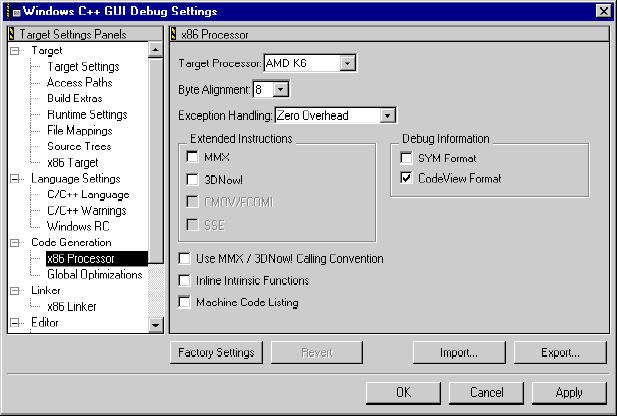
In order to compile your code for AMD processors, you need to modify the settings in the IDE to generate the proper code. This section contains an example of how to do this. Other related items to this topic are discussed in "x86 Processor."
Choose Edit > Target Settings. The Target Settings window appears. Select x86 Processor in the Target Settings Panels area. Choose the processor for which you are developing from the Target Processor list-box. If you wish to generate MMX and 3DNow! instructions, enable the options for these in the Extended Instructions area of the panel. Review the information in "Calling Conventions" for more detailed information about this choice.
There are several new features now available to support assembly code:
For more information about writing assembly code, see "Assembly Code Support."
Table 13.1 lists 3DNow! inline assembler instructions specific to the Athlon processor.
Athlon 3DNow! Inline Instructions:
Table 13.2 lists the MMX inline assembler instructions specific to the Athlon processor.
Athlon MMX Inline Instructions: