[ First ] [ Previous ] [ Next ] [ Last ] [ Manuals ]
Guided Tour of the Project Window

The Project window shows information about the various files and build targets in a project. The Project window uses four different views: the Files view, Design view, Link Order view (sometimes called Segments view or Overlays view), and Targets view. To choose a view, click its tab at the top of the Project window, as shown in Figure 3.1.
Project Window Tabs: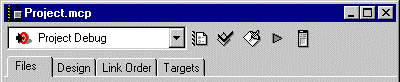
The Files view shows a list of all the files in a project. You can organize the items in this view into hierarchical groups.
The Design view shows the rapid application development (RAD) designs in the project. This view appears only when you develop software using the CodeWarrior RAD tools.
The Link Order view shows information about the compilation and link settings the IDE uses to build the final output file for the current build target.
The Targets view shows information about the active build target, build targets associated with RAD designs, build-target dependencies, and link-compatible build targets.
The following topics explain the Project window in detail:
To learn more about debugging information, see "Controlling Debugging in a Project."
[ First ] [ Previous ] [ Next ] [ Last ] [ Manuals ]
Visit the Metrowerks website at: http://www.metrowerks.com
For assistance contact Metrowerks Technical Support at: cw_support@metrowerks.com
Copyright © 2000, Metrowerks Corp. All rights reserved.
Last updated: August 17, 2000