[ First ] [ Previous ] [ Next ] [ Last ] [ Manuals ]
What is a Subproject?

A subproject is a normal, stand-alone project file that can nest within another project file, like the memory.mcp project file shown in Figure 3.19. Subprojects are useful if you have a project file that you want to keep separate from the main project file. This arrangement allows you to organize the build process into separate project files.
For example, subprojects are useful for developing applications that use a plug-in architecture. Suppose your program uses several plug-in modules, each sharing common source code with other plug-ins. You might create one project file to build all the plug-ins by creating a separate build target for each plug-in. In this scenario, the project file for the plug-ins is the subproject. Including the subproject in the project file of the main application causes the IDE to build the subproject before building the main project.
Subproject Within a Project: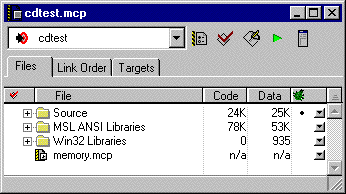
You can assign a project file to any build target in a project. To learn more, see "Assigning Files to Build Targets". To learn how to add files to a project, see "Adding Files."
You can instruct the IDE to process one or more build targets in a subproject when processing the enclosing build target in the main project. When the IDE builds a build target in the main project, it first builds any selected build targets in any of the subprojects.
You can link the output of the main project with the output of the subproject's build target. To create this link, switch to the main project's Targets view, then click in the Link column next to the subproject's build target. For more information about the Targets view and the Link column, see "Targets View".
The IDE does not automatically process a subproject's build targets after you add the subproject to the main project. The IDE only processes the chosen build targets within the subproject.
You can make a subproject specific to a build target. In other words, you can choose the build targets to which a subproject belongs. Other build targets in the main project do not handle the subproject.
[ First ] [ Previous ] [ Next ] [ Last ] [ Manuals ]
Visit the Metrowerks website at: http://www.metrowerks.com
For assistance contact Metrowerks Technical Support at: cw_support@metrowerks.com
Copyright © 2000, Metrowerks Corp. All rights reserved.
Last updated: August 17, 2000