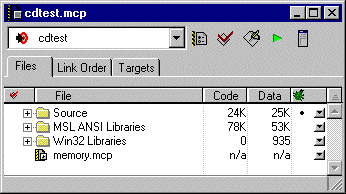
To create a subproject, drag and drop a project file into an open Project window. You can also add the project file using the techniques discussed in "Adding Files".
If your project contains multiple build targets, the IDE prompts you (Figure 3.16) to select the build targets to which you want the project file added. The project file then appears in the list of files in your project, as shown in Figure 3.21.
The subproject becomes a part of the main project file. After you perform a Make on the main project, the IDE builds the subproject first.
After you add a subproject to a project file, you can assign build targets to that subproject. To learn how to do this, see "Assigning Files to Build Targets."
Subproject Within a Project: