[ First ] [ Previous ] [ Next ] [ Last ] [ Manuals ]
Examining Project Information

You can use the Project Inspector, shown in Figure 3.22 and Figure 3.23, to view and configure information about your project and its source-code files. The Project Inspector includes an Attributes view and a Targets view.
Use the appropriate menu command to open the Project Inspector:
For more information about menu bar layouts, see "Menu bar layout".
To learn how to use the Project Inspector to assign files to specific build targets, see "Using the Project Inspector".
Project Inspector - Attributes View: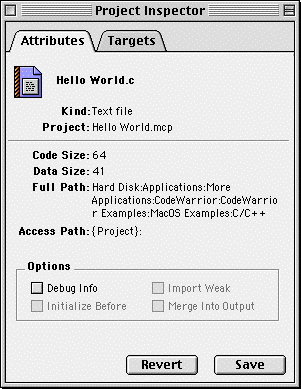
The Attributes view provides information about individual files in your project. The view shows the following file attributes:
Name-the name of the file
Kind-the file type
Project-the project to which the file belongs
Code Size-the size of the file's code
Data Size-the file's data size after being compiled by the IDE
Full Path-the path to the file's location on your hard disk
Access Path-the access path that the IDE uses to locate the file
Debug Info-Enable this checkbox to generate debugging information (symbolics information) for the file during the next build. Disable the checkbox to prevent debug-info generation. For more information, see "Controlling Debugging in a Project".
To apply your changes to a file's attributes, click Save. To undo your changes and restore the original attributes, click Revert.
Mac OS
To learn more about the Initialize Before, Merge Into Output, and Import Weak checkboxes, see "Special Library Options (Mac OS)."
Project Inspector - Targets View: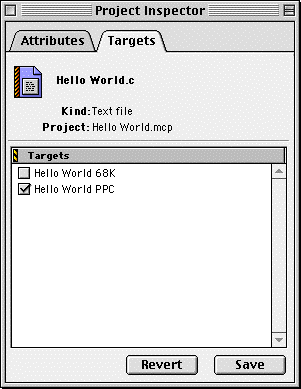
[ First ] [ Previous ] [ Next ] [ Last ] [ Manuals ]
Visit the Metrowerks website at: http://www.metrowerks.com
For assistance contact Metrowerks Technical Support at: cw_support@metrowerks.com
Copyright © 2000, Metrowerks Corp. All rights reserved.
Last updated: August 17, 2000