[ First ] [ Previous ] [ Next ] [ Last ] [ Manuals ]
Function Pop-Up Menu

 Use the Function pop-up menu, shown in Figure 5.3, to navigate to specific functions or routines in the current source-code file.
If the pop-up menu is empty, the file shown in the text-editing area is not a source-code file. If the text-insertion point is currently located within a particular function, a bullet appears next to that function in the pop-up menu.
Function Pop-up Menu: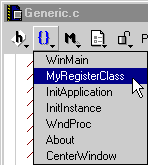
 NOTE
NOTE
By default, the pop-up menu lists functions in order of appearance in the source-code file. To alphabetically list functions, use one of the following techniques:
Alternatively, see "Sort function popup".
 TIP
TIP
If you edit a Pascal file, the Function pop-up menu shows function names in italics, procedure names in plain face, and the main program in bold face.
[ First ] [ Previous ] [ Next ] [ Last ] [ Manuals ]
Visit the Metrowerks website at: http://www.metrowerks.com
For assistance contact Metrowerks Technical Support at: cw_support@metrowerks.com
Copyright © 2000, Metrowerks Corp. All rights reserved.
Last updated: August 17, 2000