[ First ] [ Previous ] [ Next ] [ Last ] [ Manuals ]
Document Settings Pop-Up Menu

 Use the Document Settings pop-up menu, shown in Figure 5.5, to toggle syntax coloring for the current file and set the format for saving a text file.
Document Settings Pop-up Menu: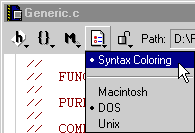
Choose Syntax Coloring from the pop-up menu to toggle the appearance of syntax elements in various colors onscreen.
The pop-up menu also lets you choose file formats for saving text files: Macintosh, DOS, and UNIX. A bullet appears next to the current save format for the file shown in the editor window. To save the file in a different format, choose a format from the pop-up menu. The IDE uses the format each time you save the text file.
For more information on the Syntax Coloring option shown in this menu, see "Text Colors."
[ First ] [ Previous ] [ Next ] [ Last ] [ Manuals ]
Visit the Metrowerks website at: http://www.metrowerks.com
For assistance contact Metrowerks Technical Support at: cw_support@metrowerks.com
Copyright © 2000, Metrowerks Corp. All rights reserved.
Last updated: August 17, 2000