[ First ] [ Previous ] [ Next ] [ Last ] [ Manuals ]
Marker Pop-Up Menu

 Use the Marker pop-up menu, shown in Figure 5.4, to manipulate markers in your text files. Markers help you access a particular line of text, remember your position in the text file, or note important parts of the text.
For more information on using markers, see "Adding, Removing, and Selecting a Marker."
The Marker Pop-up Menu: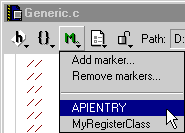
[ First ] [ Previous ] [ Next ] [ Last ] [ Manuals ]
Visit the Metrowerks website at: http://www.metrowerks.com
For assistance contact Metrowerks Technical Support at: cw_support@metrowerks.com
Copyright © 2000, Metrowerks Corp. All rights reserved.
Last updated: August 17, 2000